R L
R L
AES/EBU
COAXUSB HOST USB DAC
GN LINK
AC IN 100 - 240 V
PSU IN
TOS 1 TOS 2
WI-FI
ANTENNA
LINE-IN
WPS
WI-FI
RESET
WI-FI
LED
ETHERNET
UNBALANCED
BALANCED
SERIAL NUMBER
in App screen in App screenmobile device screen
DS-10 PLUS WIFI AP MODE
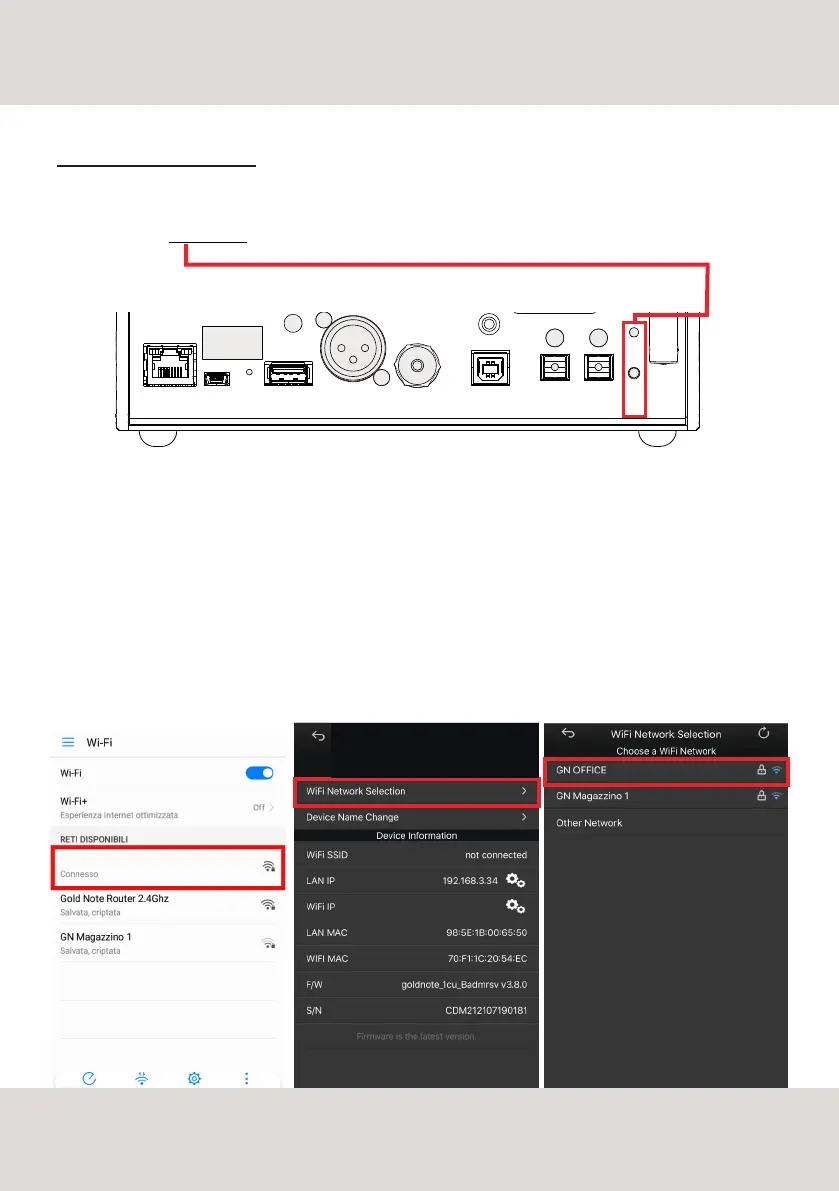
In case your router doesn't support the WPS function or you can't access it, use the Wi-Fi Access Point Mode:
1 - Press and hold for 5 seconds the WPS Wi-Fi Reset button on the rear panel of DS-10 PLUS and release
it and wait when the blue led start flashing slow DS-10 PLUS will create its own wireless network.
2 - turn ON the Wi-Fi on your mobile device and scan the networks to find GOLD-NOTE_XXX
3 - connect to GOLD-NOTE_XXX using "password" as password
4 - open the App and go into DEVICE SETUP > Wi-Fi Network Selection
5 - here are listed the wireless connections available, select the one you want to use with DS-10 PLUS
6 - DS-10 PLUS is now connected to the selected Wi-Fi network
7 - connect your mobile device to the same network used by DS-10 PLUS
21
NETWORK SETUP
GN OFFICE
GOLD NOTE
DS-10 PLUS



 To Next Page