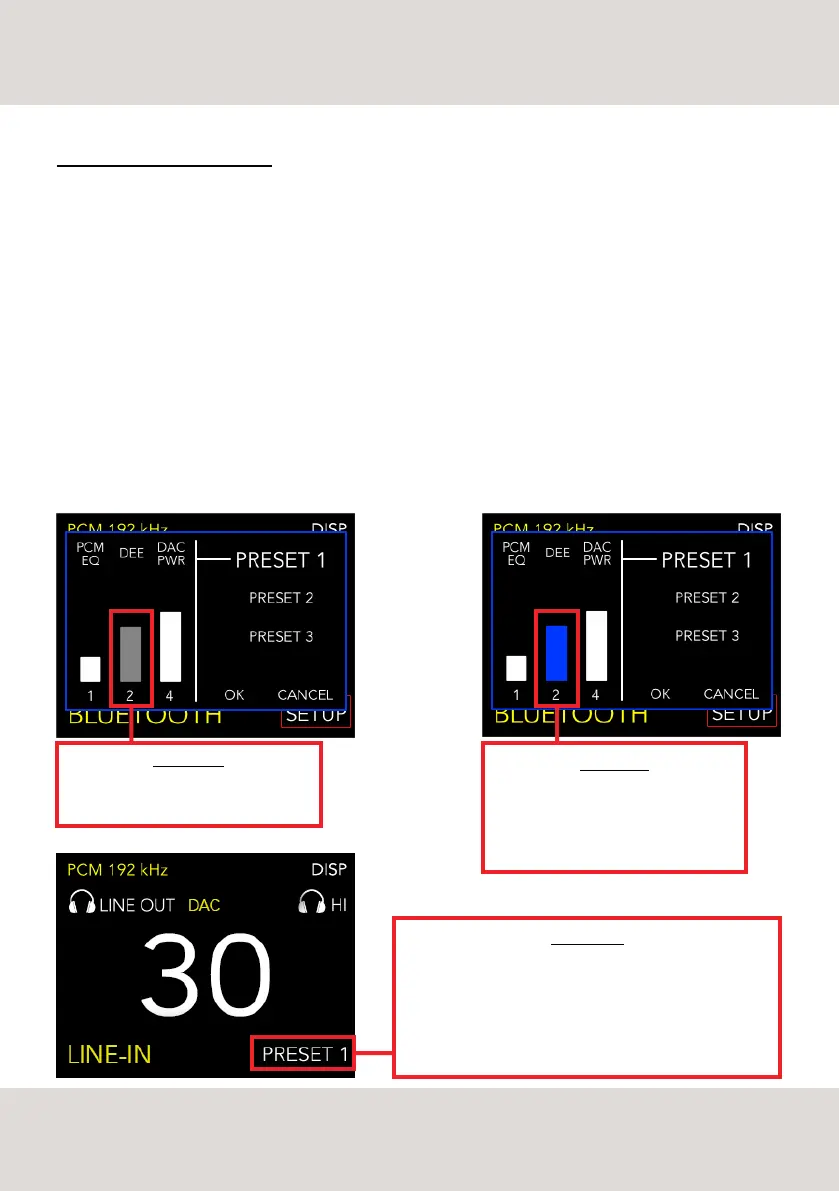
GREY COLOR
The parameter is selected and ready to
be modified.
BLUE COLOR
The changes made are confirmed. You
can select and modify a different
parameter or save the changes made to
the PRESET
PRESET 1-2-3
The changes made to the PRESETs remain stored even if
the DS-10 PLUS is turned OFF.
To use a PRESET previously modified simply select it on the
display and push the knob or the ENTER key on the remote
control to confirm the selection.
CUSTOMISE YOUR LISTENING
It’s really easy to select a PRESET and modify its parameters:
- By remote control: use the left and right arrow keys to browse the menu, push the ENTER key to select a
parameter. When the selected parameter turns grey it can be changed: use the arrow keys to increase or
decrease its value. Press the ENTER key to confirm the selected value. Repeat this operation for all
parameters. Select the word OK and press ENTER to save the changes. Select the word CANCEL to undo the
changes and return to the main screen.
- By rotary knob: turn the knob to browse the menu, push the knob to select a parameter. When the selected
parameter turns grey it can be changed turning the knob to increase or decrease its value. Press the knob
to confirm the selected value. Repeat this operation for all parameters. Select the word OK and press the knob
to save the changes. Select the word CANCEL and press the knob to undo the changes and return to the main
screen.
13
SELECTABLE PARAMETERS



 To Next Page