13
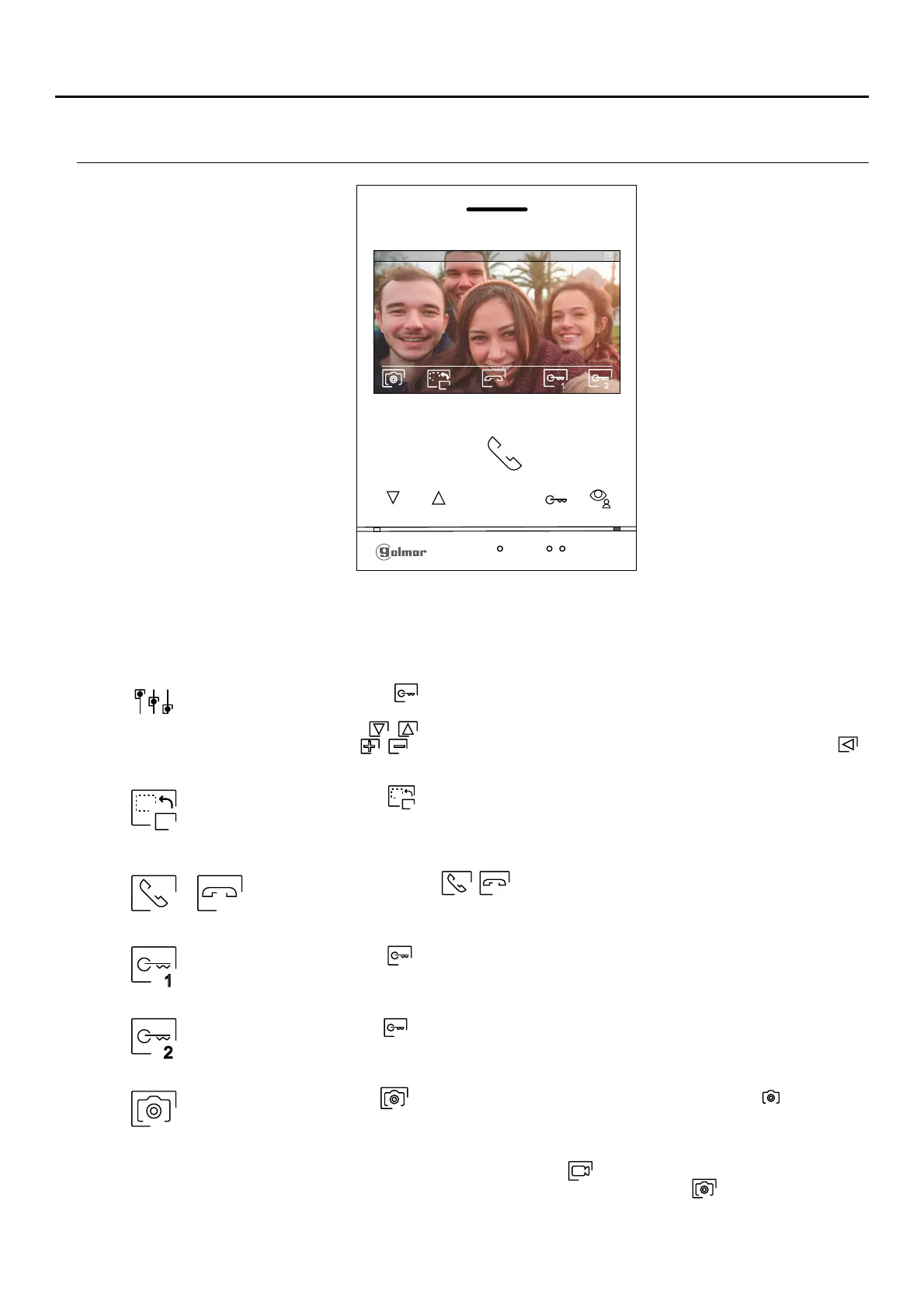
This screen is displayed during a communication process. In the top centre of the screen, the date and time are
shown and, on the right, the source of the image is displayed (door panel 1, door panel 2, camera 1 or camera 2).
Press the button below icon / to start or end audio communication with the door panel
displayed respectively. Communication has a maximum duration of 90 seconds. Once
communication has ended, the screen will turn off.
Press the button below icon to change the source of the image as long as the system has more
than one door panel or has an external camera connected and display has been activated (see
pp. 22-23). This enables the door panel camera to be changed, the audio of the corresponding
door panel to be activated and the door to be opened.
Press the button below icon to take a photograph. In the top left of the screen, icon is displayed.
Note: If a MicroSD card is inserted, a 15-second video automatically starts recording a few seconds after
receiving the call. In the top left of the screen, icon is displayed (see p. 11 to configure video
recording mode). Then a short 1-second press on the button below icon will take a photograph
or a long 2-second press will record a video.
Press the button below icon for 3 seconds to access the image and monitor in communication
volume settings menu. Select the option to be modified by pressing the buttons below
corresponding icons / , change to the desired level by pressing the buttons below
corresponding icons / and validate the changes made by pressing the button below icon ,
(see pp. 14-16).
Press the button below icon to activate the lock release (or device connected to the CV output of
the door panel) for 3 seconds (factory setting, programmable by the installer; see pp. 22-23).
Press the button below icon to activate the lock release (or device connected to the relay output of
the door panel) for 3 seconds (factory setting, programmable by the installer; see pp. 22-23).
1
2
1
2
0 -0 -21 7 019 11:17:10
1
1 2
COMMUNICATION SCREEN
ART 4/G2+MONITOR
2












 To Next Page