16
Continued from previous page.
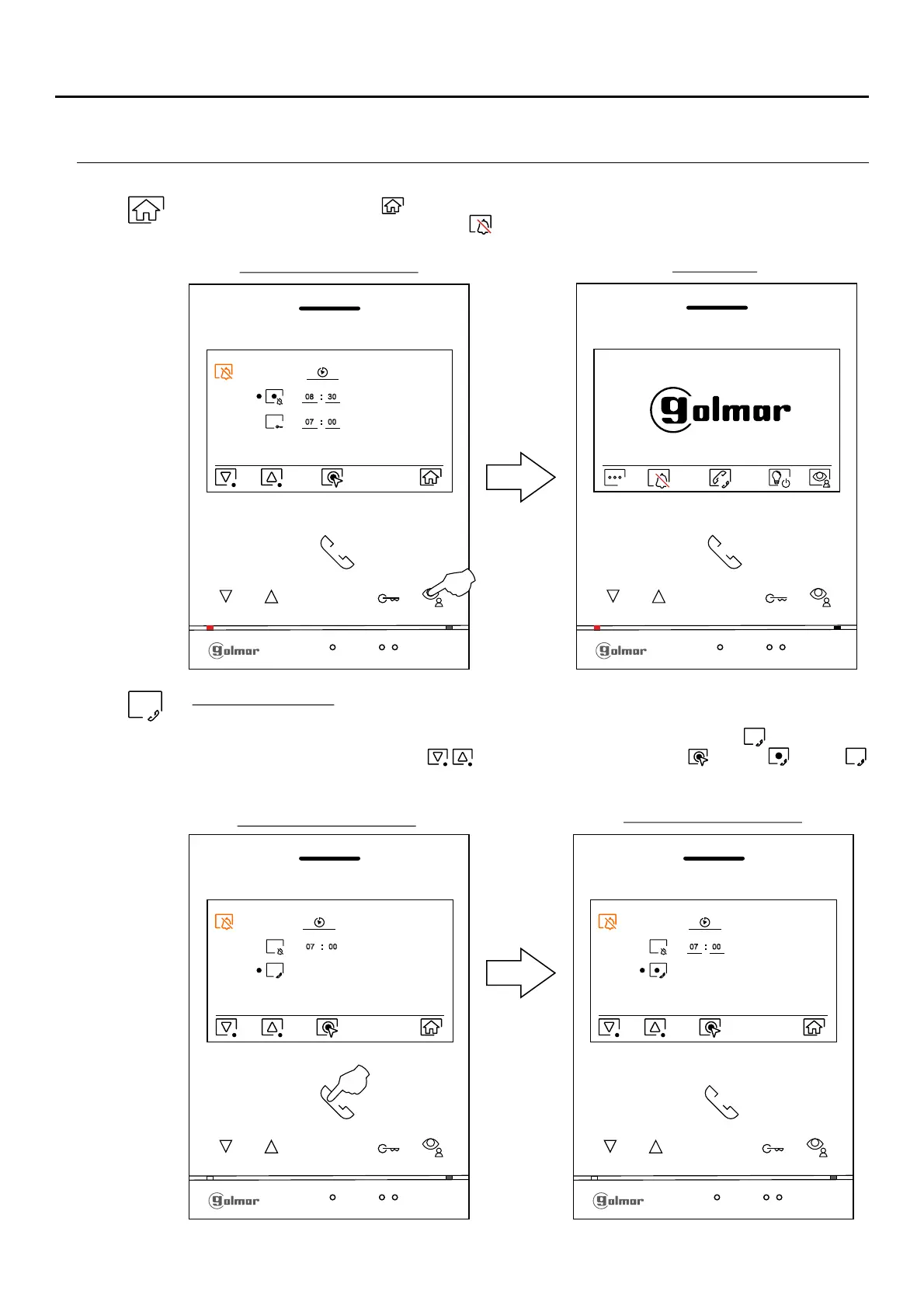
PERIOD OF TIME FOR 'DO NOT DISTURB' MODE MENÚ
Option selection screen
07 00
For external intercom, the monitor(s) of the apartment that makes the call of theand the monitor(s)
apartment that receives the call must have the intercom function enabled:
To enable/disable the intercom function between apartments, go to the option with icon by pressing the
buttons below corresponding icons / Then press the button below icon to enable / disable.
this function. See pages 20 to 21 for intercom between apartments. (This function is disabled by default).
Main menu
Press the button below icon to return to the main menu. If the 'Do not disturb' mode is enable (see
pages 15 to 16) will be shown the icon in the main menu and the m LED will turn ononitor status
(red color).
Option selection screen
08 30
07 00
Continued overleaf
ART /G2+4 MONITORLITE
Option selection screen
07 00












 To Next Page