Continued overleaf
17
Continued from previous page.
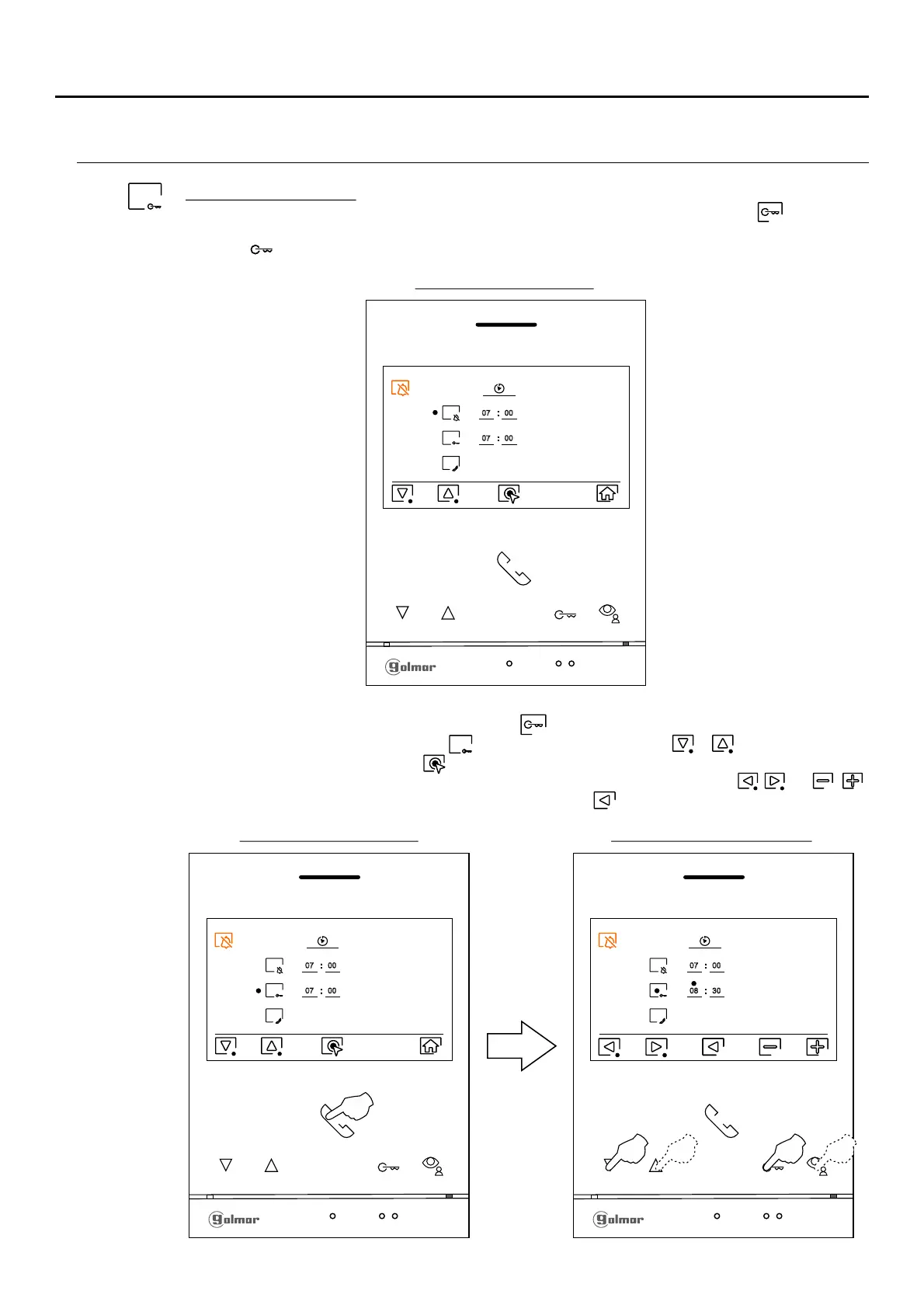
PERIOD OF TIME FOR 'DO NOT DISTURB' MODE MENÚ
”Automatic door openning”: This selection is visible in the “Do Not Disturb” settings menu, with the special
code '0441' (Doctor mode) already entered in the monitor (see specialfor automatic door opening
codes pp. 23 to 26). In standby monitor, you can also access the menu by pressing the pushNote:
button....... (blinking in white color) on the monitor.
1
Option selection screen
To set a period of time for automatic door openning mode (after 3 seconds of receiving a call from the
door panel), go to the option with icon pressing the button below icon or and select the option
by pressing the button below icon Then you can set a period of time. (from 00h & 01 minute to 23h &
59 minutes) 'Automatic door openning’ mode and /for , by pressing corresponding buttons / ,
validate the changes made by pressing the button below icon .
# #
Time period setting screen
Option selection screen
# #
07 00
07 00
07 00
08 30
1
07 00
07 00
ART /G2+4 MONITORLITE












 To Next Page