40
The cooling system manufacturer’s instructions must be checked
for required air flow. Any electronic air cleaners or other devices
may require specific air flows, consult installation instructions of
those devices for requirements.
3. Knowing the furnace model, locate the high stage cooling
air flow charts in the Specification Sheet applicable to
your model. Look up the cooling air flow determined in
step 2 and find the required cooling speed and adjustment
setting.
Example: A *MVC950704CX furnace installed with a
2.5 ton air conditioning system. The air flow
needed is 1000 CFM. Looking at the cooling
speed chart for *MVC95704CX, find the air
flow closest to 1000 CFM. A cooling airflow
of 990 CFM can be attained by setting the
cooling speed to “C” and the adjustment to -
10% trim.
4. Continuous fan speeds that provide 25, 50, 75 and
100% of the furnace’s maximum airflow capability are
selectable via dip switches S5- 3, 4.
Example: If the furnace’s maximum airflow capability
is 2000 CFM and 25% continuous fan
speed is selected, the continuous fan speed
will be 0.25 x 2000 CFM = 500 CFM.
5. Locate the blower speed selection DIP (S3) switches on
the integrated control module. Select the desired “cooling”
speed tap by positioning switches 1 and 2 appropriately.
Select the desired “adjust” tap by positioning switches 3
and 4 appropriately. To enable adjustments and select -5,
5, -10 or 10% trim, you must set dip switch S5-2 to
ON. If S5-2 is in the OFF position , you will receive
0% trim. Refer to the following figure for switch positions
and their corresponding taps. Verify CFM by noting the
number displayed on the dual 7-segment LED display.
6. The multi-speed circulator blower also offers several custom
ON/OFF ramping profiles. These profiles may be used to
enhance cooling performance and increase comfort level.
The ramping profiles are selected using DIP switches S4-
1, 2. Refer to the following figure for switch positions and
their corresponding taps. Refer to the following bullet points
for a description of each ramping profile. Verify CFM by
noting the number displayed on the dual 7-segment LED
display.
12
A* OFF OFF
BONOFF
COFFON
DONON
Switch Bank: S4
DIP Switch No.
(*Indicates factory setting)
Ramping
Profiles
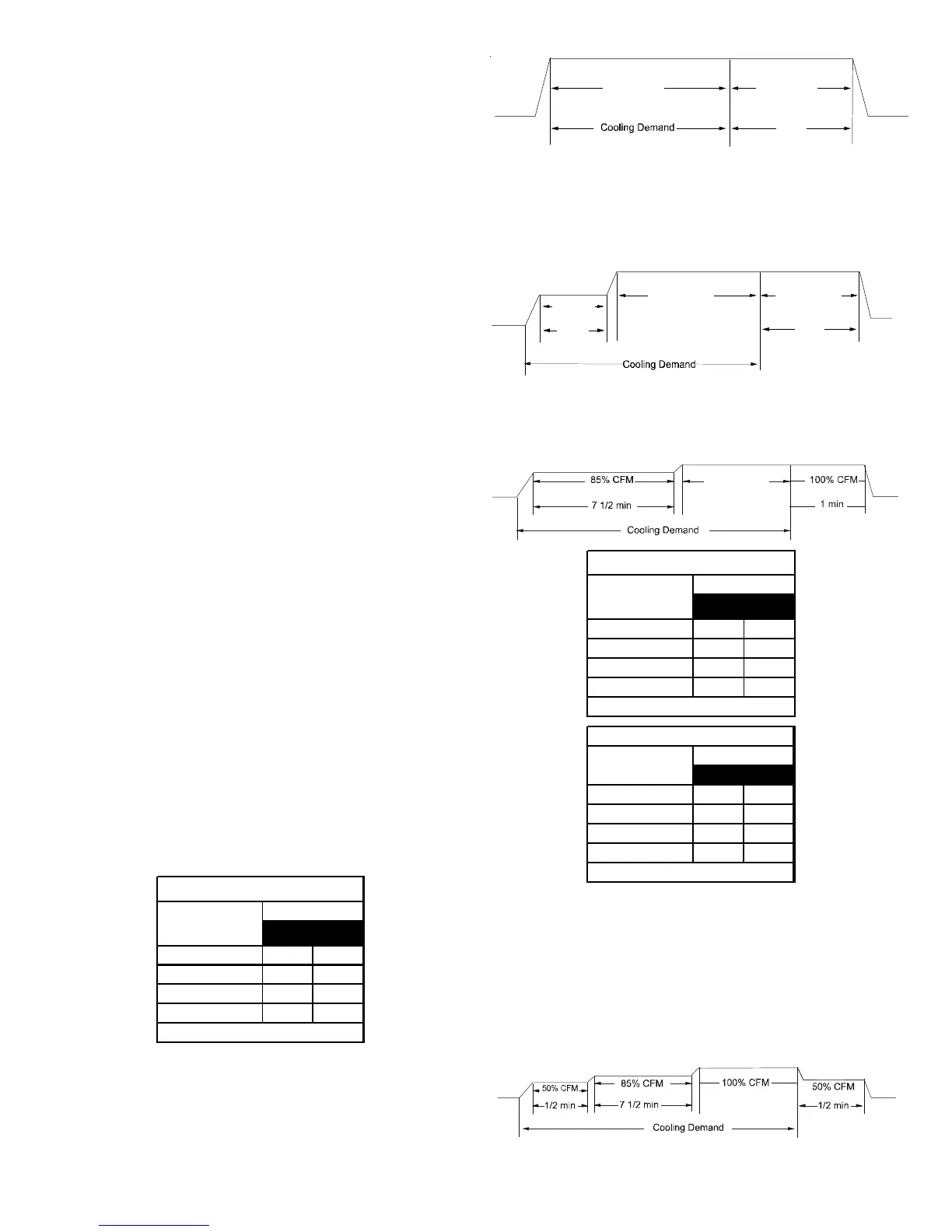
• Profile A provides only an OFF delay of one (1) minute at
100% of the cooling demand airflow.
OFF
100% CFM 100% CFM
1 min
OFF
• Profile B ramps up to full cooling demand airflow by first
stepping up to 50% of the full demand for 30 seconds. The
motor then ramps to 100% of the required airflow. A one
(1) minute OFF delay at 100% of the cooling airflow is
provided.
50% CFM
1/2 min
100% CFM
100% CFM
1 min
OFF
OFF
• Profile C ramps up to 85% of the full cooling demand
airflow and operates there for approximately 7 1/2 minutes.
The motor then steps up to the full demand airflow. Profile
C also has a one (1) minute 100% OFF delay.
100% CFM
OFF
OFF
12
AOFFOFF
BONOFF
COFFON
D* ON ON
Switch Bank: S3
Cooling Speed
Taps
DIP Sw itch No.
(*Indicates factory setting)
34
+ 5%* OFF OFF
- 5% ON OFF
+ 10% OFF ON
- 10% ON ON
DIP Switch No.
(*Indicates factory setting)
Switch Bank: S3
Adjust Taps
NOTE: To enable adjustments and select -5, 5, -10 or 10%
trim, you must set dip switch S5-2 to ON. If S5-2 is in the
OFF position, you will receive 0% trim.
• Profile D ramps up to 50% of the demand for 1/2 minute,
then ramps to 85% of the full cooling demand airflow and
operates there for approximately 7 1/2 minutes. The motor
then steps up to the full demand airflow. Profile D has a
1/2 minute at 50% airflow OFF delay.
OFF
OFF






 To Next Page