334149
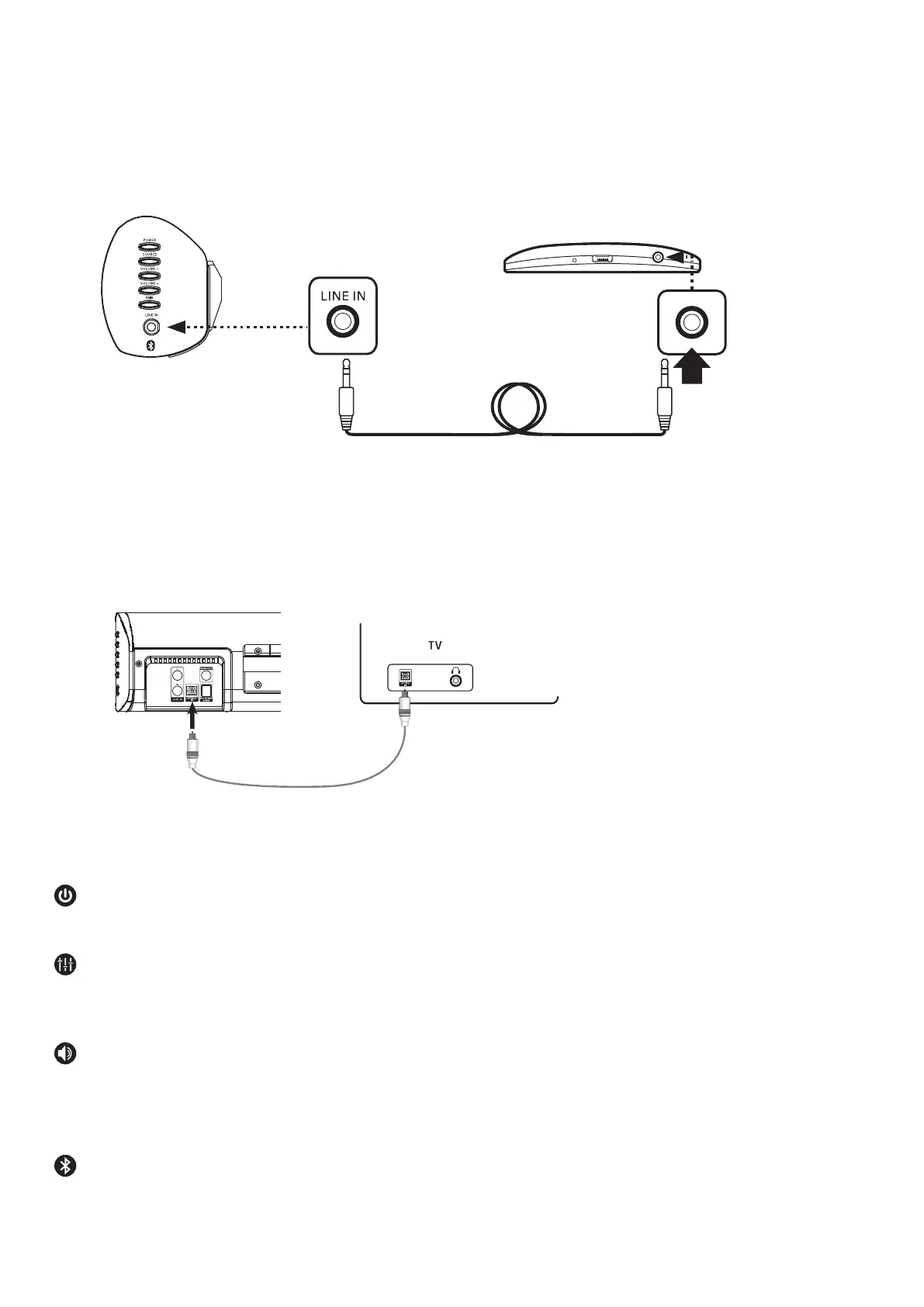
Via Optical Connection (the optical cable not included)
Connecting to a mobile device
You can connect soundbar to your TV through optical cable if your TV has optical in jack.
Play music from your Smartphone, Tablet or MP3 Player via the LINE IN connection.
Smartphone / Tablet / MP3 PlayerSound Bar
3.5mm Jack to Jack cable
USEFUL INFORMATION
The soundbar will automatically switch into standby mode when there is no signal after
more than 20 minutes.
Sound Interference
RCA Phono and Headphone 3.5mm LINE IN cables could be subject to sound interference.
Please place cables carefully and not near mains cables.
TV Speaker not disabled
If the sound is still coming out of the TV speaker then you may need to disable the TV speakers and
then enable the audio feature.
This can be done via the TV Settings menu (consult your TV User Guide).
Bluetooth Connection
This technology is to enable you to connect your Smartphone or Tablet to the Sound Bar for playback
of your music library. This connection method is not compatible with Bluetooth enabled Smart TVs.



 To Next Page