STEAM INJECTION DURING BAKING
Steam injection results in better browning and a crunchier crust.
Water from the tank drips in a controlled manner into a tray next to upper heaters. This way, just the
right amount of steam is generated, resulting in better browning and crunchier crust, while the crumb
or core remains springy and fluffy. We recommend using steam injection when baking bread, fresh
rolls, sponge rolls, cakes, as well as smaller cuts of poultry and vegetables.
Steam injection during the baking process is available with conventional baking system with a fan,
large grill with fan, and air fry. In addition to the selected baking system, the symbol will
also appear on the display unit.
INFORMATION!
The steam injection symbol will appear on the display unit if you have selected a
temperature higher than 150 °C.
Activating the steam injection
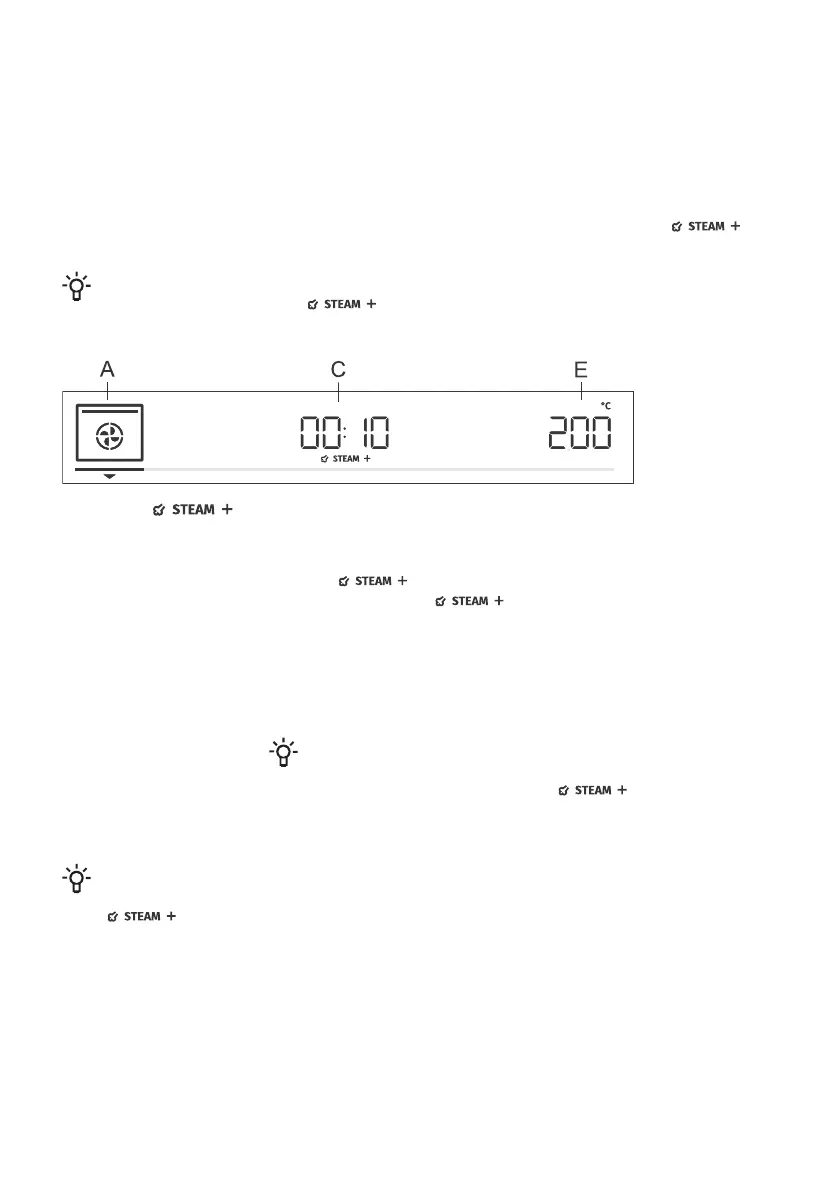
To activate steam injection during the baking process, rotate the KNOB
to menu C (see image) and confirm your selection. Rotate the KNOB to
the sign . Confirm the selection. Rotate the KNOB again,
select the fully lit sign , and confirm it. The function is now
activated. (If you do not select the fully lit sign, the function will not be
active).
Touch the start | stop key to start the cooking process.
Fill will appear on the display unit. Fill the water tank (see chapter "Filling
the Water Tank" below), then press the KNOB to confirm.
INFORMATION!
When the oven reaches a temperature of over 150 °C and 10
minutes have passed, the symbol will appear on the
display unit and the steam injection process will start.
INFORMATION!
The function can also be switched off while it is in progress. Rotate the KNOB to the setting
and press on the KNOB to confirm. Choose the dimmed sign and confirm it by
pressing on the KNOB.
21



 To Next Page