2
1 Welcome
If you’re reading this, you are probably a working musician or
audio professional of some kind. You’ve spent years honing
your craft with long, lonely hours spent strumming, picking,
tweaking, bowing, thumping and plucking. Maybe you tour the
world, or just the local coeshops. You’ve gotten up on stage
tired, given more than you thought you had and driven home
barely awake but your soul still singing. You have friends and
bandmates out there that you rely on like family. Some of your
friends, maybe the very best ones, are made of wood, steel,
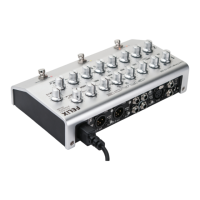
glue, bone and strings. And now you can welcome Felix to the
latter category.
Regardless of where you end up playing, from here on when
you look down at that stage oor, he’ll be down there shining
back up at you, making you sound better and your job easier.
While Felix is not the most complicated piece of gear you’ve
ever operated, he does come with a great deal of exibility and
setup options, which means we highly recommend you have
a good look at this owner’s manual to familiarize yourself with
his ner points. Once you overcome the learning curve (easy,
we promise), you’ll nd Felix to be intuitive, powerful and really
quite user friendly.
Most of all, we made Felix so you can make great music. So read
this manual and then get back to work!
2 Safety Information
• Indoor use only
• Ordinary Protection: This equipment should not be
exposed to dripping or splashing.
• Avoid placing objects lled with liquids, such as vases or
glasses, on this equipment.
• Class I Equipment (grounded type)
• Electrical rating: 100-240V~ 50-60Hz 10W
• Mains supply voltage uctuations are not to exceed ±10%
of the nominal supply voltage.
• Pollution Degree 2
• Installation (Over voltage) Category II for transient
overvoltages.
• Maximum Relative Humidity: <80%
• Operation temperature range: 10 °C to 40 °C
• Storage and transportation temperature range –40 °C to 70
°C
• Maximum altitude: 3000m (9843 ft)
• Equipment suitable for continuous operation
• Weight: 3.2lbs
TABLE OF CONTENTS
1 Welcome 2
2 Safety Information 2
3 Safety Marking Symbols 3
4 Features 3
5 Top Panel Controls and Features 4
6 Back Panel Controls and Features 5
7 Side Panel Controls and Features 5
8 Connecting Felix to Stu 6
8.1 1/4” Instrument inputs, Ch1 and Ch2 6
8.2 Ch1 XLR mic input 6
8.3 Insert 6
8.4 Amp Out 6
8.5 Tuner Output 6
8.6 FS - footswitch Input 6
8.7 DI Outputs, Ch1 & Ch2 6
8.8 Headphone Output 6
8.9 100-240VAC Power Input 7
9 Operation 7
9.1 Where to put Felix? 7
9.2 Using the XLR mic input Ch1 7
9.3 Instrument / line inputs 7
9.4 Filtering and EQ 8
9.5 Output controls 9
9.6 Footswitch Controls 10
9.7 Side Panel Controls 10
10 Diagrams 11
10.1 Insert cable Wiring 11
10.2 External Footswitch Wiring 11
10.3 Adjusting Internal Jumpers 12
10.4 Internal Jumper Locations 13
10.5 Block Diagram 14
10.6 Connection Diagram 15
11 Specications 16
12 Cleaning and Maintenance 17
13 Warranty 17
14 Manual Revisions 18


 To Next Page