Troubleshooting
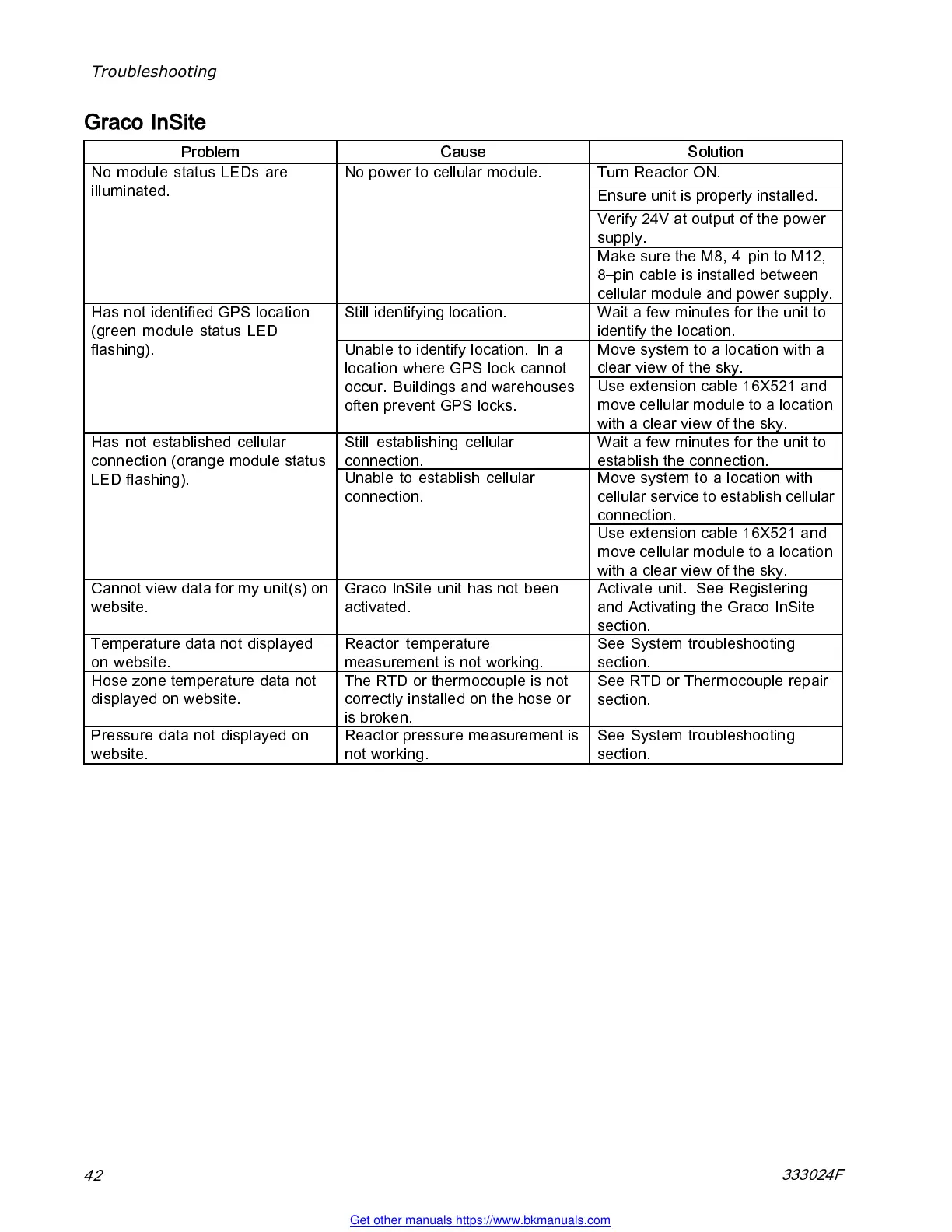
Graco InSite
Problem
Cause Solution
Turn Reactor ON.
Ensure unit is properly installed.
Verify 24V at output of the power
supply.
NomodulestatusLEDsare
illuminated.
No power to cellular module.
Make sure the M8, 4–pin to M 12,
8–pin cable is installed between
cellular module and power supply.
Still identifying location. Wait a few minutes for the unit to
identify the location.
Move system to a location with a
clear view of the sky.
Has not identified GP S loc ation
(green module status LED
flashing).
Unable to identify location. In a
location where GPS lock cannot
occur. Bu ildings and warehouses
often prevent GPS locks.
Use extension cable 16X521 and
move cellular module to a location
with a clear view of the sky.
Still estab li sh ing cellul ar
connection.
Wait a few minutes for the unit to
estab lish the connection.
Move system to a location with
cellu lar servic e to establi sh cel lul ar
connection.
Has not established cellular
connection (orange module status
LED flashing).
Unable to establish cellular
connection.
Use extension cable 16X521 and
move cellular module to a location
with a clear view of the sky.
Cannot view data for my unit(s) on
website.
Graco InSite unit has not been
activated.
Activate unit. See Reg istering
and Activating the Graco InSite
section.
Temperature data not disp layed
on website.
Reactor temperature
measurement is not working.
See System troubleshooting
section.
Hose zone temperature d ata not
displa ye d on website.
The RTD or thermocouple is not
correctly installed on the hose or
is broken.
See RTD or Thermocouple repair
section.
Pressure data not displayed on
website.
Reactor pressure measurement is
not working.
See System troubleshooting
section.
42
333024F
Get other manuals https://www.bkmanuals.com



 To Next Page