765041776 Rev. 006 20
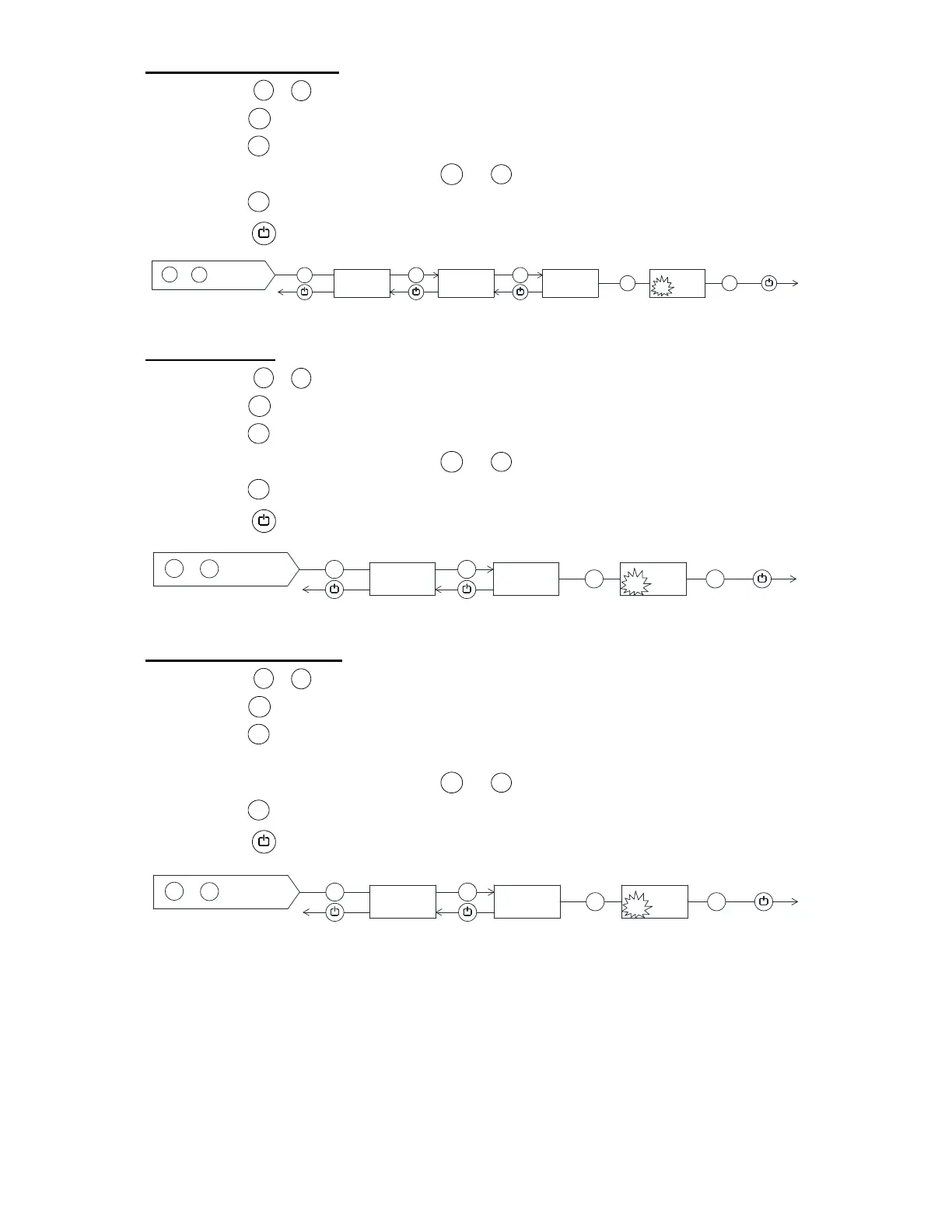
5. Temperature offset
Press for more than 3 seconds.
Press , until the secondary display shows CAL.
Press , the secondary display shows CA.
Change the value by using the or key.
Press to confirm.
Press 3 times to exit the user menu.
6. Alarm limits
Press for more than 3 seconds.
Press , until the secondary display shows ALL.
Press , the secondary display shows FAS.
Change the value by using the or key.
Press to confirm.
Press twice to exit the user menu.
7. Number of defrosts
Press for more than 3 seconds.
Press , until the secondary display shows DEF.
Press , the secondary display shows the current no. of defrosts ( 4 is
default).
Change the value by using the or key.
Press to confirm.
Press twice to exit the user menu.
P
+
1
+
P
+
-
P
P
P
+
P
>3 sek.
1
+
+/-
5
P
CAL
5
CA
5
0
51
2 x
5 x
12.
P
+ 1
+
P
+
-
P
P
P
+
P
>3 sek.
1
+
+/-
5
ALL
5
FAS
5
ESC
2 x
6 x
13.
P
+
1
+
P
+
-
P
P
P
+
P
>3 sek.
1
+
+/-
5
DEF
5
4
5
5
2 x
7 x
14.


 To Next Page