765042420 Rev.000 14
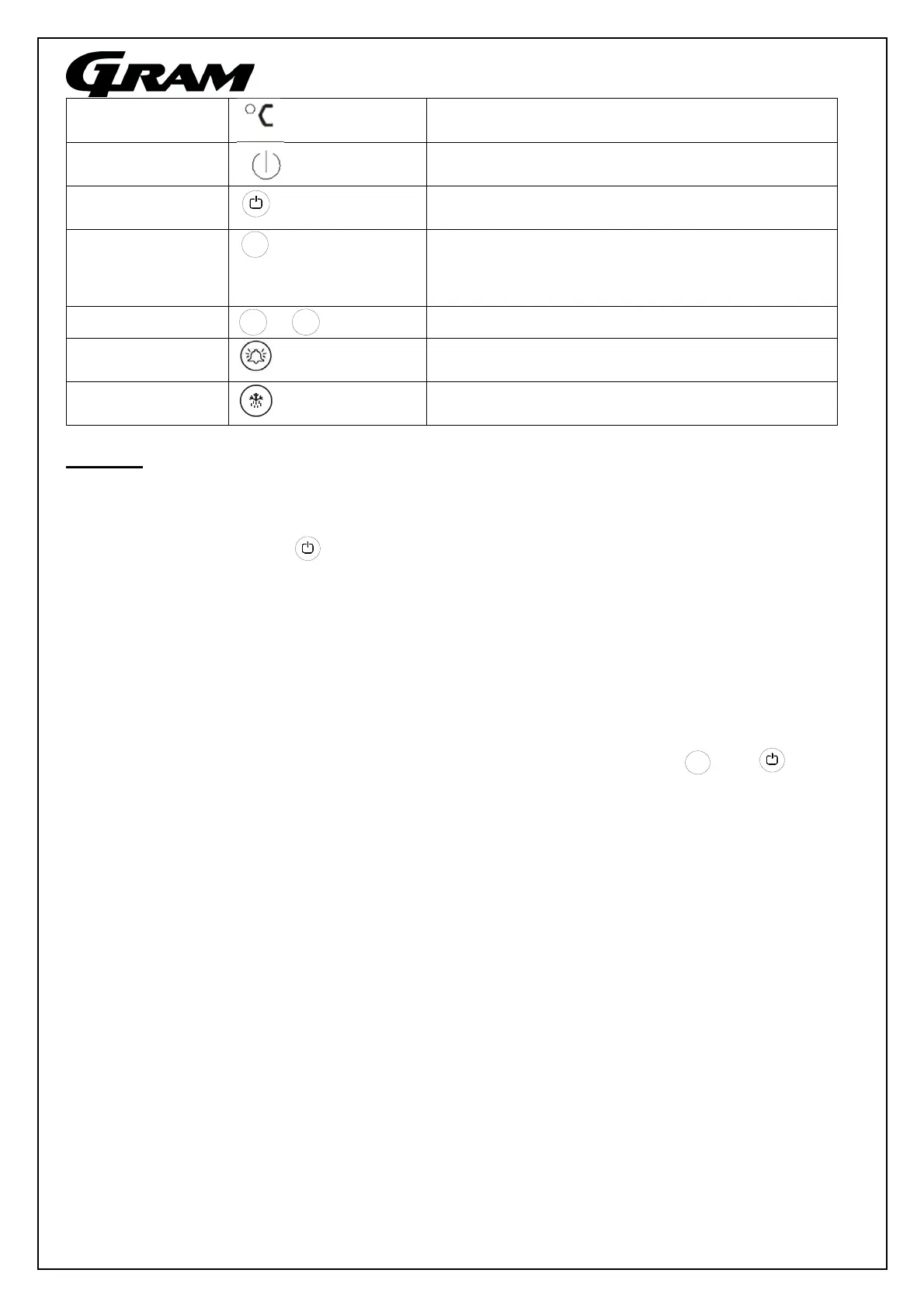
This symbol indicates that the temperature in
the displa
is measured in °C
When this symbol is lit, the cabinet is in
standb
mode.
Operating
buttons
On/off button. Used to switch the cabinet on or
off and to exit a menu.
Press the P button to set the desired
temperature in the cabinet /Set point. This
button is also used as a ”select” button.
+/- buttons. Up/down when making settings.
The alarm clock is used in connection with
temperature alarms
The defrosting button is used to initiate manual
defrostin
Start-up:
Connect the product to the electrical outlet. If the product starts in Standby, do the
following:
Press the button for approx. 2 sec to switch the product on.
Upon start-up, the display will show the current temperature in the cabinet and relevant
control lights will be lit.
Keyboard lock
If the display is locked, attempts to switch the cabinet off or to enter settings will result in
the display showing Loc. In this state, no settings can be made on the controls.
The keyboard for the controls can be unlocked by simultaneously pressing and
for approx. 1 second. The display will now show UnL, and the display is unlocked.
The keyboard can be locked in the same manner. After being locked, the display will
show Loc, and the display is locked.
P
-
+
-


 To Next Page