The PT 335B Multi is a versatile automatic creaser designed for print finishing solutions, offering multiple finishing options for various paper processing needs. This machine is equipped with a 4-inch vacuum pile feeder, an easy-to-use LCD screen, and a keyboard for intuitive operation.
Function Description:
The primary function of the PT 335B Multi is automatic creasing, but it also supports cross perforating (including partial perforations), and offers a choice of three creasing widths. Additionally, it can be fitted with an array of rotary tools for perforating, scoring, slitting, and kiss-cutting. The machine is designed to handle a maximum of 32 crease/perf positions per sheet and has a memory capacity for 30 jobs, making it suitable for a wide range of finishing tasks. Skew compensation is also integrated to ensure precise alignment.
Important Technical Specifications:
- Electrical: 110-130V, 50/60Hz, 15A.
- Speed: Up to 4,500 SPH (sheets per hour), based on an 8.5"x11" landscape sheet with one crease.
- Maximum Stock Size: 13"x25.5".
- Minimum Stock Size: 4.7"x5.5".
- Stock Weight: 26# bond to 16 pt.
- Model Type: Tabletop (with an optional stand available).
- Maximum Crease Positions: 32 per sheet.
- Program Memory: 30 jobs.
- Feeder: 4" air-fed vacuum pile feeder.
- Dimensions (approximate): 510mm (width) x 1100mm (length) x 390mm (height, tabletop unit).
Usage Features:
The PT 335B Multi offers a user-friendly experience with its control panel, which includes a keypad and an LCD screen.
- Quick Start: The manual provides a step-by-step quick start guide, covering machine power-on, tray adjustment, stock loading, guide positioning, airflow adjustment, pile height limiter setting, front separator adjustment, crease depth adjustment, and skew adjustment.
- Operation Modes: The machine operates in five distinct modes, accessible via the "M" (Mode) key.
- Mode 1 (Main Operation): Displays "Ready" or "Running" status, Preset QTY, and Feed QTY. Users can input desired sheet quantities. It shows the first two crease data inputs and allows scrolling through up to 32 crease positions.
- Mode 2 (Crease Data Input): Allows input of up to 32 crease positions (0-900.0, accurate to one decimal place). The system automatically navigates through input fields and returns to Mode 1 when input is complete.
- Mode 3 (Cover Hinge): Specifically for book cover making, allowing input of "SPINE" (first spine line to leading edge) and "THK" (book thickness/spine width) parameters, which generate four crease lines.
- Mode 4 (Progressive Crease): Activates or deactivates progressive creasing. When active, users can set parameters for "Inc" (increasing), "Dec" (decreasing), "I&D" (increasing and decreasing), or "V" (V-mode) crease patterns, along with sheet count, initial crease, and depth. The V-mode is designed for square-back saddle-stitched books, allowing thick paper to lay flat after binding.
- Mode 5 (Feed Mode): Offers "Auto" and "Manual" feed options. In Auto Mode, the machine automatically feeds stock from the pile. In Manual Mode, the machine feeds one sheet at a time for testing.
- Mode 6 (Recall/Save Job): Allows users to save up to 30 job settings and recall them for future use. It is recommended to record job numbers to prevent overwriting.
- Mode 7 (Speed): Users can select between "Low" and "High" speed settings for operation.
- Mode 8 (Recalibrate): Used to calibrate the crease line gap if it shrinks or stretches. Users measure the real paper length, input it into the machine, and pass the paper through for automatic recalibration. A warning is given if the input data is more than 3% greater than the real length.
- Hardware Settings:
- Crease Depth: Adjustable via four Allen screws on the crease bar. Proper adjustment prevents unclear creases, cracking, or double feeds. The 3rd screw in the middle should not be adjusted.
- Front Guide Adjustment: A knob adjusts the front airflow to prevent double feeding and accommodate different paper weights.
- Air Gate Adjustment: A knob adjusts air vent sizes. Clockwise for heavier stock (more airflow), counterclockwise for lighter stock (less airflow).
- Pile Height Sensor: In Auto Feed Mode, a knob adjusts the pile height. Clockwise for higher, counterclockwise for lower. In Manual Feed Mode, it should be turned clockwise to maximum to avoid an "Elevator Motor Error."
- Skew Adjustment: A wheel adjusts the angle of the fixed side guide to compensate for paper skew errors. Moving the knob down skews paper to the right, up to the left. When adjusting, paper backstop and magnetic side guides must be moved away from the paper stack edge.
- Optional Parts:
- Slide-in Tools: Includes cross crease bars (standard 1.0mm; optional 0.4mm, 0.6mm, 1.2mm, 1.4mm) and cross perforate bars (optional 12 TPI, 24 TPI, 52 TPI). These bars are inserted by aligning and securing a screw.
- Linear Tools: Four types of linear tools are available: scorer, perforator, kiss cutter, and slitter. These tools are installed on the tool mount shaft using two screws: Screw 1 fixes the tool, and Screw 2 adjusts the tool's depth. The anvil is mounted on the outfeed shaft.
Maintenance Features:
Regular maintenance is crucial for the longevity and optimal performance of the PT 335B Multi.
- Daily/Weekly Cleaning:
- Use GW Roller Cleaner to clean ink/toner dirt and debris from rollers to prevent build-up and protect roller integrity.
- Follow roller cleaning with a wash of water and Simple Green (1-part Simple Green to 30 parts water). Avoid excessive Simple Green to prevent soap residue.
- Lubricate roller bushings with 3-in-1 oil to ensure proper paper feeding and prevent rollers from slowing or sticking.
- Clear paper dust from all sensors using compressed air.
- Clean all surfaces with a water-soluble cleaner.
- Tool Handling: The kiss cutter and slitters, though similar in appearance, should not be interchanged to prevent blade damage. The kiss cutter is chamfered on both sides, while the slitter is chamfered on only one side.
- Roller Removal: To remove rollers for maintenance, detach the clip at the operator side, then slide the shaft right to loosen and remove it. Loosen set screws of anvils to install new ones, ensuring all set screws touch the flat part of the shaft.
Troubleshooting and Error Codes:
The machine provides error codes to assist in troubleshooting:
- E-1 CR Motor Error: Crease motor locks.
- E-2 Elevator Error: Limit switch closed or sensor finds nothing after starting motor, or pulse from pulse sensor stops.
- E-3 Elevator Error: Both table up sensor and lower sensor are triggered.
- C-1 CR Cover Open: Safety cover is open.
- C-2 Jam at Infeed: Infeed sensor is activated while the machine is not running.
- C-3 Jam at Outfeed: Outfeed sensor is activated while the machine is not running.
- C-4 No Paper or Paper Jam: Infeed sensor is not activated after the machine starts for 12 seconds.
- C-5 Please Set Paper: Press start but no paper.
- C-6 Please Insert Tools: Press start but tools are not installed.
- C-7 Tray Level Err: (No specific description provided, but implies an issue with the tray level).
It is important to read and understand the entire manual before operating the PT 335B Multi. For any questions, contact your local dealer or Graphic Whizard. Graphic Whizard is not liable for damages resulting from improper maintenance, unauthorized modifications, misuse, or operation outside specified environmental conditions. The design and specifications are subject to change without notice.

 Need help?
 General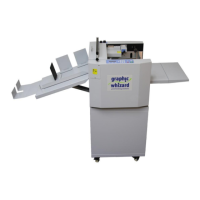

 To Next Page