17 / 36
33032_jp_V1
After the installation of the memory card, there is a folder struc-
ture in it. These folders are actually empty.
Finally, the log files are saved in subfolders called "Modelname"
named according to the structure 0001_year-month-day.bin. If a
model memory is still nameless, the corresponding log files are
saved in a subfolder entitled "NoName".
In the folder "Models" are saved the exported model memories.
The data can be evaluated on a compatible computer using the
programs found on the downloads page for the transmitter
under www.graupner.de.
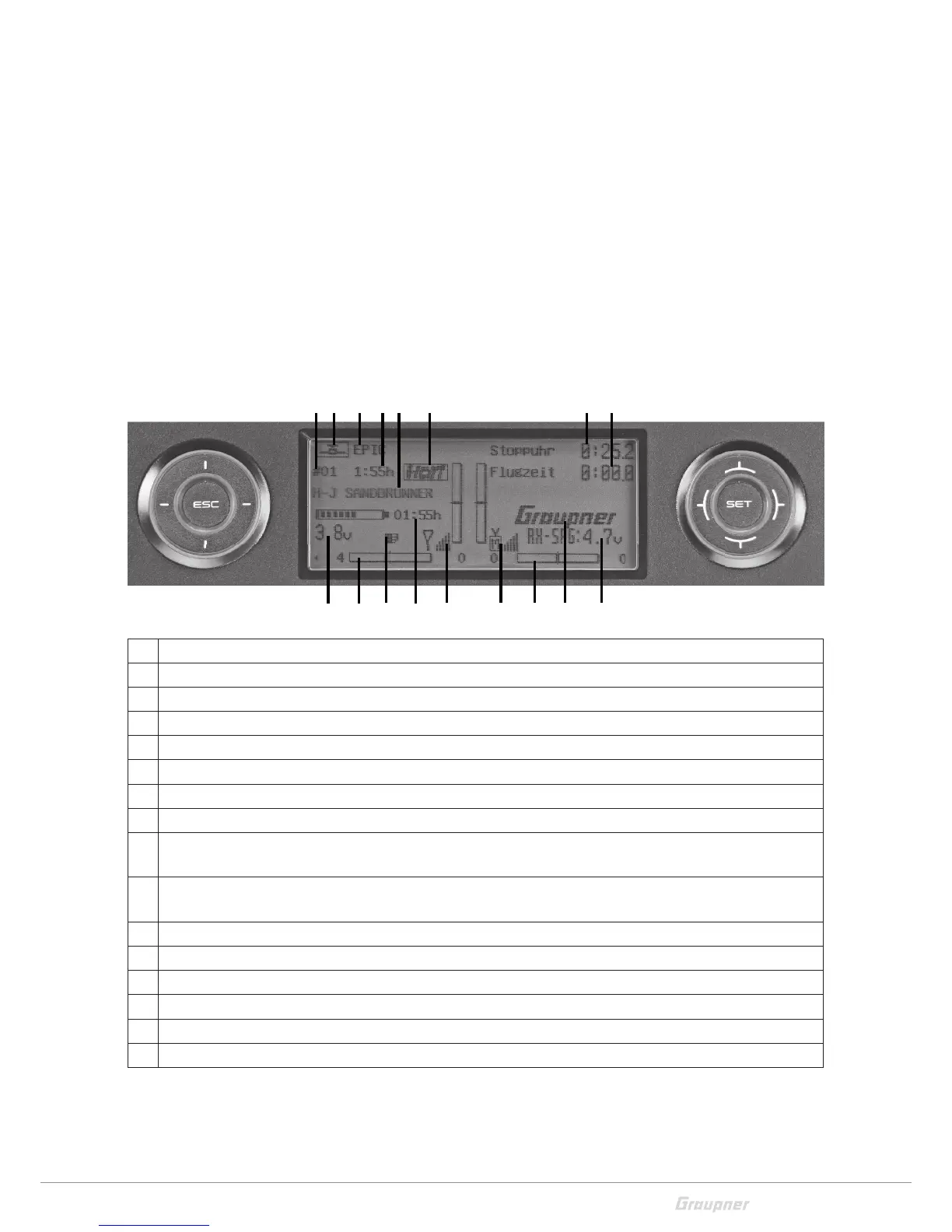
Display and touchpad
1 Model memories 1 … 80
2 Model type display (plane/heli)
3 Model name
4 Model operating time
5 User name
6 Operating mode HoTT/PPM
7 Flight chronometer in min:s (forward/reverse)
8 Flight timer in min:s
9 Transmitter battery voltage with dynamic bar indicator (if the battery voltage underruns the 3.6 V (adjust-
able) threshold a warning message will appear and an acoustic warning will sound)
10 Graphic display of the position of the four digital trimming levers with a numeric position and direction
display.
11 Symbol "micro SD card insert"
12 Transmitter operating time (automatically reset to 00:00 if the voltage is at least 0,3 V higher)
13 Signal power
14 Operating mode
15 Graupner logo or flight phase name
16 Receiver battery voltage RX-VOLT
2 31 5 6
9 10 12 1011
4
7
14
8
13 1615



 To Next Page