D Series Modular Air-cooled Scroll Chillers
16
5.3.2 Menu Operation Instructions
◆
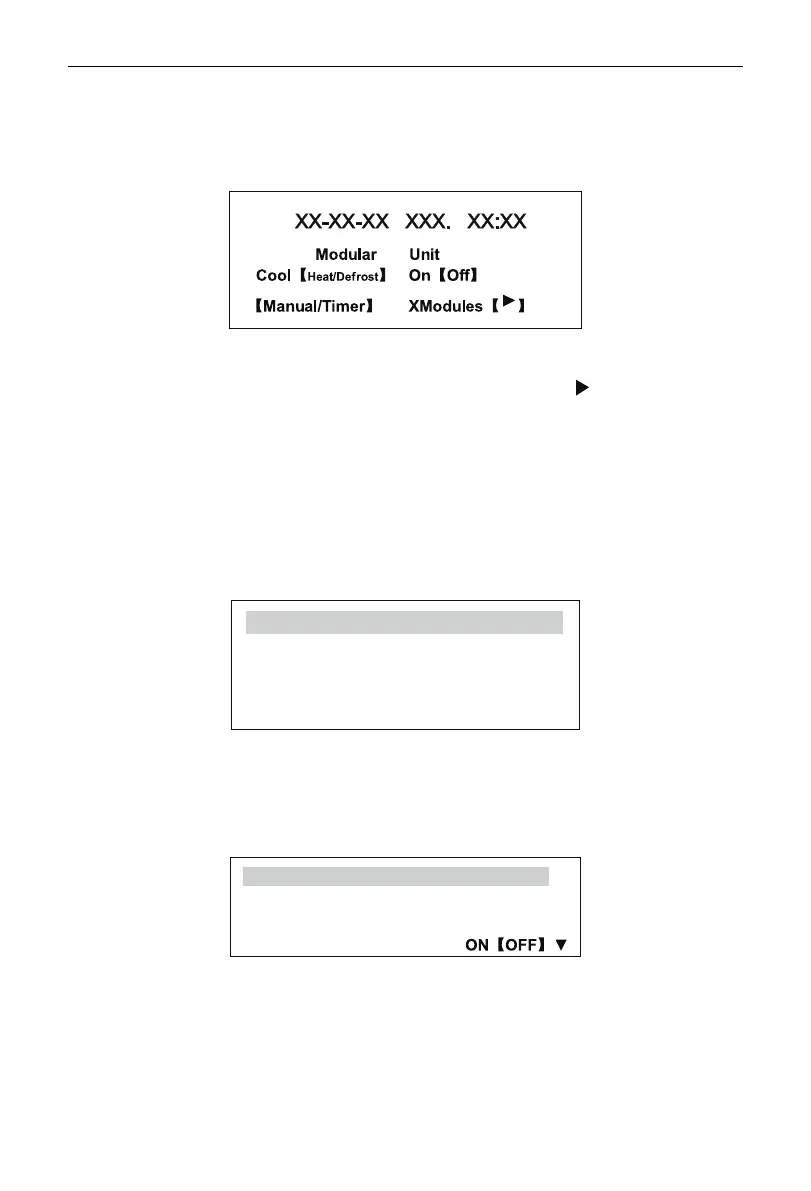
Home page
When the controller is powered on, the microcomputer will make a 3-second automatic detection and
the LCD on the wired controller will display the following content.
The content of default home page menu is dependent on system state. XX stands for year, month,
day, hour and minute. Only one item or none is displayed in the “
【】
”, representing the start/stop state of
the system, starting method and quantity of linked modules. Presence of the “ ” at the end means the
system is at fault.
After entering into a menu item, if no operation is made on the Wired Controller within 10 minutes, the
system will automatically go back to the above default home page menu (Home Page).
Press the Exit button on the wired controller at any time for enough times, you can go back the default
home page menu as shown above.
◆
Main Menu
When home page is present on the screen as shown in the above drawing, press the Conrm to enter
into the Main Menu and the following items is displayed on the screen.
User’s Setup
Module View
Parameter Setup
Version
Press the up or down selection button to choose required function and press the Conrm button to
go to the page.
(1) User’s Setup
The following is basic settings most common for users. On the Main menu, select the User’s Setup and
press the Conrm to go to the sub-menu, as shown in the following.
Run Mode 【Cool/ Heat/Defrost】
Startup 【Manual/Timer】
Auxiliary Heat ON【OFF】
Auto-Antifreeze
Page 1



 To Next Page