D Series Modular Air-cooled Scroll Chillers
24
(3) Parameter Setup
On the Main Menu on the screen, select Parameter Setup and press Conrm to go to the page as
shown in the following drawing.
Press Exit to quit the page and go back to the previous menu. Press Up or Down selection button to
select a needed setting interface.
y
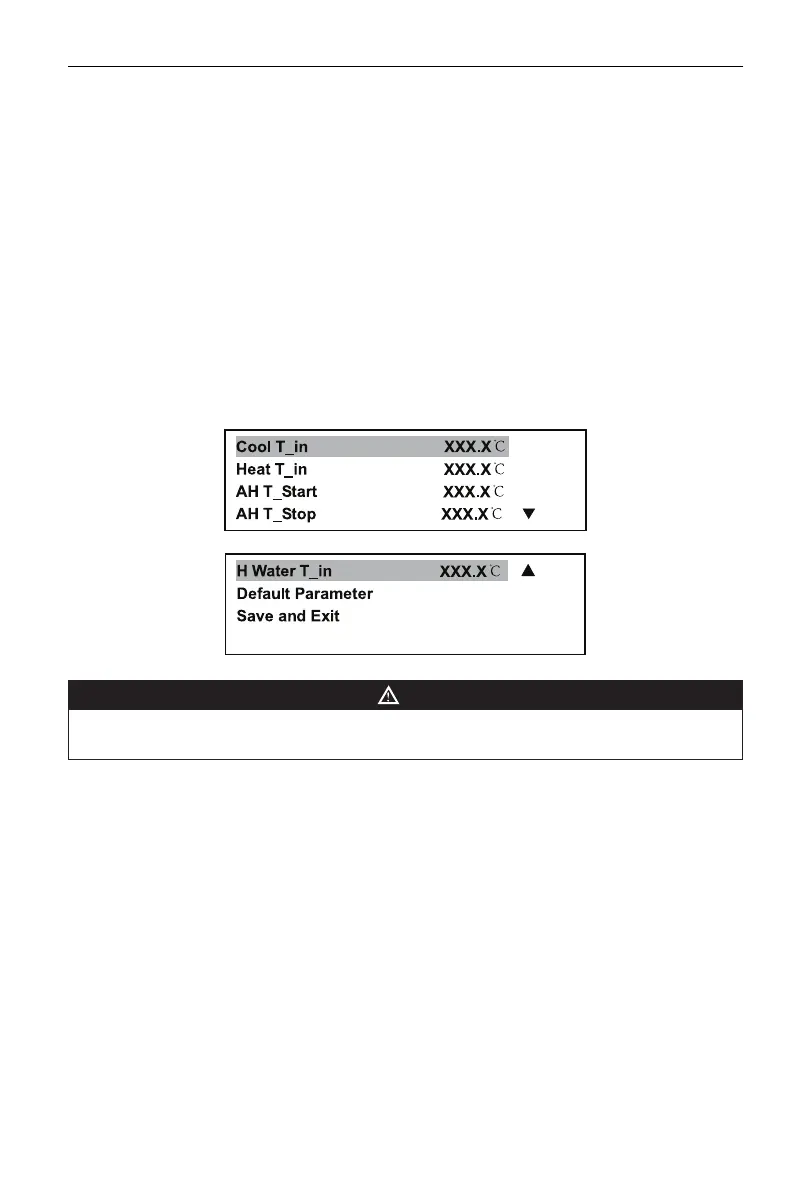
User-level Parameter Set
Select the menu and conrm the selection for going to User Para. Setup menu. Press the Up or Down
selection button to select the parameter to be modied and press Conrm to go to the modication page.
Press the Up or Down selection button for entering parameters and press Conrm or Exit to go back
to the parameter set menu. Other parameters can be modified in the same way. After entered Default
Parameter option, System will inquire whether use Default Value, if YES is choosed, then the parameters
will be modied to Factory Default Value
。
After modication, press the Up or Down selection button to
save parameter and quit the item. A prompt for asking whether to save the modication comes up again
on the screen. Select Conrm to save it and go back to the Main menu. Please note that only in the above
exit way can modications be saved.
Page 1
Page 2
NOTE
•
Above Items display is dependent on unit model. If this Item is not existent for a certain model, “NA”
would be present on the display zone for corresponding Item.
y
System-level Parameter Set
User shall not use the function unless under instruction of debug personnel if necessary, to prevent an
accident. Code entry is essential for operating the function. Button points on how to operate: select the
menu and conrm the selection, and a prompt of code entry appears on the screen; press the Up and
Down selection buttons to enter correct password, press Conrm to conrm it, and go to Parameter Set
Menu; press the Up and Down selection buttons to select parameters to be modied, press Conrm to go
to modication interface, press the Up and Down selection buttons to enter parameter value, and press
Conrm or Exit to go back to the Parameter Set menu; other parameters can be modied in the same
way; After entered Default Parameter option, System will inquire whether use Default Value, if YES is
chosen, then the parameters will be modied to Factory Default Value
.
after modication, press the Up
and Down selection buttons to select Save and Exit item under the Parameter Set menu, and a prompt
whether to save the modied values comes up again on the screen, and if you need to save them, you can
select OK and then press Conrm to save modications and go back to the Main menu. Please note that
only in the above exit way can modications be saved.



 To Next Page