Fast Deposit Module CA10 User Manual
Confidential material of GRG, No disclosure to unauthorized Party 8 / 35
Chapter 4 Method to Debug and Maintain CA10 with Toolplus
1. Install Toolplus
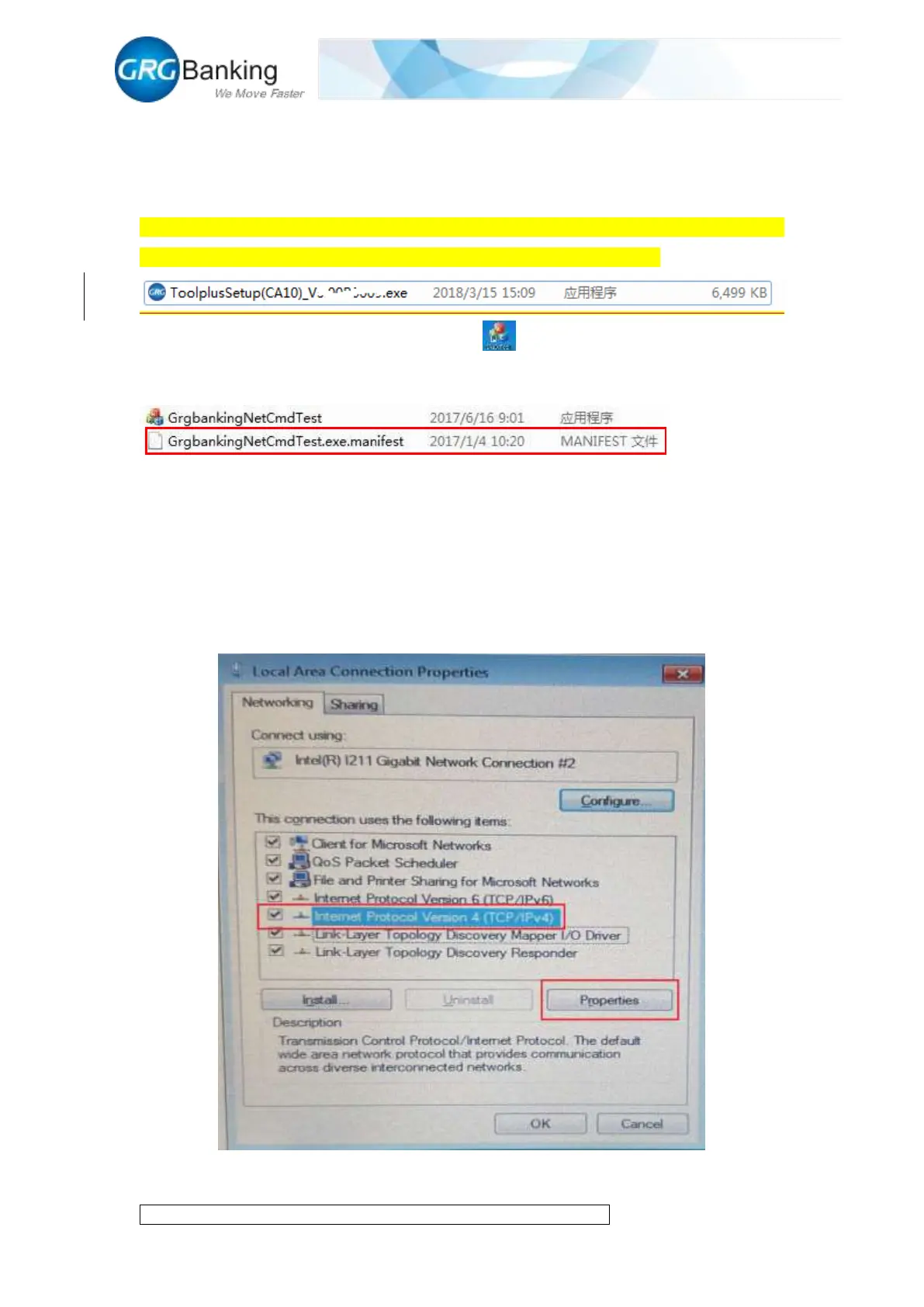
As shown in the figure below, double click “ToolplusSetup(CA10)_Vx.xxBxxxx”, Vx.xxBxxxx
means version, click “next” until finish installation, default language is English.
Double click to run the test tool “CA10_ToolPlus”, , (note: for Windows XP operating
system, it is required to remove the .manifest file under the installation directory to run the tool
normally after installation).
2. Connecting CA10 to PC
2.1 Connecting to PC with cable
The IP address of CA10 is set by default upon the delivery from factory (IP address: 192.168.1.12,
Port: 7500).
Connect CA10 to PC with the RJ45 cable and modify the “Local Connection” IP address for PC
as shown in Figure 4-1 in which the number “52” also can be other numbers except for “12”.


 To Next Page