Configure
3.7.1 Trigger Configuration
A trigger event occurs when the unit receives the specified trigger input resulting from a specified
combination of conditions on the configurable pins.
Set the configurable pins to None.
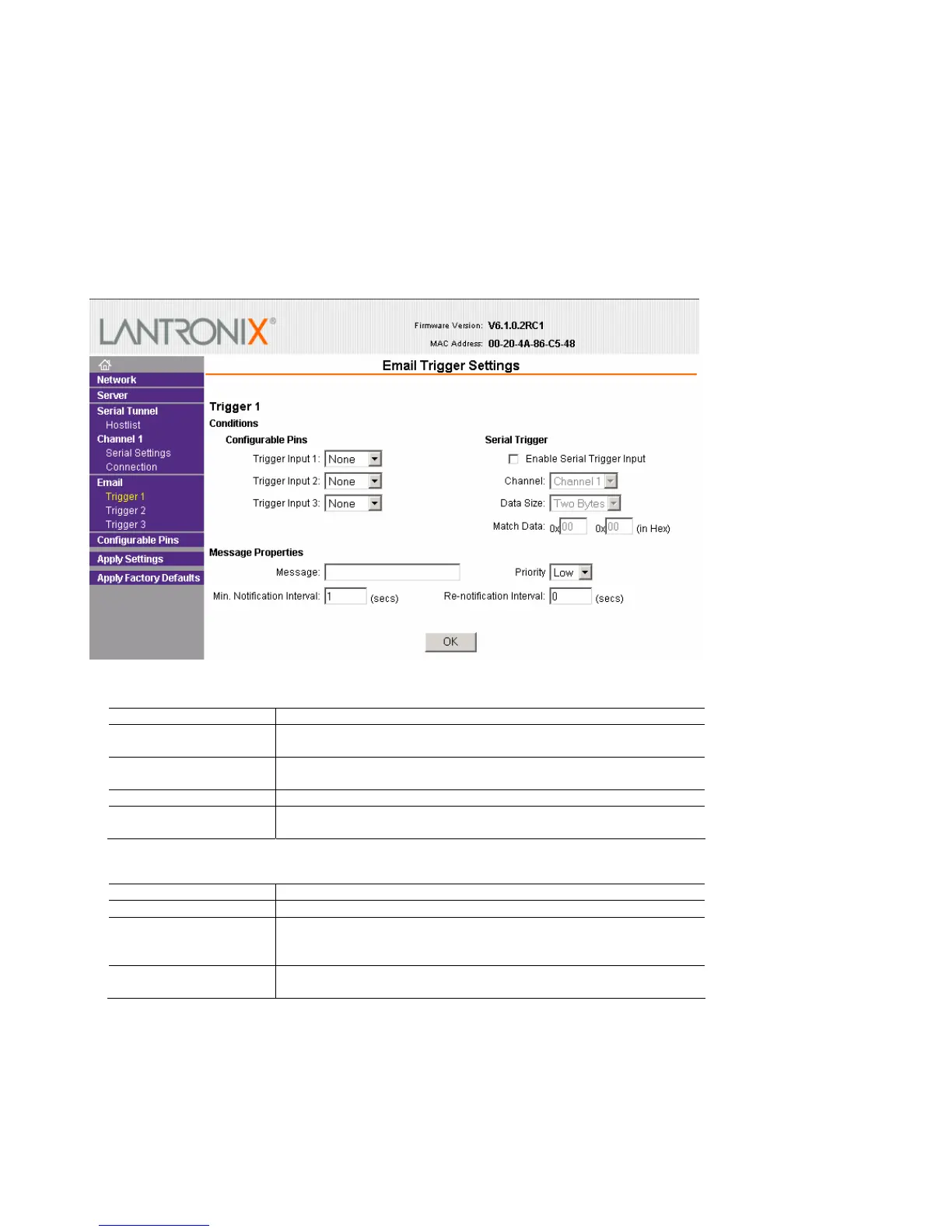
To configure the XPort’s email trigger settings:
1. On the main menu, click Trigger 1, Trigger 2, or Trigger 3 to configure the desired trigger settings. The
Email Trigger Settings page opens.
2. Configure or modify the following fields:
Conditions
Configurable Pins
Set to None.
Enable Serial Trigger
Input
Enabling this option causes specified serial communications to count
as a trigger input.
Channel
Select the channel prompting the trigger. For the NET232, use only
Channel 1.
Data Size
Select the data size prompting the trigger.
Match Data
Enter the data, which, when it appears in the communication stream,
prompts a trigger.
Note: All of the conditions must match for the NET232 to send an email notification.
Message Properties
Message
The subject line of the trigger event email to the specified recipient(s).
Priority
The priority level for the email.
Notification Interval
The minimum time allowed between individual triggers. If a trigger
event occurs within the minimum interval since the last trigger, it is
ignored.
Re-notification Interval
Indicates the time interval in which a new email message is sent to the
recipient(s) when a single trigger event remains active.
3. When you are finished, click the OK button.
4. On the main menu, click Apply Settings.
3-12 NET232/NETUSB User Guide



 To Next Page