Model G9983 (Mfg. Since 8/09)
-5-
To help you understand the set up and operation
instructions, we recommend that you become
familiar with the basic features of your new sand-
er.
External Features
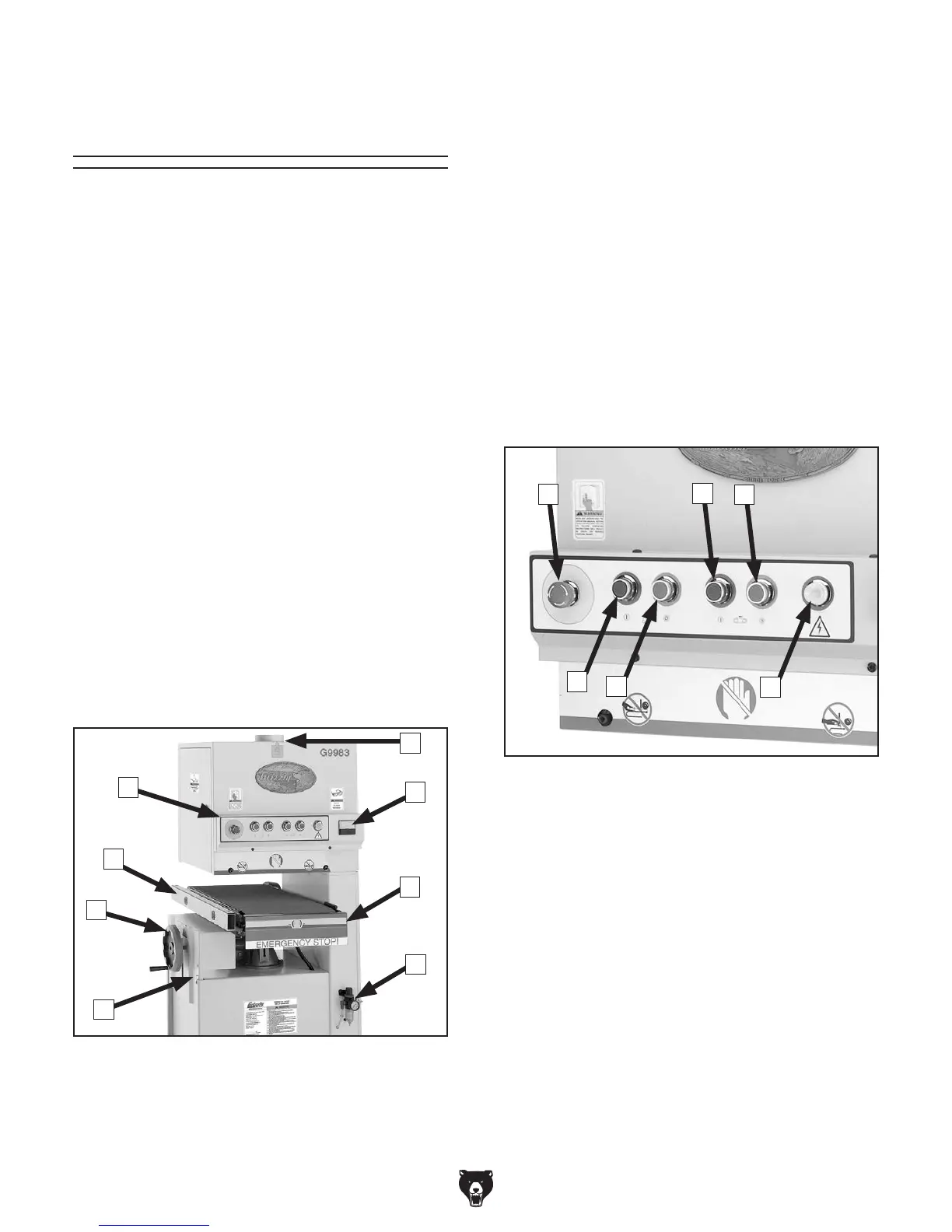
Please match up the list below with the letters in
Figure 1 to identify the external sander compo-
nents.
A. Control Panel
B. Table Extension
C. Conveyor Height Handwheel
D. Conveyor Height Gauge
E. Dust Port
F. Load Meter
G. Emergency Stop Bar
H. Pressure Regulator
B
A
C
D
F
G
H
E
Figure 1. These are the basic external
components of the sander.
Control Panel
The control panel houses the main power switch,
the feed belt ON/OFF buttons and the sanding
belt ON/OFF buttons. Please refer to Figure 2 to
identify these controls.
A. Main Power ON / Emergency STOP switch.
B. Sanding Belt OFF button.
C. Sanding Belt ON button.
D. Feed Belt OFF button.
E. Feed Belt ON button.
F. Power Indicator Light
Figure 2. These are the main power controls.
A
D
E
B
C
F
Basic Controls &
Features


 To Next Page