Toughsat Users Manual Ground Control
- 10 -
When The Toughsat Is Online
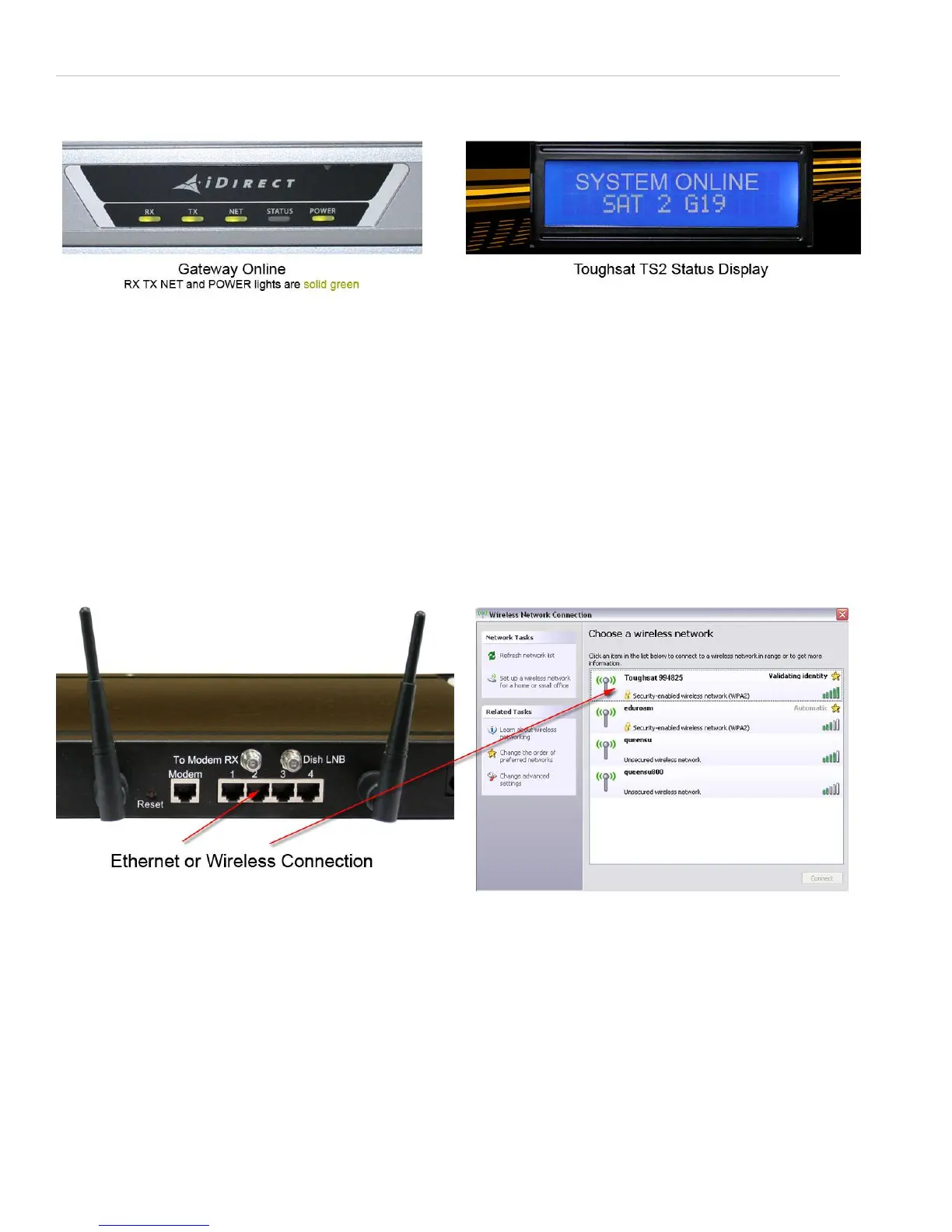
The system is online when the gateway lights (on the iDirect Evolution X5) show solid RX, TX, NET and Power lights are
solid green. Also the Toughsat display will display the current system status. If you do not see this light pattern, it could
be due to bad or incorrect cable connections. Please contact Ground Control support for help. Note that the iDirect does
not have a power switch and turns on when power is present.
PRESS STOP TO STOP ALL DISH MOVEMENT of the Toughsat for any reason. You may press “Deploy” or “Stow” after
pressing the “Stop” button.
Connecting To The Internet
The Toughsat is pre-configured, so connecting to the Internet is as easy as connecting to the LAN via Ethernet or the
wireless access point. The default SSID for the Wi-Fi “Toughsat <serial number>”. There are 4 Ethernet ports on the
back of the ACU that access the LAN. Up to 256 LAN connections can be made. The router default configuration uses
DHCP to manage the IP addresses, so all devices should be set to receive DHCP.
Once the computer is connected to the network, you may simply open any browser and navigate to any web page.


 To Next Page