Toughsat Users Manual Ground Control
- 14 -
When all of these things are true, click on “Find Satellite”. This dish should lock on satellite and create an Internet
connection automatically.
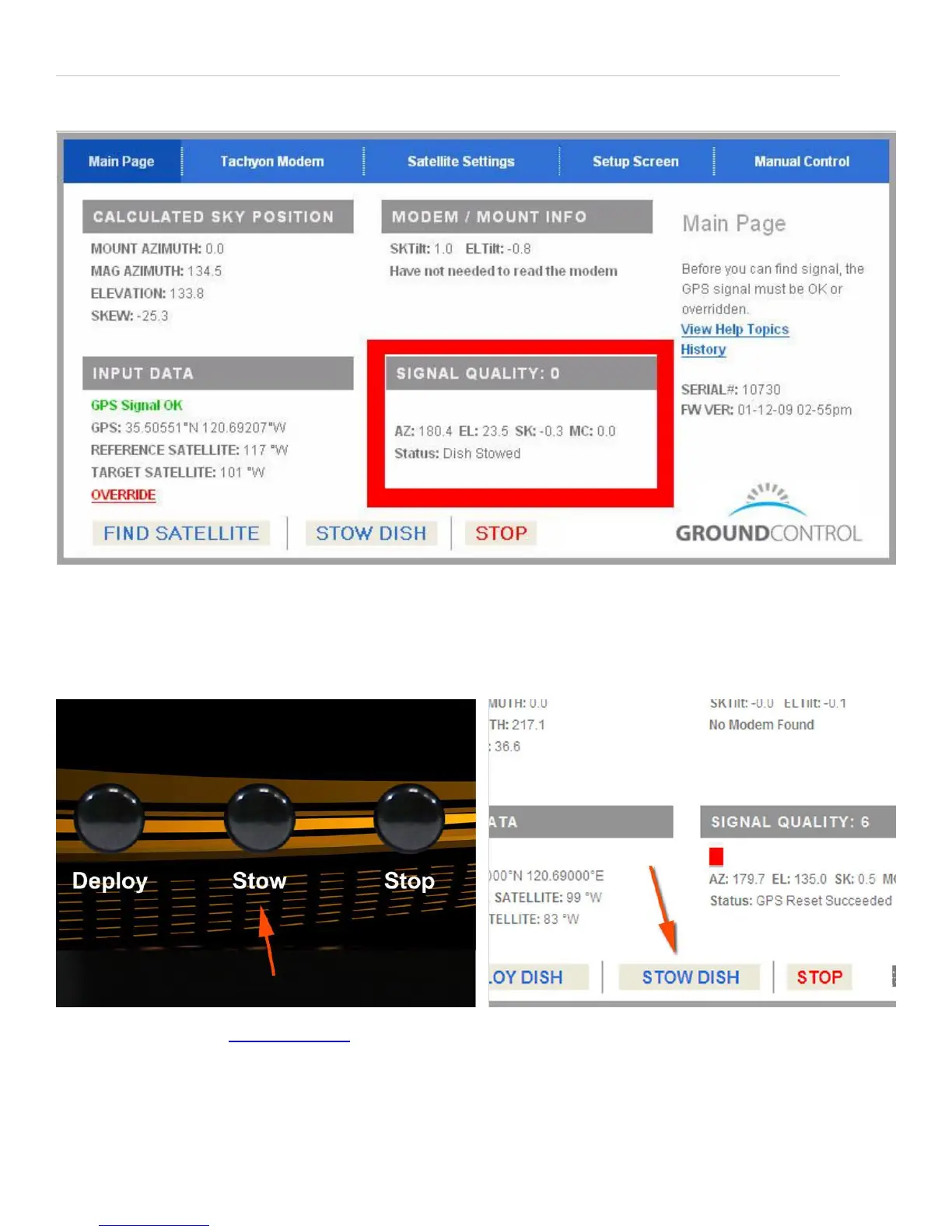
Now look at the “Signal Quality” section, here: and you will see what the Toughsat is doing at this moment, in the “Status”
line. The Toughsat will search for signal, and when it’s ready, it will display “Passed Test, System Online”.
You are online. Confirm it by connecting to any web page on the Internet with your browser.
Stowing The Dish
Stowing the dish on the Flyaway can either be done by pressing “Stow” on the Toughsat TS2 panel, or by accessing the
controller’s web page at http://192.168.1.2 and pressing on the “Stow Dish” button.
PRESS STOP – TO STOP ALL MOVEMENT OF THE DISH for any reason. Press “Find Satellite” or “Stow Dish” to
resume movement.
NOTE - The Toughsat must be stowed before moving of the vehicle can take place. Failure to stow the system before
moving the vehicle may cause damage to your dish and will void your warranty. When the TOUGHSAT is commanded to


 To Next Page