Toughsat Users Manual Ground Control
- 34 -
Satellite Dish Won’t Search Or Is Stuck
First Steps: First make sure that all equipment is powered on. To do this, look for the indicator lights on the front of the
equipment:
If you found equipment that wasn’t powered on, try power it on and try your search again.
If all equipment was on, try power cycling. Find the power cables to the Controller, your iDirect gateway, and pull them
out. Count slowly to ten, then plug the modem, then the controller. You should see the power lights come on, and shortly
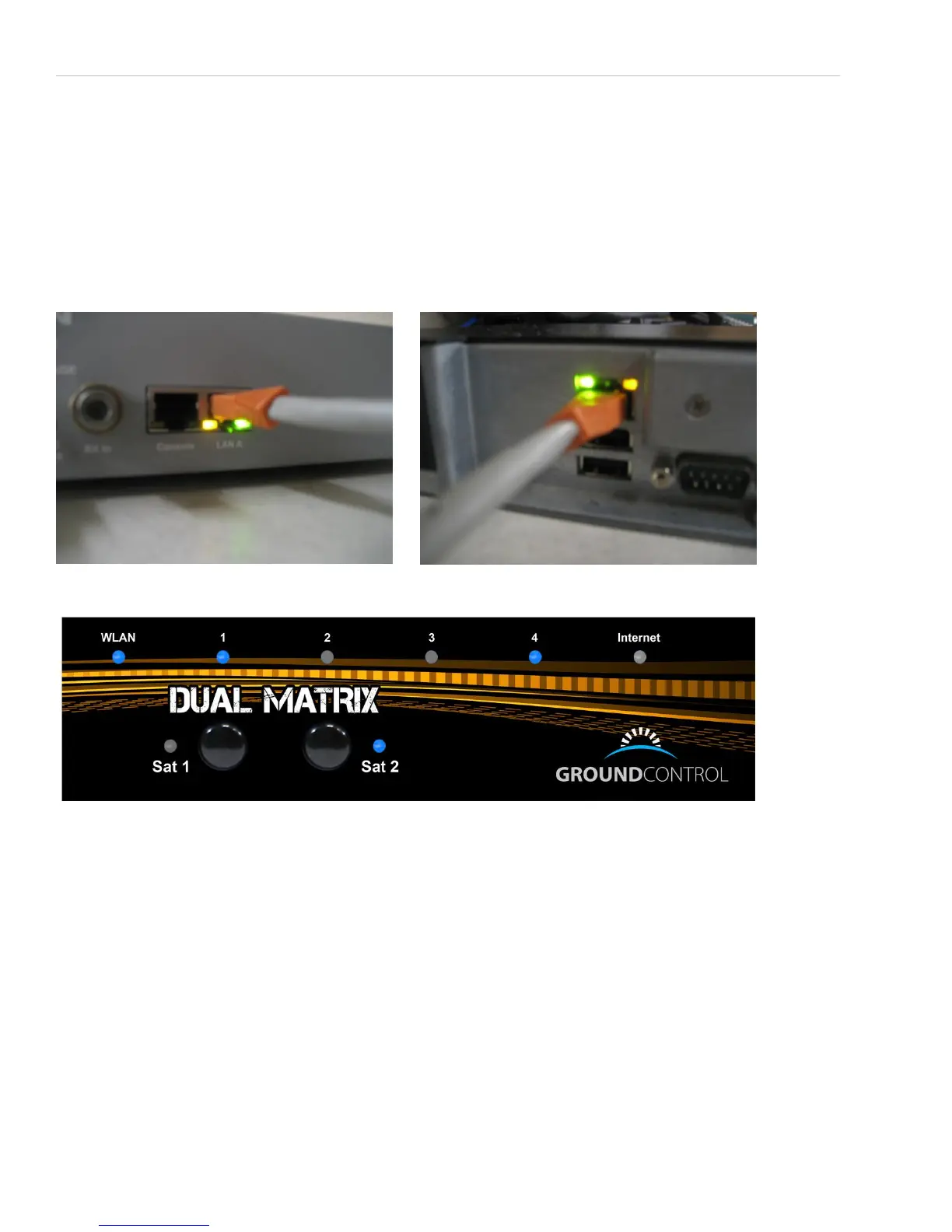
afterward, you should see the link lights on your modem come up to indicate that they are communicating with the
controller:
You should also see a link lights on the TS2 controller:
When all of these are active, your equipment is up and ready to search. Connect to the dish control page at 192.168.1.2,
then check the input data.
First check to make sure the basic parameters are ok:
Under “Input Data” you should have a green “GPS Signal OK”
Under “Modem/Mount Info” there will be SK and EL tilt readings, as well as an RX readout.
If the GPS is “not acquired”, it most likely just needs more time. It’s common for the GPS to take several minutes to
acquire. If it still hasn’t acquired after 10 minutes or more, you may need to call technical support.
If Under Modem/Mount Info it says “No Modem Found”, it means the dish failed to establish communications with the
modem. Power cycle the entire system once. If this does not clear the problem, check IP settings.


 To Next Page