Toughsat Users Manual Ground Control
- 22 -
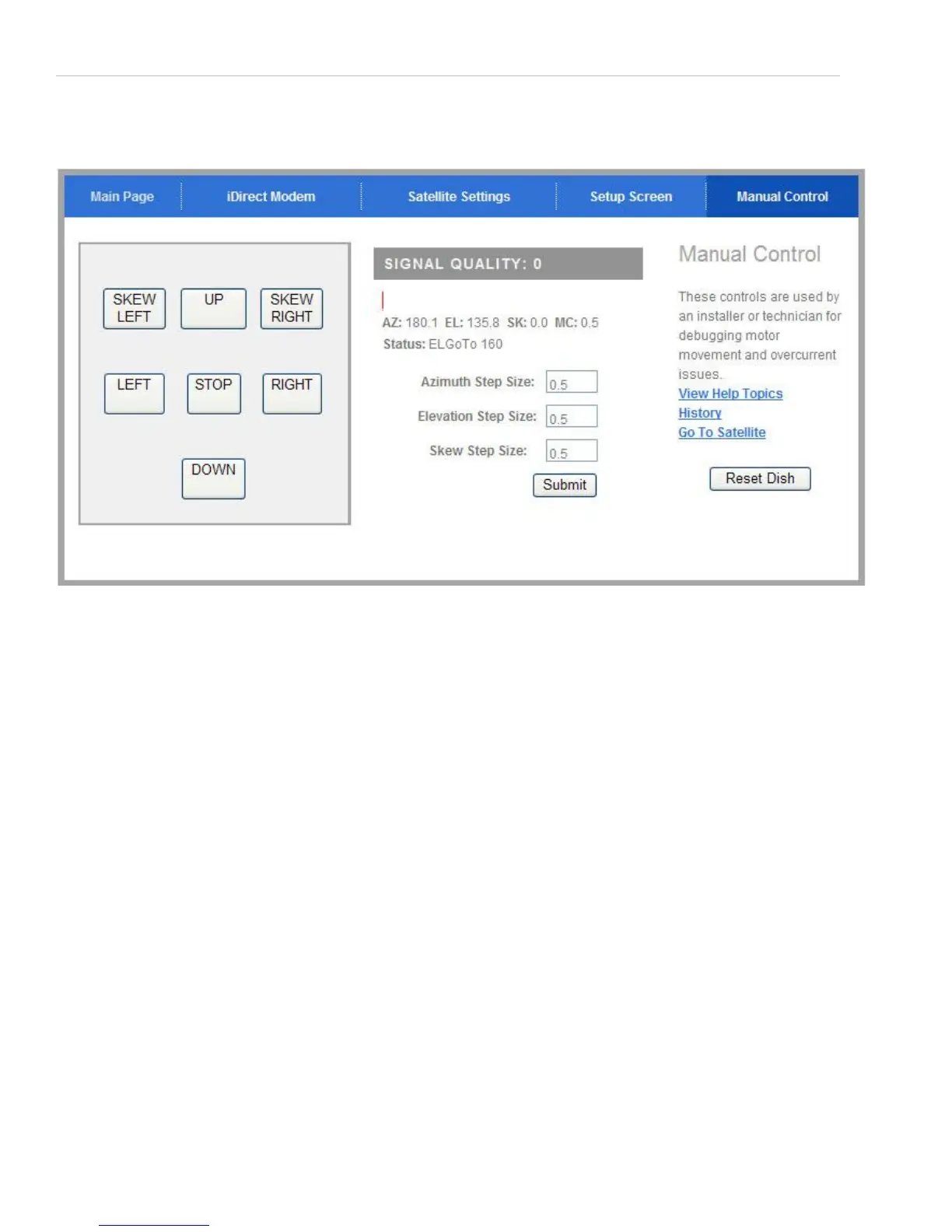
Locate the “Manual Control” button in the upper right corner and click it. You should see Toughsat Main menu. Click on
the Manual tab on the top right of the menu.
The buttons that you see control all three axes of motion for the antenna. The left and right buttons adjust the azimuth
(side to side movement), the up and down buttons control the elevation (up and down movement) and the diagonal arrows
adjust the skew / polarity of the antenna clockwise or counter-clockwise. You should also note the “Step size” boxes:
these control the amount of adjustment that each click of the arrows makes. The default is 0.5 degrees, which is a very
small motion. For large motions of the dish, you should set the step size for the motors you’re going to adjust - a good
size is 15 degrees. Once you have input the new step size(s), click on the “apply” button to save your choices. Then, you
may begin adjusting the antenna using the manual control buttons.


 To Next Page