21
CDM 700 page 21
GB
TRACK
TRACK
TRACK
TRACK
CLASS 1
LASER PRODUCT
TRACK
O
I
O
I
O
I
O
I
O
I
O
I
O
I
O
I
O
I
O
I
O
I
O
I
O
I
O
I
O
I
O
I
O
I
O
I
O
I
O
I
O
I
O
O
O
I
O
I
O
I
O
I
O
I
O
I
O
O
I
O
I
O
I
O
I
O
I
O
O
I
O
O
I
O
I
O
I
6
.
O
Y
E
M
I
C
A
N
T
O
(
H
e
a
r
M
y
V
o
ic
e
)
7
.
D
O
N
'
T
W
A
N
N
A
L
O
S
E
Y
O
U
8
.
G
E
T
O
N
Y
O
U
R
F
E
E
T
9
.
Y
O
U
R
L
O
V
E
I
S
B
E
D
F
O
R
M
E
1
0
.
C
U
T
S
B
O
T
H
W
A
Y
S
1
1
.
O
Y
E
M
I
C
A
N
T
O
(
S
p
a
n
is
h
V
e
r
s
i
o
n
)
1
2
.
S
I
V
O
Y
A
P
E
R
D
E
R
T
E
E
P
C
4
6
5
1
4
5
2
B
IE
M/
STEM
R
A
S
T
E
R
E
O
A
l
l
r
i
g
h
t
s
o
f
t
h
e
p
r
o
d
u
c
e
r
a
n
d
o
f
t
h
e
o
w
n
e
r
o
f
t
h
e
r
e
c
o
r
d
e
d
w
o
r
k
r
e
s
e
r
v
e
d
.
U
n
a
u
th
o
r
i
s
e
d
c
o
p
y
i
n
g
,
p
u
b
l
i
c
p
e
r
f
o
r
m
a
n
c
e
,
b
r
o
a
d
c
a
s
t
i
n
g
,
h
ir
i
n
g
o
r
r
e
n
t
a
l
o
f
t
h
i
s
r
e
c
o
r
d
i
n
g
p
r
o
h
ib
i
t
e
d
.
M
a
d
e
in
A
u
s
t
r
ia
1
.
A
Y
,
A
Y
,
I
2
.
H
E
R
E
W
E
A
R
E
3
.
S
A
Y
4
.
T
H
IN
K
A
B
O
U
T
Y
O
U
N
O
W
5
.
N
O
T
H
I
N
'
N
E
W
C
O
M
P
A
C
T
D
I
G
I
T
A
L
A
U
D
I
O
1
2
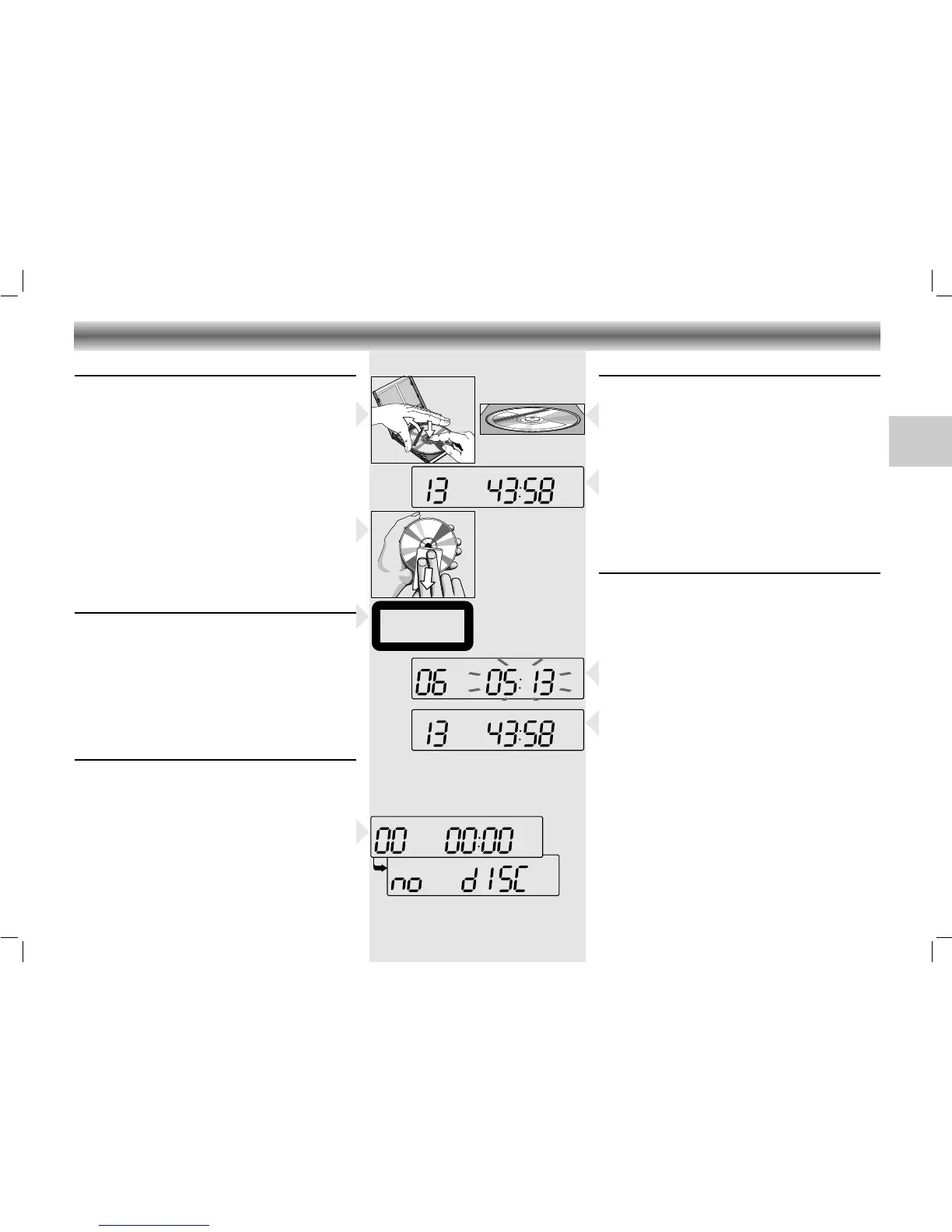
CD handling
• Use only CDs which have the symbol
ʀ
.
• To take the CD out of its box easily, press the centre
spindle while lifting the CD.
• Never write on a CD or attach any sticker to the
CD.
• Always hold the CD at the edge and always store it
in its box after use with the label facing up.
• To remove dust and dirt, breathe on the CD and
wipe it with a soft, lint-free cloth in a straight line
from the center towards the edge. Cleaning agents
may damage the CD.
• Do not expose the CD to rain, moisture, sand, or to
excessive heat. (E.g. from heating equipment or in
motor cars parked in the sun).
Warning
CLASS 1 LASER PRODUCT means that the laser´s cons-
truction makes it inherently safe so that the legally
prescribed maximum permissible ratiation values can
never be exceeded.
CAUTION: Using any equipment or devices other than
those described and specified in these operating
instructions, or tampering with the unit in any way, can
result in dangerous exposure to radiation.
Selecting ‘CD’
• Press the ON/OFF button to switch the unit on.
•
Press the CD button on the unit or on the remote control.
– The CD 6 indicator lights up.
– When you select CD when no disc is inserted or
when the disc is not inserted correctly, the display
will first show ‘TRACK 00 00:00‘ and afterwards
the indication no d1SC.
CD PLAYER
Inserting a CD
• Press OPEN to open the CD door.
• Insert the CD, printed side facing up. In addition to
standard 12 cm CD´s, you can also play 8 cm CD
singles without an adaptor.
• Close the cover.
– The CD player scans the contents list of the CD.
After that, the total number of tracks and the total
playing time appear on the display.
Playing a CD
• Press PLAY/PAUSE 2; to start playback.
– The display shows the current track number and its
elapsed playing time.
•
Adjust the sound with the VOLUME and UBS controls.
• For brief interruptions, press PLAY/PAUSE 2;.
– The playing time indication starts flashing.
• To resume playback, press PLAY/PAUSE 2; again.
• To stop playback, press STOP 9.
– The total playing time and number of tracks will then
appear on the display.
– The CD player also goes to position STOP:
– by pressing OPEN;
– when the end of the CD is reached;
– if the batteries run down or if the power supply is
interrupted.
• To take out the CD, open the CD door by pressing
OPEN.
• Open the CD door only if the CD player is in
position STOP.






 To Next Page