EasyManua.ls Logo

Gsmart Maya M1 v2 - Home Screen Status Indicators Explained; Volume, Battery, and Network Status Icons

Gsmart Maya M1 v2
56 pages
Print Icon
To Next Page IconTo Next Page
To Previous Page IconTo Previous Page
Loading...
_________________________________________________________
Maya M1 v2
1-11
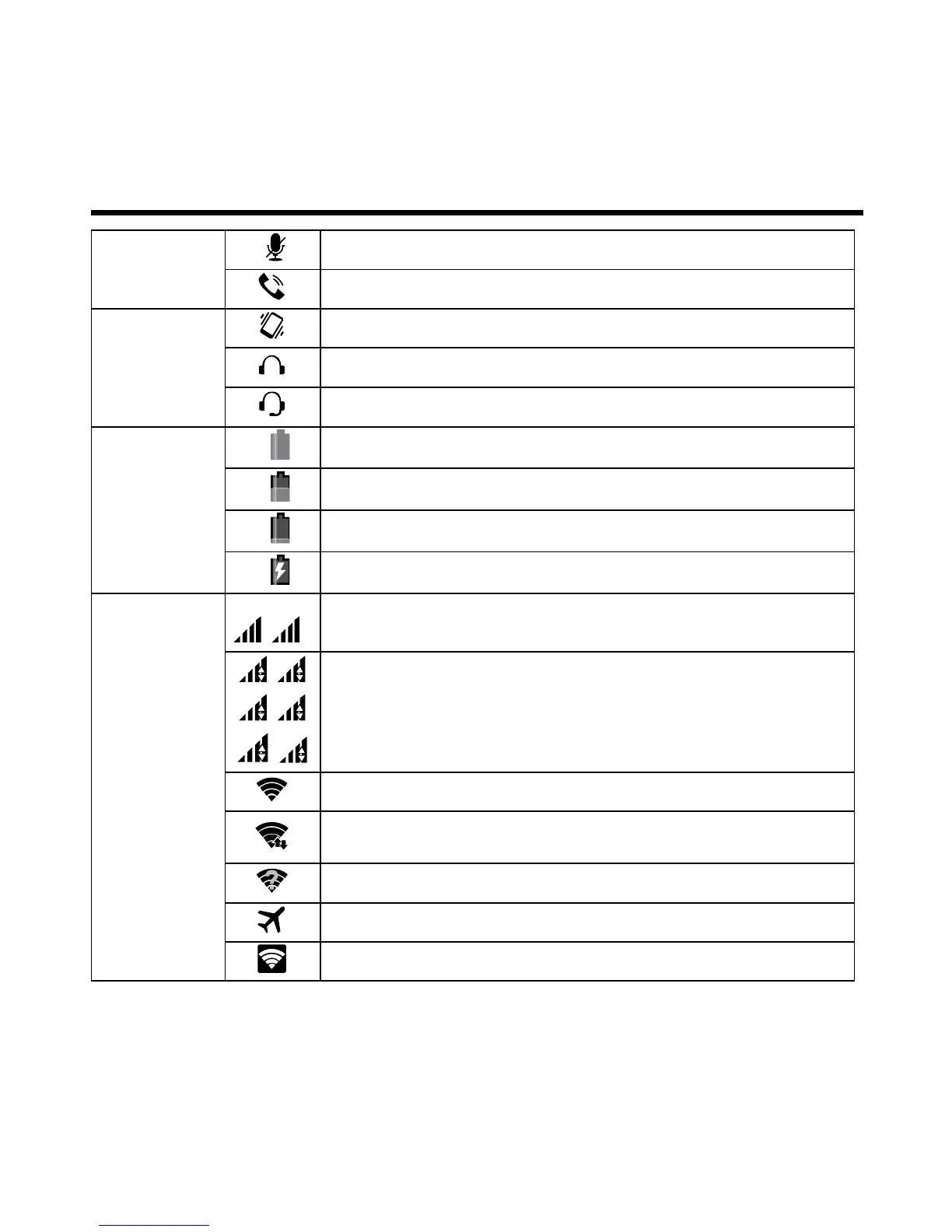
Mute the call.
Speaker is on.
Volume
Vibration is on.
Wired headset connected.
Wired microphone headset connected.
Battery
Battery is full.
Battery is low.
Battery is very low.
Battery is charging.
Network
and
Connection
1
2
Maximum signal strength. Fewer bars indicate lower signal strength.
Left icon is SIM1 signal (WCDMA+GSM).
Right icon is SIM2 signal (GSM).
1
G
1
E
1
3G
1
H
2
G
2
E
GPRS\ EDGE\ 3G\ HSPA+ is in progress.
SIM1 supports GPRS\ EDGE\ 3G\ HSPA+ networks.
SIM2 supports GPRS\ EDGE networks.
Wi-Fi is connected.
Wi-Fi is in progress.
Wi-Fi Network is activated.
Airplane mode.
Portable Wi-Fi hotspot is activated.

Related product manuals