25
ZY120 6-20kVA (11) User Manual EN rev.04.doc
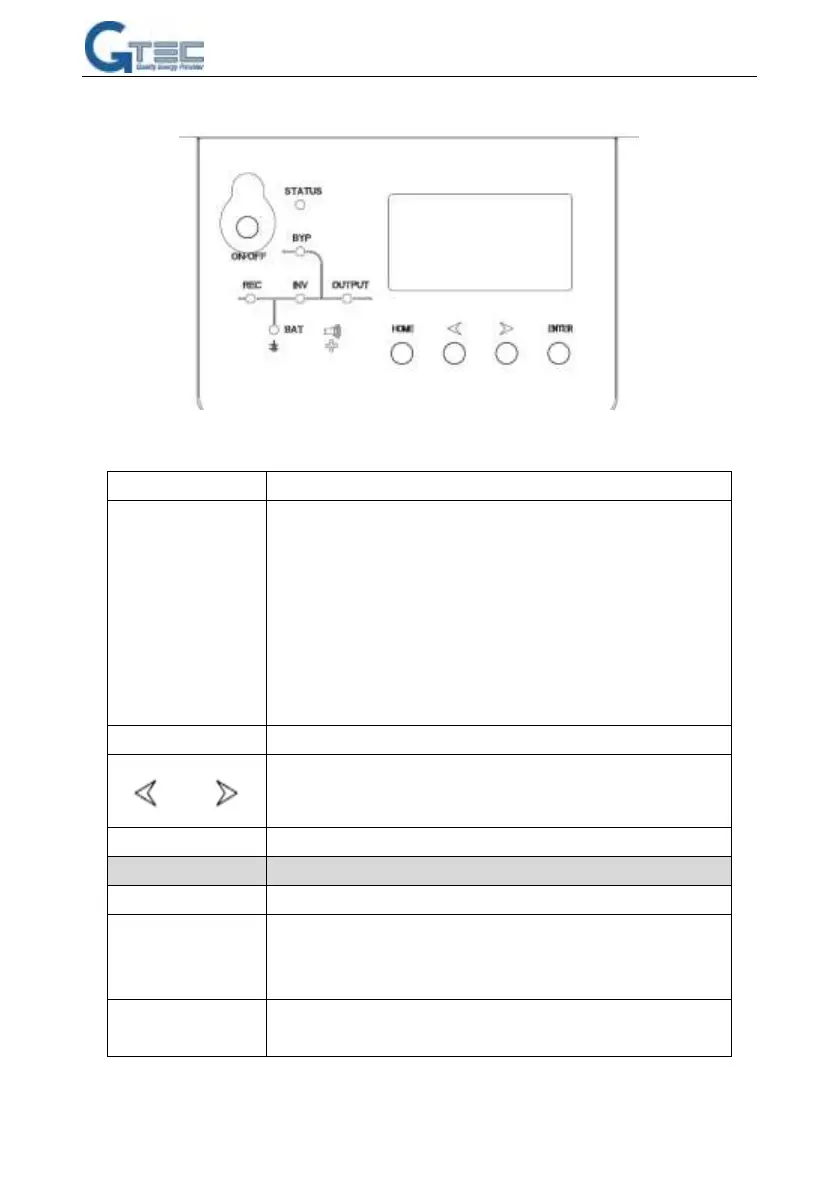
6. CONTROLS and INDICATORS
Fig.8 Display Panel
Description of Panel
1.Press on/off to start inverter when rectifier is OK
NOTE
Not available when UPS is set in automatically start mode
2. Press on/off directly when there is no main input, press again to
start UPS
3. Press on/off to shutdown inverter when UPS is in normal mode.
4.Press on/off to shutdown UPS completely when UPS is in battery
mode
UPS status: green--normal mode, red--UPS is abnormal
Rectifier indicator: green--rectifier is normal, green flicker--rectifier
is starting, red--rectifier fault, red flicker--rectifier alarm,
dark—rectifier is not working
Inverter indicator: green--inverter is normal, green flicker--inverter
is starting or tracking with bypass(ECO), red—inverter fault and



 To Next Page