22
1
ON
2 3 4 5 6 7
ON
OFF
1 2 3 4 5 6 7
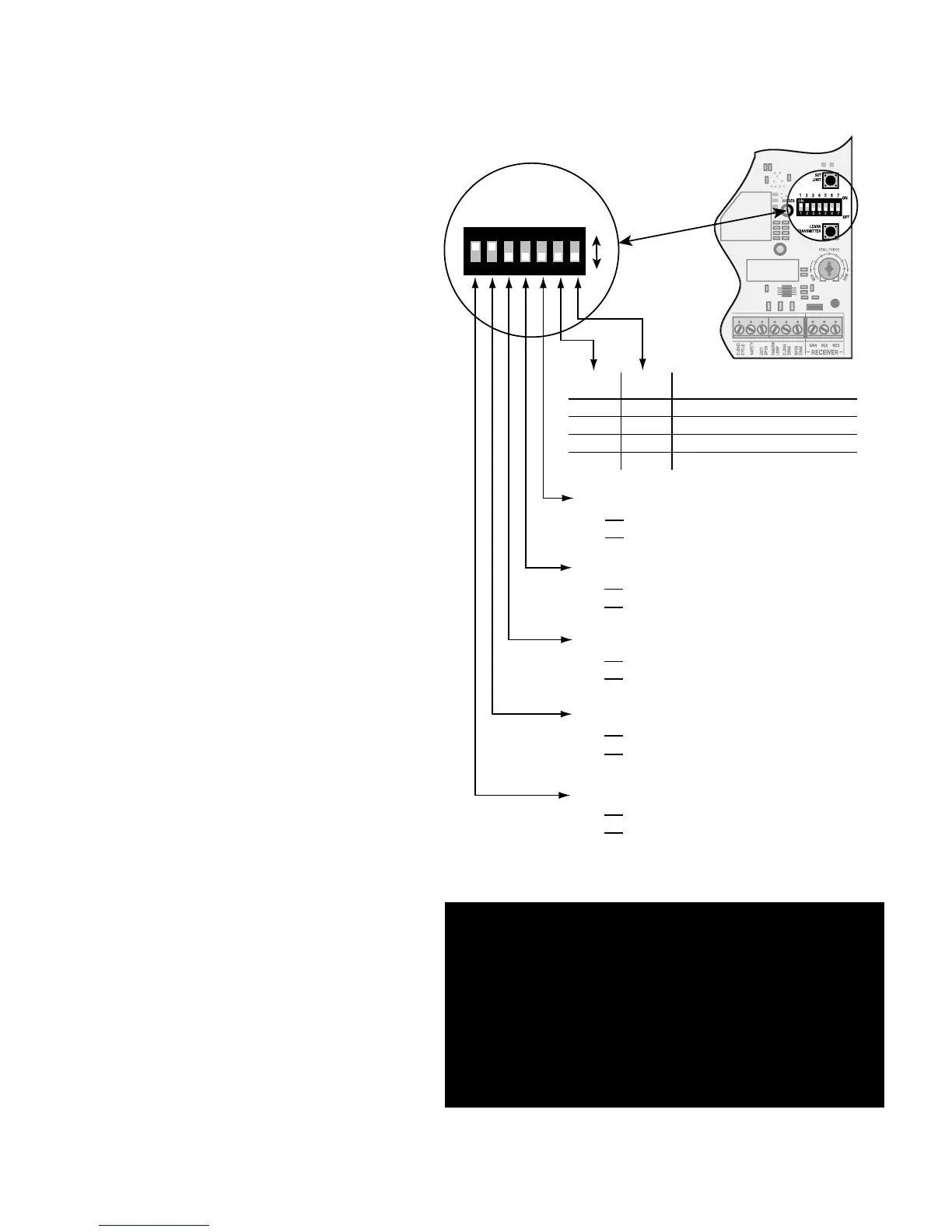
DIP#6 DIP#7 Delay Time for Auto-Close
ON ON 15 seconds
ON OFF 30 seconds
OFF ON 60 seconds
OFF* OFF* 120 seconds (factory preset)
DIP#5
ON
D1 mode, constant pressure to operate gate.
OFF*
B2 mode, momentary contact to operate gate.
DIP#4
ON Push-to-open operation.
OFF* Pull-to-open operation.
DIP#3
ON Auto-close enabled.
OFF* Auto-close disabled.
DIP#2
ON* Buzzer warning enabled.
OFF Buzzer warning disabled
DIP#1
ON* Soft start enabled.
OFF Soft start disabled.
* Factory preset
DIP Switches
Main DIP Switch Settings (MODES)
DIP Switch #1 - Soft Start/Stop
The Soft Start/Stop feature slowly starts the
gate as it begins to open and slows the gate as
it comes to the closed position. This saves wear
and tear on the gate and gate operator system.
DIP Switch #2 - Warning Buzzer
The Warning Buzzer alerts you when the gate
operator is beginning to either open or close the
gate. It sounds for the first 2 seconds in each
direction. It also sounds a warning when the gate
obstructs two times in one cycle. Switching this
to OFF only disables the open and close warning
not the obstruction warning.
DIP Switch #3 - Auto-Close
With the Auto-Close switch in the OFF position
the gate will remain open until it receives
another signal from an activation device such
as a transmitter, keypad, or push button control.
With the Auto-Close switch in the ON position
the gate operator will automatically close the
gate. The time the gate will remain open is
determined using DIP Switches #6 and #7.
DIP Switch #4 - Push/Pull-to-Open
If your gate opens into the property the DIP
Switch is set to OFF (factory). If your gate
opens out from the property the DIP Switch
must be set to the ON position. NOTE: if you
have a Push-to-Open gate application you will
need a Push-to-Open bracket (see Push-to-Open
Instructions on page 30).
DIP Switch #5 - B2/D1 Mode
This DIP Switch must remain in the OFF
position unless the gate operator is going to be
used by a guard or gate attendant, who can only
open the gate when constant pressure is applied
to a push button control device.
DIP Switches #6 and #7
The combination of these two switches
determines the amount of time the gate will
remain open when DIP Switch #3 is set in the
ON position.
Control Board Settings
IMPORTANT CONTROL BOARD SETTINGS:
CONTROL BOARD DIP SWITCH #1 is factory
preset in the ON position and MUST remain in the
ON position. Changing this setting can damage
your gate, gate opener and
possibly void your warranty!



 To Next Page