36
Column Installation Information
IF THIS OPERATOR WILL BE USED WITH GATES THAT ARE MOUNTED ON
MASONRY, BRICK, OR ROCK (etc.) COLUMNS:
READ THE FOLLOWING CAREFULLY BEFORE PROCEEDING
A. The simplest solution is to install the operator in a push-to-open configuration (requires Push-To-Open Bracket,
see Accessory Catalog). The minimum clearance is easier to achieve and clearance is no longer a problem,
since the operator will be pushing the gate away from the column instead of pulling it toward the column. It
is recommended that you place a steel plate between the operator mounting brackets and masonry surface for
additional strength.
B. If a push-to-open installation is impossible due to traffic hazards, terrain, etc., another option is to re-hang the
gate. You may hang it on a post, either in the center of the column or at the back corner, or move the gate to the
back corner of the columns.
C. The most difficult solution is to cut a notch in the column to accommodate the operator and power cable. This
job is NOT for the inexperienced!
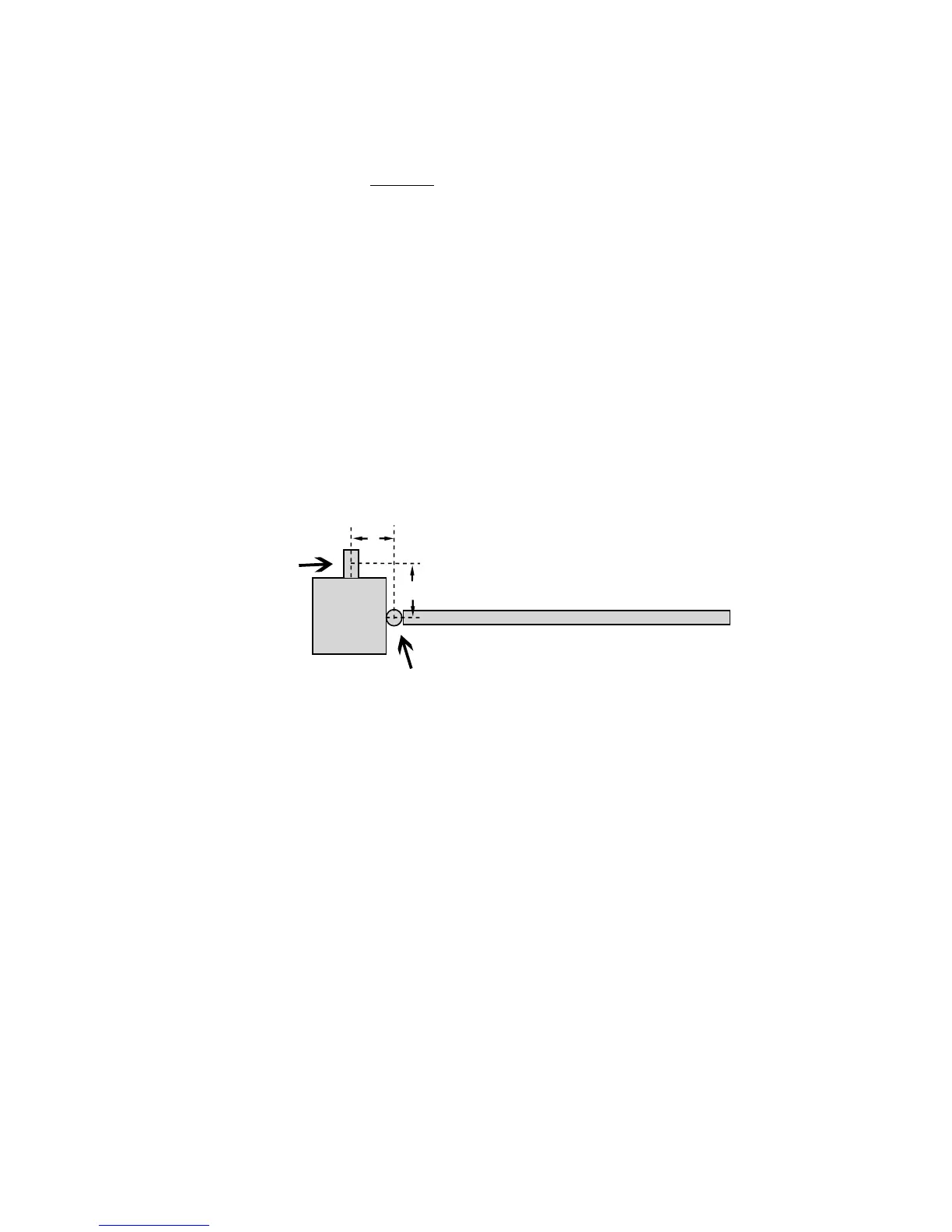
Column
Po
st Bracket
pivot point
Gate
A
B
Column Mount Example
(A + B can not exceed 14 inches)
Example: If A is 2" then B can not exceed 12"
Hinge



 To Next Page