15
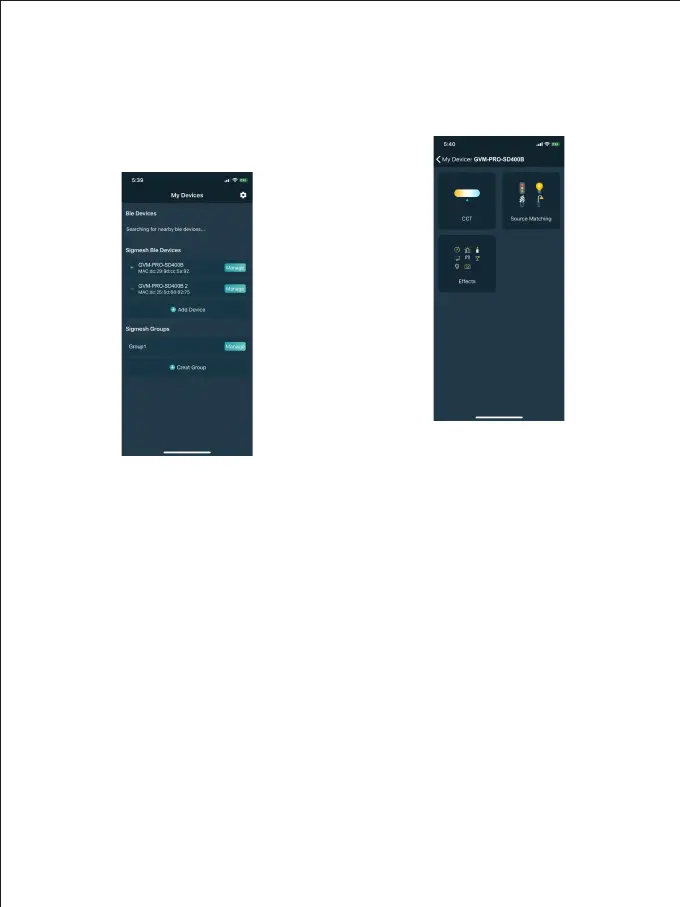
Equipment management
① After successfully adding your
lighting device, your device will be
displayed in the "My Devices" list;
(Figure 3)
② Click the device bar to enter the
device control. (Figure 4)
Figure 3
Figure 4
USE AND SAVE
Do not place the product in high humidity, strong electromagnetic field, high
temperature environment, or under direct sunlight. If the product is not to be used for
a long time, disconnect the power supply.
Clean:Please unplug the power before cleaning. And use a damp cloth instead of any
detergent or soluble liquid, so as not to damage the surface layer.
Power:Ensure that the power supply is within the scope of use, a too high or too low
voltage power may affect its performance.
Repairing:If there is fault or performance degradation, do not unpack the shell by
yourself, so as not to damage the machine and invalidate the warranty.When there is a
malfunction, do not hesitate to contact us,and we will do our best to solve the
problem.
Accessories: In order to maximize the performance, please use the accessories
provided by manufacturer and approved ones.
Warranty:Do not modify the product, otherwise the warranty will be invalidated.



 To Next Page