TX100 USB 32 6T7639a
5.6.2 Creating a multiple link
The system allows you to link an input to several outputs (for example a pushbutton which controls several lamps).
A multiple link can be created on 2 ways.
- Repeat several times the creation of a simple link described previously, selecting every time a new output to be linked with
the same input.
or
• Select an input.
• Select an output.
• Prepare the link by briefly pressing the key.
• The symbol is displayed.
• Select another output.
• Press briefly the key to display the link to be created: The symbol is displayed.
No long pressure on key shall be done before all links have been prepared.
Continue selecting another output.
Repeat the procedure for each new output to be linked.
After having selected an input and an output.
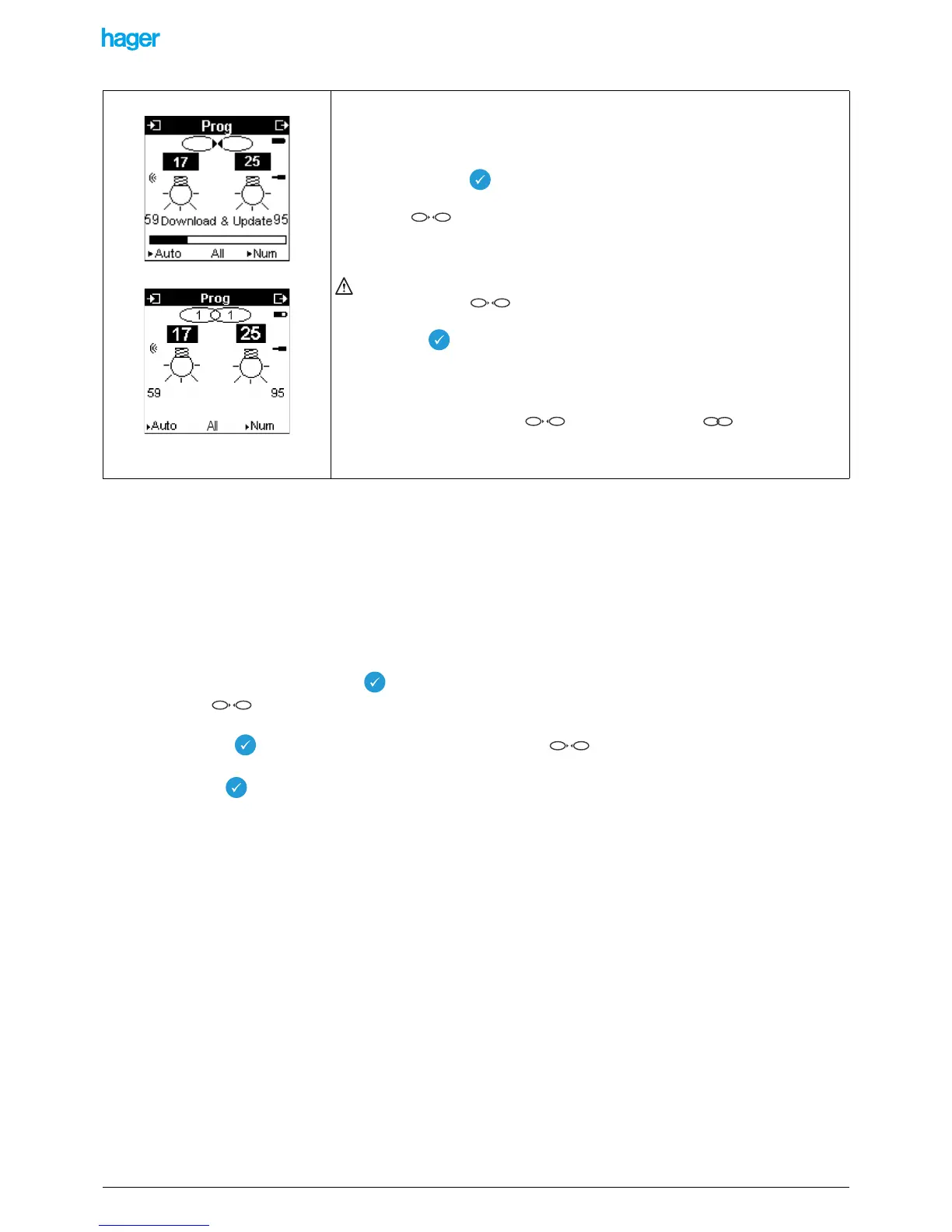
To create a simple link between this input and this output (for example between input 17
- pushbutton function and output 25 - lighting ON/OFF function).
• Press briefly key
The symbol appears to indicate that a link is to be created.
! Pressing briefly a second time erases the link being created.
If the function of the input is not compatible with the output, the TX100 emits a sound
signal and the symbol does not appear.
• Press the key for a long time to confirm the link.
A download bar indicates that the link is being downloaded into the products. In case of
a radio range problem, the download bar blinks.
At the end of the download, the symbol is changed in : the figures
indicate that a link was created between 1 input and 1 output.
11


 To Next Page