TX100 USB 9 6T7639a
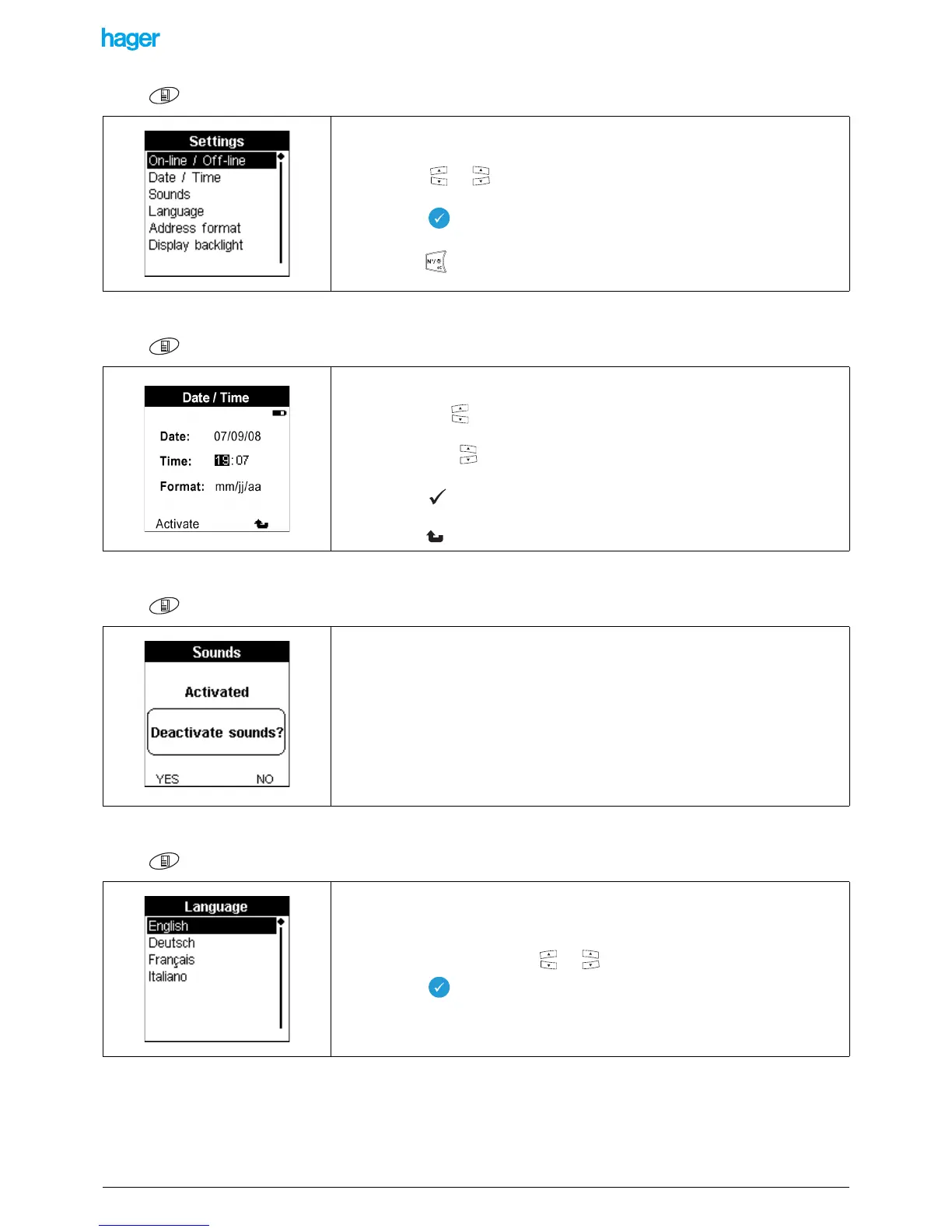
Screen / Menu / Settings
2.3.2 Time and day setting
Screen / Menu / Date and Time
2.3.3 Activation of the sounds
Screen / Menu / Settings / Sounds
2.3.4 Language selection
Screen / Menu / Settings / Language
This screen allows selecting a specific setting.
• Press the or key to select the setting to be carried out.
• Press the key to confirm your selection.
! The key allows you to return to the previous screen.
This function allows you to set the date and the time.
• Press the left keys to move from one field to the next.
• Press the right keys to increase or decrease the value of the selected field.
• Press the key to confirm your selection.
! The key allows you to return to the previous screen.
Activating the sounds allows you to obtain a confirmation beep sound for certain actions.
• Press the YES or NO screen key to activate or deactivate the sounds.
The language used is selected during the initial start up.
It is however possible to change it at a later stage.
• Select the language with the or keys.
• Press the key to confirm your selection.
! If the desired language is not displayed, carry out an update using the USB
stick supplied with the product.


 To Next Page