TX100 USB 46 6T7639a
The TX100 has several installation maintenance and configuration help tools for:
- The management of the products of an installation.
- The management of the installations.
- Carrying out measurements.
- Making simulations.
- Updating the software of the TX100.
- Learning an installation.
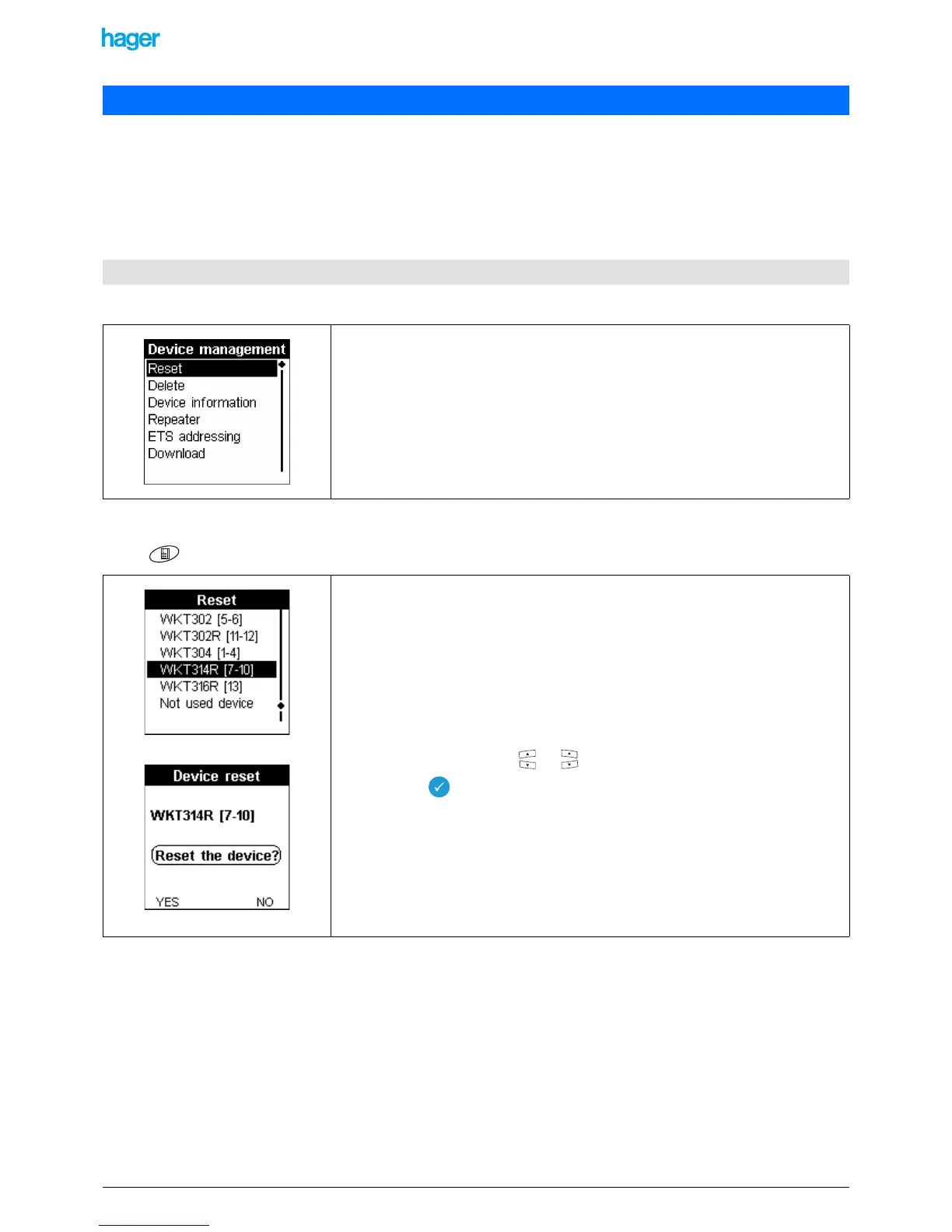
Screen Menu / Device management:
9.1.1 Resetting a product to its factory condition
Screen Menu / Device management / Reset
9. Maintenance and adjustment help tools
9.1 Management of the products of an installation
This screen gives acces to the following items:
- Reset: allows resetting a product, which may belong or not to the installation, into
its factory condition.
- Delete: allows removing a product from the installation and resetting it to its fac-
tory condition.
- Device information: gives information about a product and gives access to addi-
tional parameters.
- Repeater: allows activating or inhibiting the repeater function of a bidirectional RF
product.
- ETS addressing: allows setting a product in the physical addressing mode.
- Download): allows starting a download for a given product.
The Device reset screen displays:
- The list of the products of the installation.
- The "not used device" allows resetting products which do not belong to the instal-
lation.
- To reset a product belonging to the installation:
• Select a product with the or key.
• Press the key to confirm your selection.
A confirmation screen is displayed.
• Press the YES screen key to confirm the device reset.
• Press the NO screen key to return to the previous screen.


 To Next Page