TX100 USB 47 6T7639a
9.1.2 Product information
Screen / Menu / Device management / Device information:
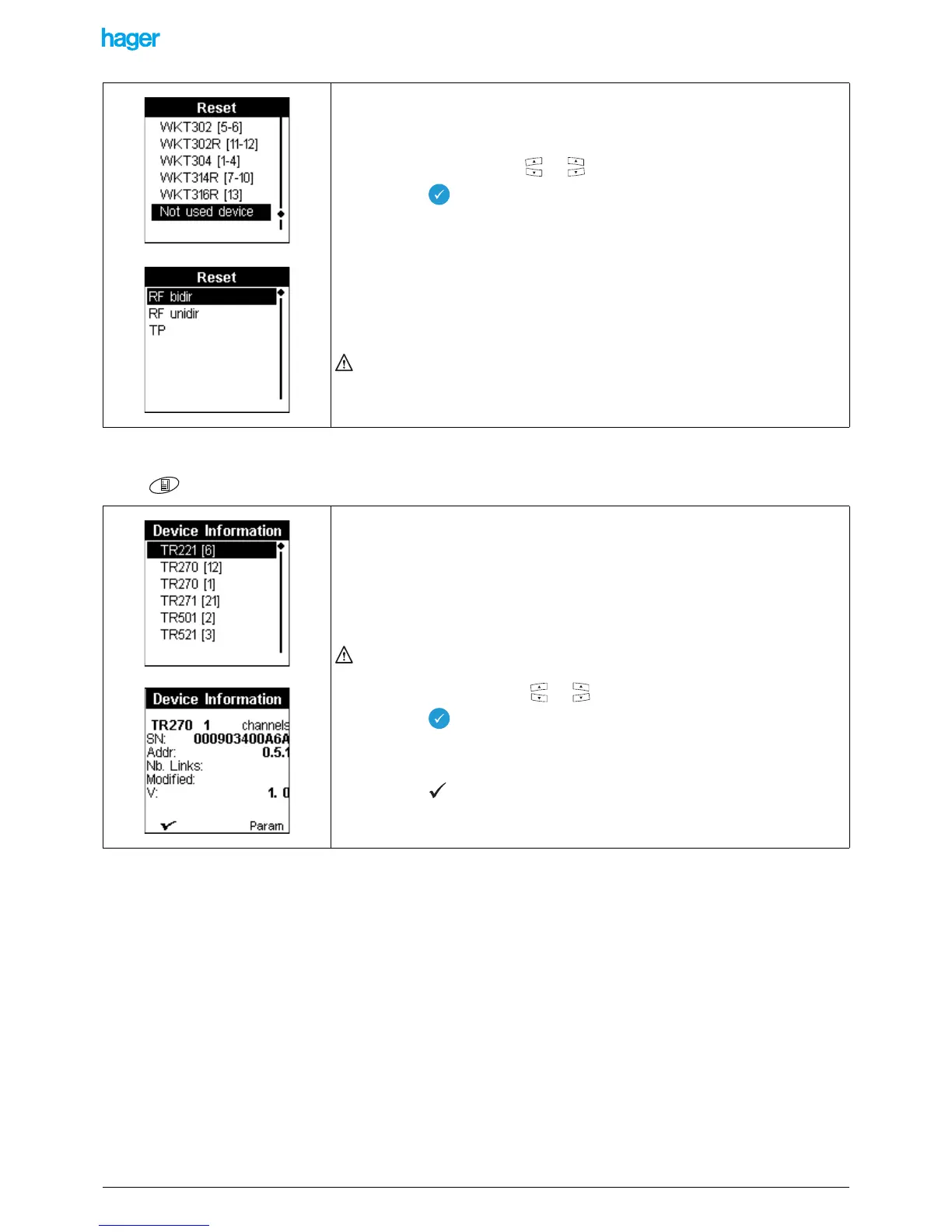
To reset a product which does not belong to the installation:
• Select Not install. with the or key.
• Press the key to confirm your selection.
A Reset screen with the list of the product types is displayed:
• Select the type of the product: RF or TP
Depending on the product, a specific status must be activated (refer to the start-up
manual of the products or to Annex 1):
- TP device: press on the physical addressing button and confirm.
- RF bidir product: switch the power supply off and on again.
- RF unidir product: go close to the product and activate an input, the tool detects
the product, activate the input again to reset the product.
This procedure does not allow resetting several products at a time.
This screen displays the list of the products of the installation, the figures between
brackets correspond to the numbers of the inputs or outputs.
! - Only the products detected during the Learning step are displayed.
- The number does no appear for non numbered inputs. If no input was
numbered, only the product reference is displayed.
- When a product includes both inputs and outputs, the numbers of the
inputs are displayed on the left inside of the parentheses, separated by a
comma from the numbers of the outputs, which are displayed on the right.
An symbol ! in front of a reference indicates a product configuration fault.
• Select a reference with the or keys.
Press the key to confirm your selection.
A product information screen showing the reference of the product is displayed:
• Press the screen key to return to the previous screen
• Press the Param screen key to display the product parameters setting screen.


 To Next Page