TX100 USB 48 6T7639a
9.1.3 Creation of a RF repeater
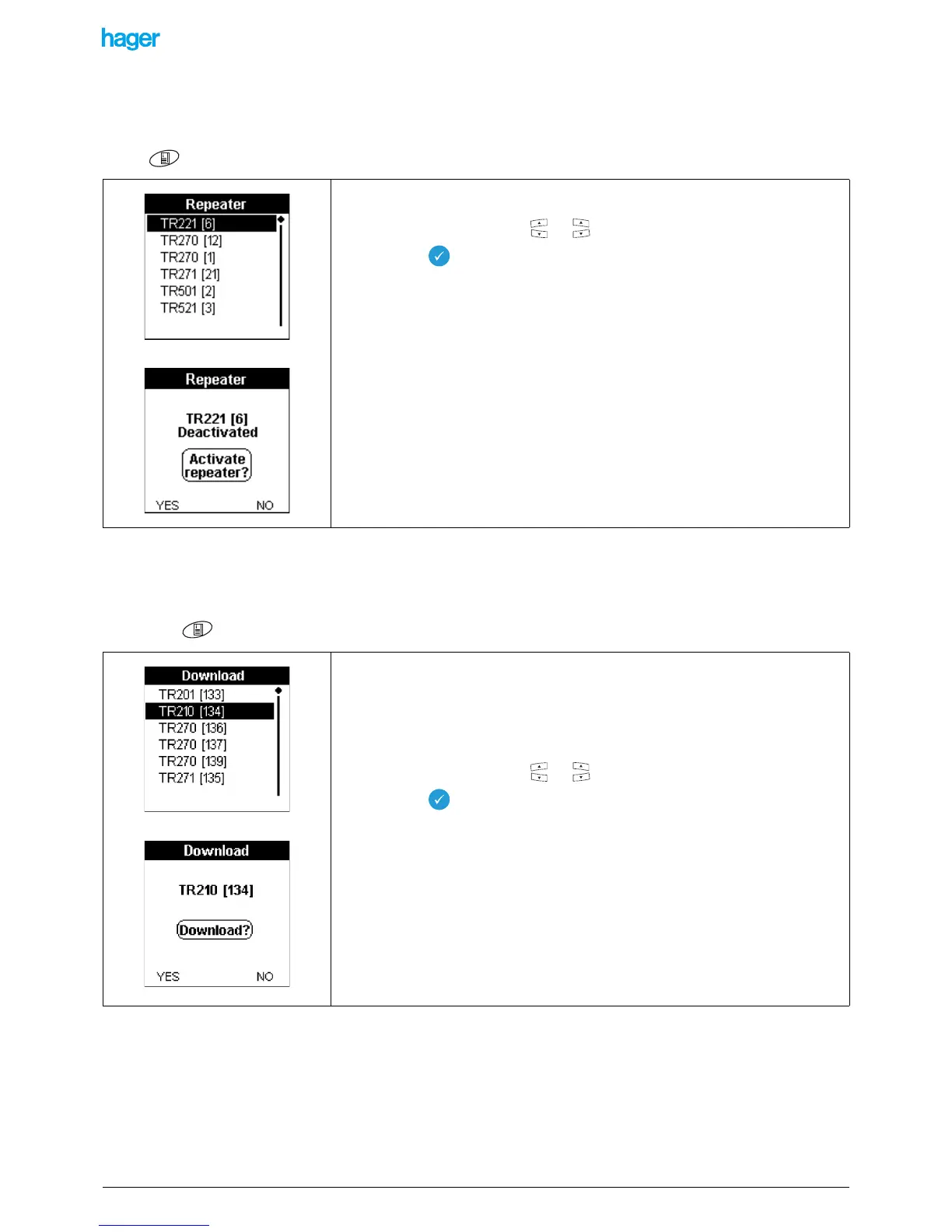
This function allows activating or inhibiting the repeater function of a bidirectional RF product.
Screen / Menu / Device management / Repeater
9.1.4 Downloading products
This function allows downloading a product and removing the download errors reported in the Prog screens or in the screens
displaying products lists.
• Screen / Menu / Device management / Download).
The list of the bidirectional RF products of the installation is displayed.
• Select a reference with the or keys.
• Press the key to confirm your selection.
• Press the YES or NO screen key to activate or deactivate the repeater function.
This screen displays the list of the products of the installation.
! Only the products detected during the Learning step are displayed.
The ! symbol in front of a reference indicates a product configuration fault.
• Select a reference with the or keys.
• Press the key to confirm your selection.
A Download screen showing the reference of the product is displayed and asks for a
confirmation for the download.
• Press the YES screen key to start the download.
• Press the NO screen key to return to the previous screen.
Note: if the product is equipped with indicator leds, they switch on.


 To Next Page