TX100 USB 7 6T7639a
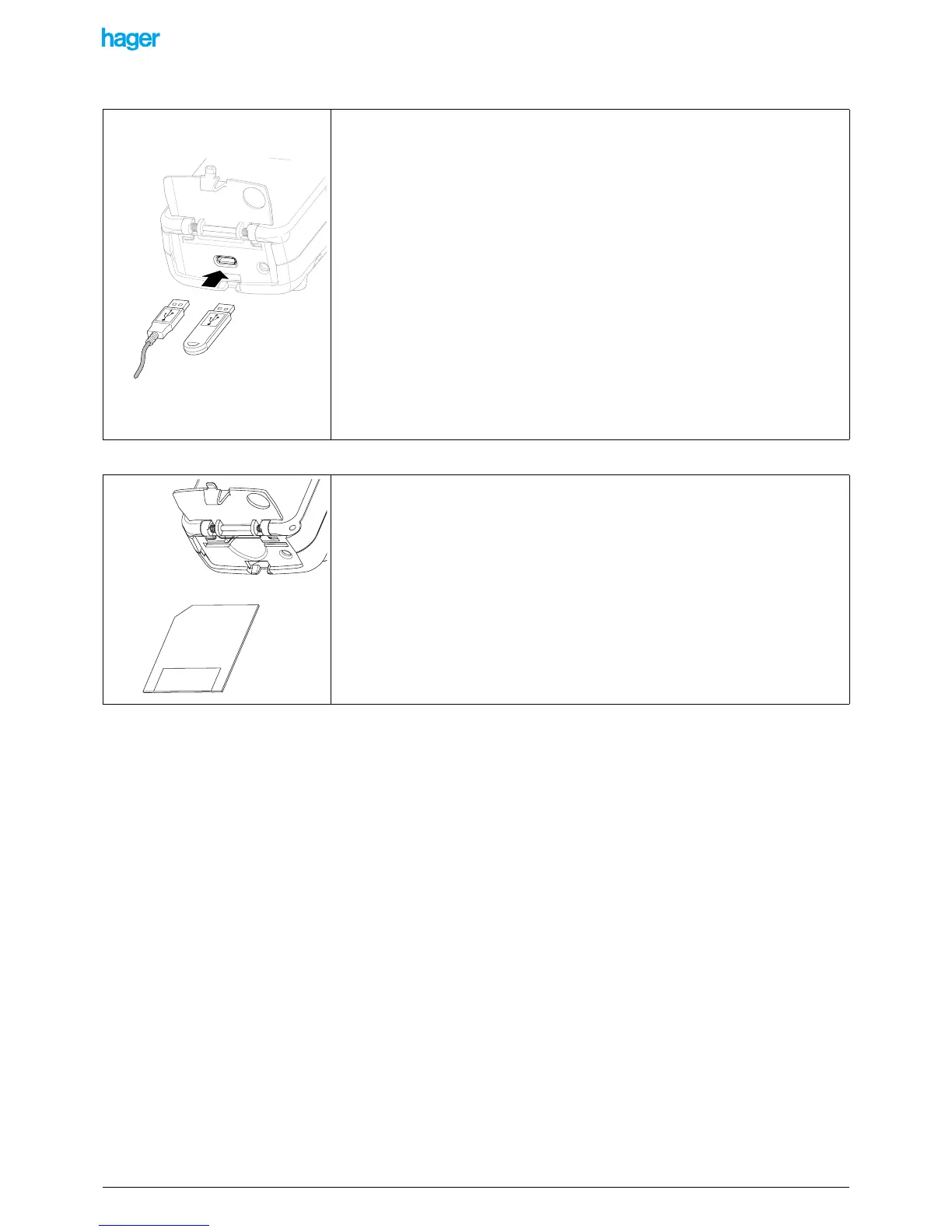
2.1.3 USB connector (only on TX100 USB)
2.1.4 Smartcard reader (only on TX100 SM)
Observe the direction of insertion of the USB connector: the USB symbol must always
be directed upwards
• Open flap A.
• A USB connector allows connecting the TX100 with:
- A USB stick (a stick is supplied with the TX100) using the 15 cm long cord
supplied.
- A PC throug a USB port, using the 1 m long cord supplied
!The sticks with write protection cannot be used
The TX100 can process the two following file types:
- project files with the .TXH extension: to load a project in the TX100.
- software update files with the .UPD extension: to download a new version
of the software in order to take advantage of the latest improvements made
for the configurator.
• Open flap A.
• Insert a smartcard into the configurator in accordance with the figure shown
opposite.
The TX100 can process the two following file types:
- project files with the .TXH extension: to load a project in the TX100.
- software update files with the .UPD extension: to download a new version of the
software in order to take advantage of the latest improvements made for the configu-
rator.


 To Next Page