TX100 USB 41 6T7639a
8.2.2 Inputs, outputs and object selection
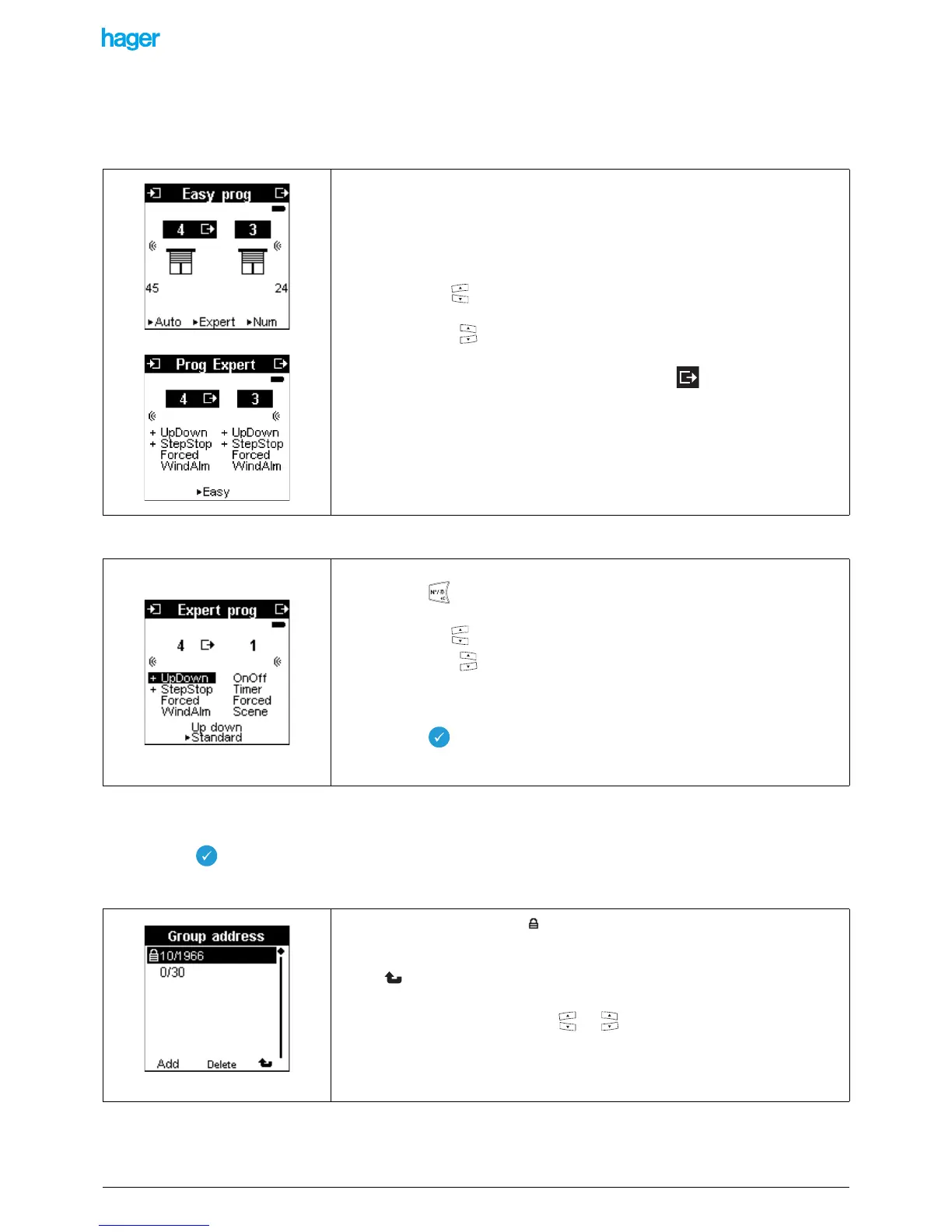
• Inputs and outputs selection
This selection may be done either in Prog Expert or in Prog Easy.
• Selection of the object to be displayed or modified
8.2.3 Display and edition of the group addresses of the communication objects
• Select a communication object (input or output).
• Press the key to display the list of the group addresses associated with this object.
The Group Address screen is displayed:
• Press the left keys to select an input.
• Press the right keys to select an output.
The list on the input side is of the +Info type: it displays both the inputs and the status
indications of the outputs (the outputs are marked with the symbol following the
output number).
• Select the Prog Expert mode.
• Press the key to switch between the objects list and the inputs/outputs
numbers.
• Press the left keys to select an input object.
• Press the right keys to select an output object.
! Only one object will be selected on this screen: the one on which the scrolling has
stopped.
• Press the key to display the list of the group addresses associated with this
object.
! An address preceded by the symbol is a locked address, which cannot be
modified. It has been assigned by the TX100.
! The screen key allows you to return to the previous screen.
• Select a group address with the or keys.
• Press the Del screen key to delete a group address (not displayed if the address is
locked).
• A screen asks for confirmation before deleting.
• Press the Add screen key to add an address to the list.


 To Next Page