TX100 USB 52 6T7639a
9.3.2 Updating the software from a PC
Screen / Menu / Update / Update with computer
The update procedure is started when the YES screen key is pressed.
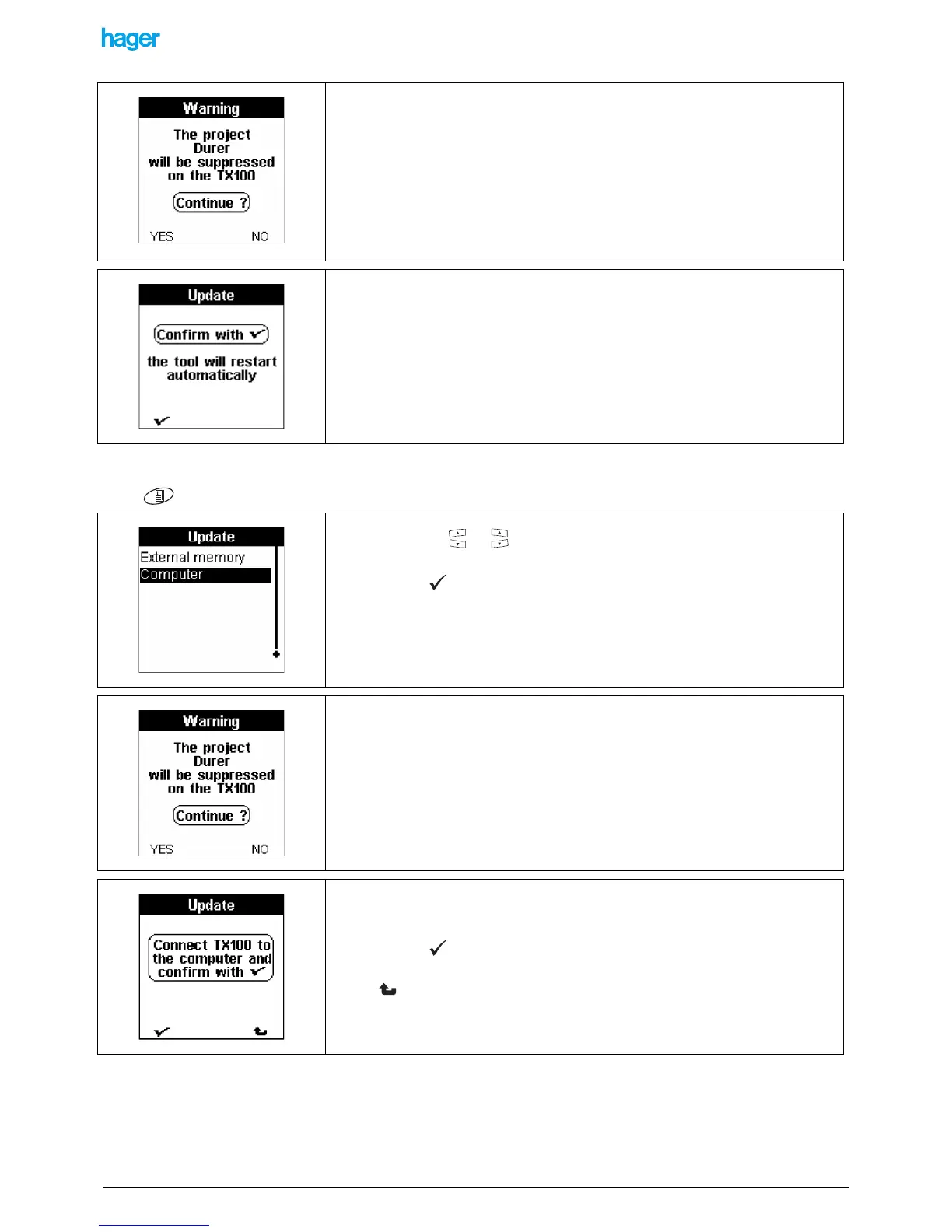
A Warning screen informs that the current project stored in the TX100 will be deleted:
! Press the YES screen key to confirm.
! Press the NO screen key to cancel and to return to the previous screen.
A wait screen is displayed until the end of the update:
• Remove the external memory and confirm to complete the update.
The update is completed, the TX100 restarts.
• Press the key or .
• Select Update with computer.
• Press the key to confirm your selection
! Do not use a USB hub to carry out the TX100 - PC connection.
A Warning screen informs that the current project stored in the TX100 will be deleted:
• Press the YES screen key to confirm.
• Press the NO screen key to cancel and to return to the previous screen.
After the confirmation, a screen asks to connect the TX100 to the PC.
• Carry out the connection.
• Press the screen key to confirm.
! The screen key allows you to return to the previous screen.


 To Next Page