TX100 USB 56 6T7639a
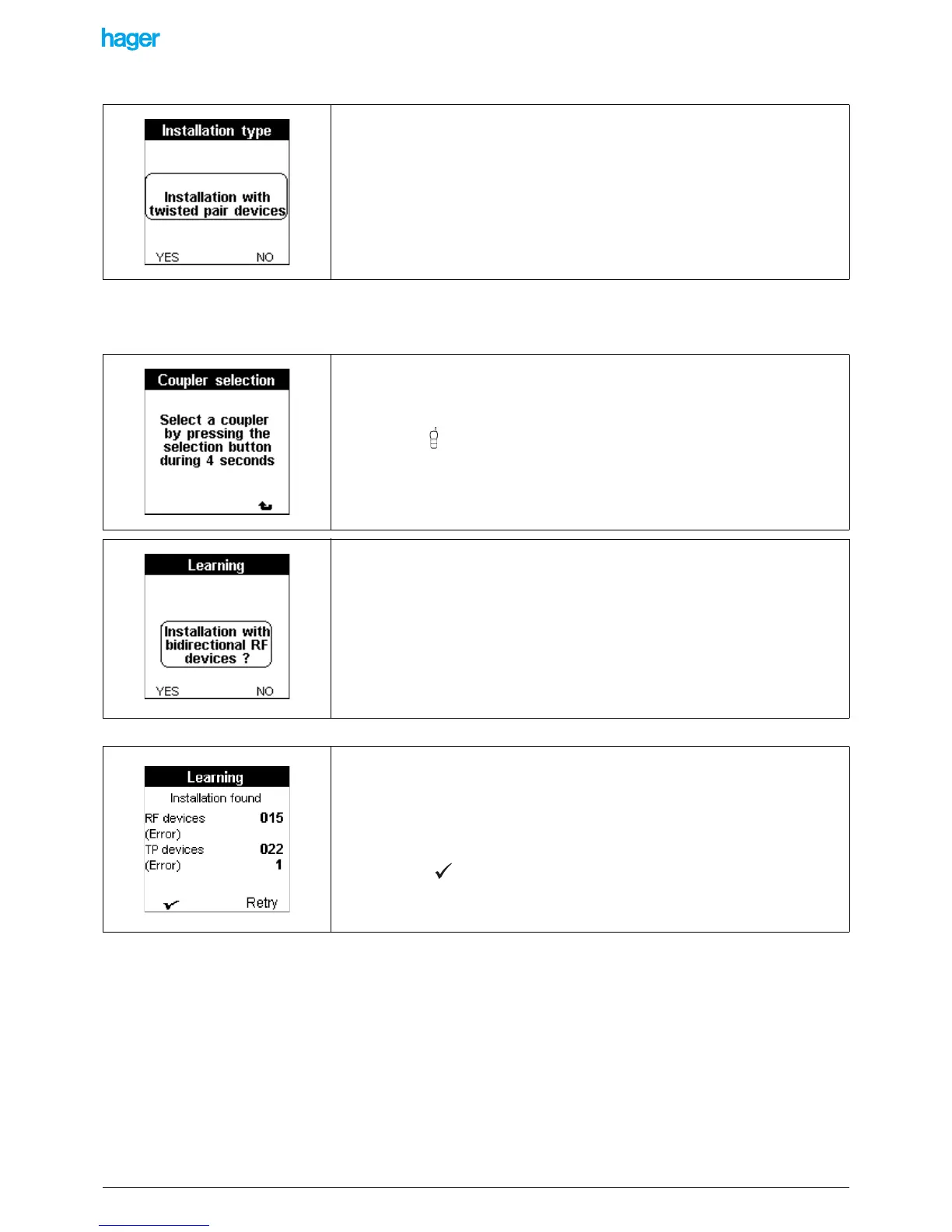
The Learning project is now created. The Installation type screen is displayed:
9.4.2 Case of a TP or mixed installation
The Coupler selection screen is displayed when YES is pressed:
The following screen is displayed:
• Press the YES screen key if the installation is a TP or mixed one.
• Press the NO screen key if the installation is entirely a RF one:
See. "Case of an entirely RF installation".
This screen indicates that the TX100 is ready to detect a media coupler and to assign it.
- To detect and assign the media coupler.
• Press the button of the media coupler until the red indicator lights up (4 sec).
• Release the button.
A Download wait screen is displayed for some seconds. A sound signal is emitted when
the selection is done.
• Press the YES screen key if the installation includes one or more bidirectional RF
products.
• Press the NO screen key if the installation includes no bidirectional RF products.
The Learn installation screen displays:
• the total number of RF products found.
• the total number of TP products found.
• the Error lines indicate the number of products which are only partly learnt.
• Press the Retry screen key to re-start the procedure. This option is interesting
when errors occur.
• Press the screen key to confirm.
An Update screen is displayed.


 To Next Page