Service Manual
Model No.: 48E2500
- 23 -
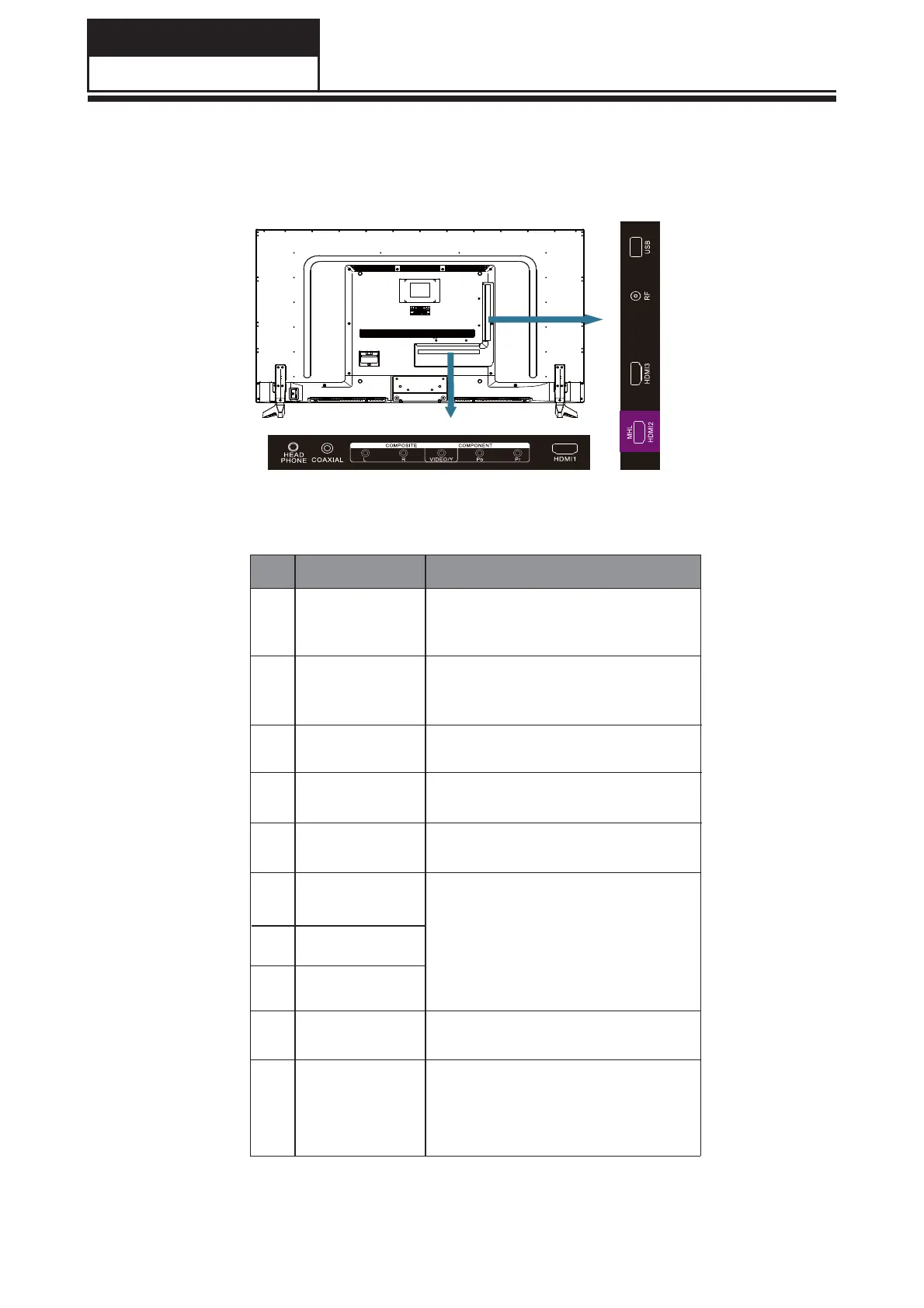
7-2 Rear Terminals
NOITCENNOCLAREHPIREP
# Item Description
1
HEADPHONE
Connect headphones to this jack.
When headphones are inserted,
the TV speakers will be muted.
2
COAXIAL
Connect a coaxial audio cable
from a sound bar, stereo system,
receiver, etc.
3
USB
Insert a USB storage device to the
USB port to view JPEG photos,
and listen to MP3 music. (See
page 16 for more information.)
4
RF
VIDEO
Connect an antenna or cable TV
Connect the video cable for a
composite device.
cable to this jack.
5
HDMI1
HDMI2(MHL)
Connect HDMI devices to these
jacks. An HDMI cable carries both
video and sound. You do not need
to make an audio connection for
an HDMI device. Note: The HDMI2
port is MHL enabled.
6
HDMI3
8
7
9
10
L
R
Connect the audio cables for a
component or composite device.
YPbPr
Connect the video cables for a
component device.


 To Next Page