- 47 -
Service Manual
Model No.: 48E2500
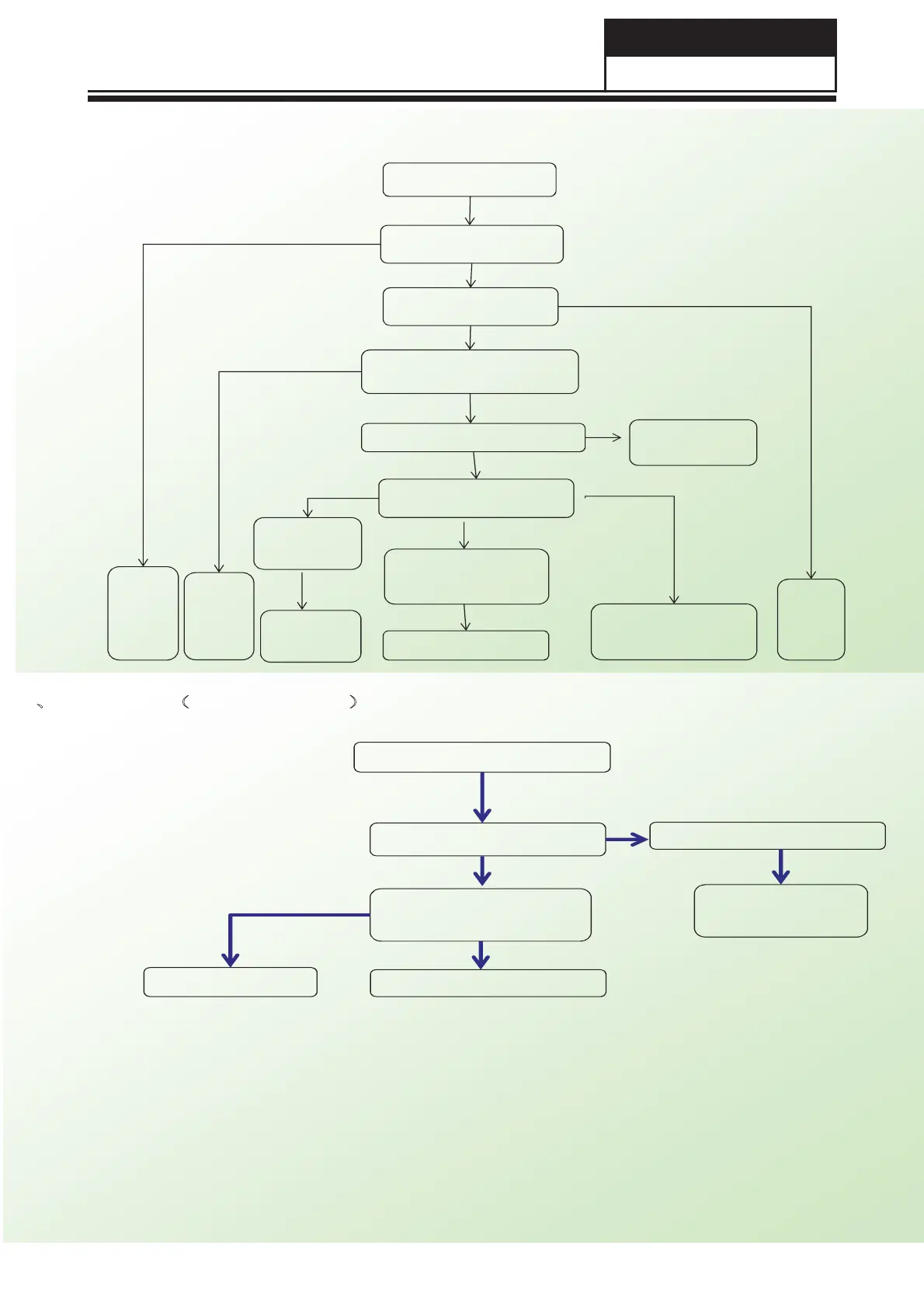
Increase
brightne
ss
check is brightness is in dim
status
Correct
the LED
cable
Check ADJ&PWM&
ON/OFF Control signal
Check
Main
board
function
Change QB304
Check if LED
output short
IR indicator light
up but backlight slake
Check if LED output cable
is connect correction
Check if UB301 PIN 5
voltage is above 15V
Check the power
components (QB301)
damage or not
Remove
short status
Change UB301
3.Power Board Service Guide
Y
Y
Y
Y
Y
Y
Y
N
N
N
N
Check EB202 voltage is 380V
Y
Check PFC
circuit
N
4ǃPFC circuit˄EB202 no 380V˅
EB202 voltage is below 380V
Check UB202 voltage is 15V
Y
N
Change the damage componet
Check QB304 damage or not
Check the power
components (DB201,QB201)
damage or not
Y
Change QB304
Change UB202
N
Y


 To Next Page