EasyManua.ls Logo

Haier 48E2500 - PC Mode Troubleshooting; Picture Alignment and Color Issues; HDMI;YPbPr;CVBS Input Issues

Haier 48E2500
53 pages
Print Icon
To Next Page IconTo Next Page
To Previous Page IconTo Previous Page
Loading...
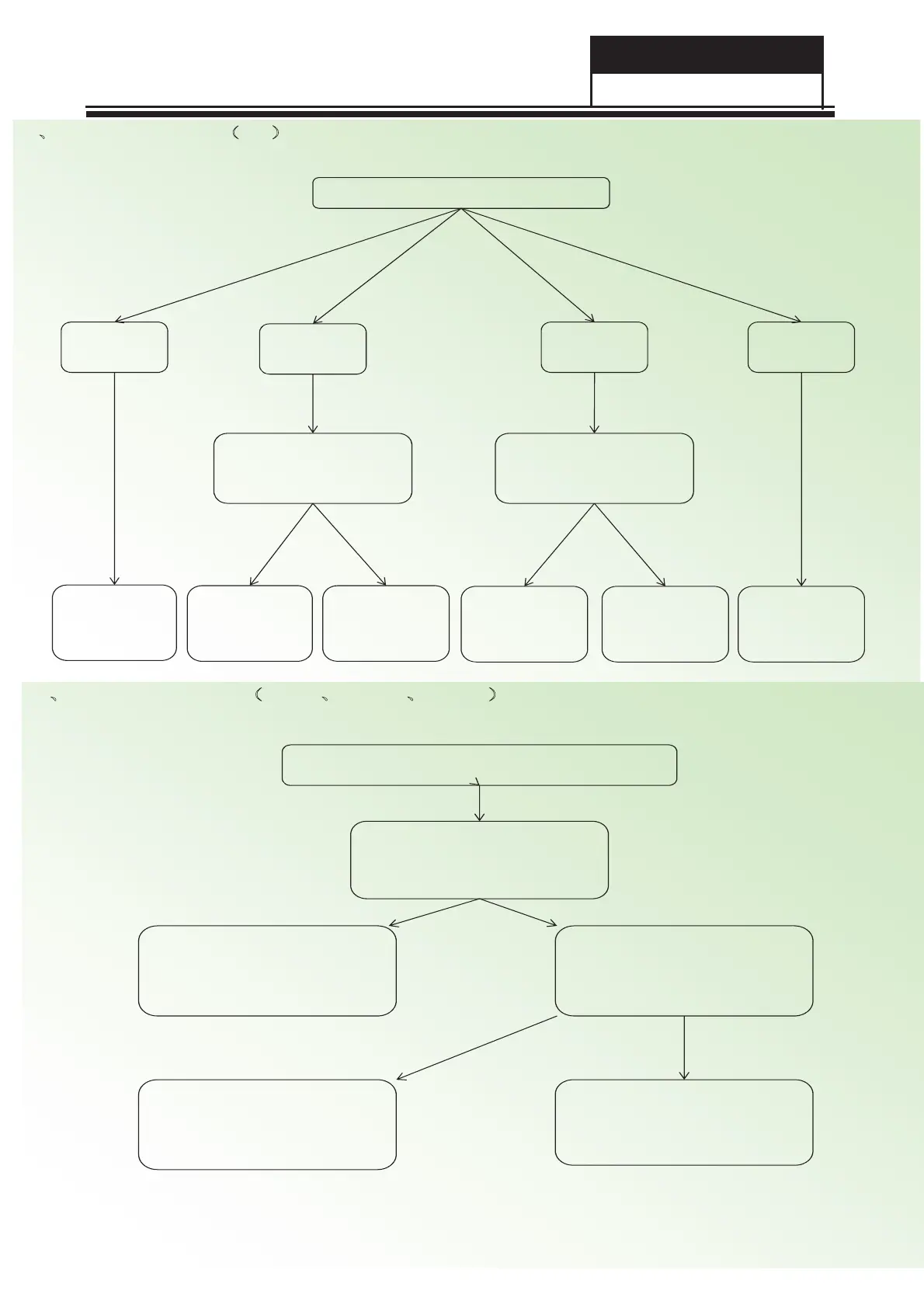
PC mode
Picture is not
in center
Missing color,
deflection color
Picture
dithering
No signal
Do “auto adjust”
process
Check if the R.G.B
input signal of U1
is normal
Do “reset” process
on the menu
Y
N
Check the circuit of
R.G.B input
Check if the signal of
V-sync,H-sync is OK
Check the circuit
of VS.HS
Do “reset” process
on the menu or
the input mode
can’t be supported
Check the circuit
of VS.HS
Y
N
11ǃFunction Trouble˄PC˅
HDMI , YPbPr , CVBS
12ǃFunction Trouble˄HDMIǃYPbPrǃCVBS˅
Check the signal at the jack
Check the external source
Check the signal on the
Corresponding of U1
Check the circuit from jack to
U1(MSD3393)
Change U1(MSD3393)
NY
N
Y
Service Manual
Model No.: 48E2500
- 51 -

Related product manuals