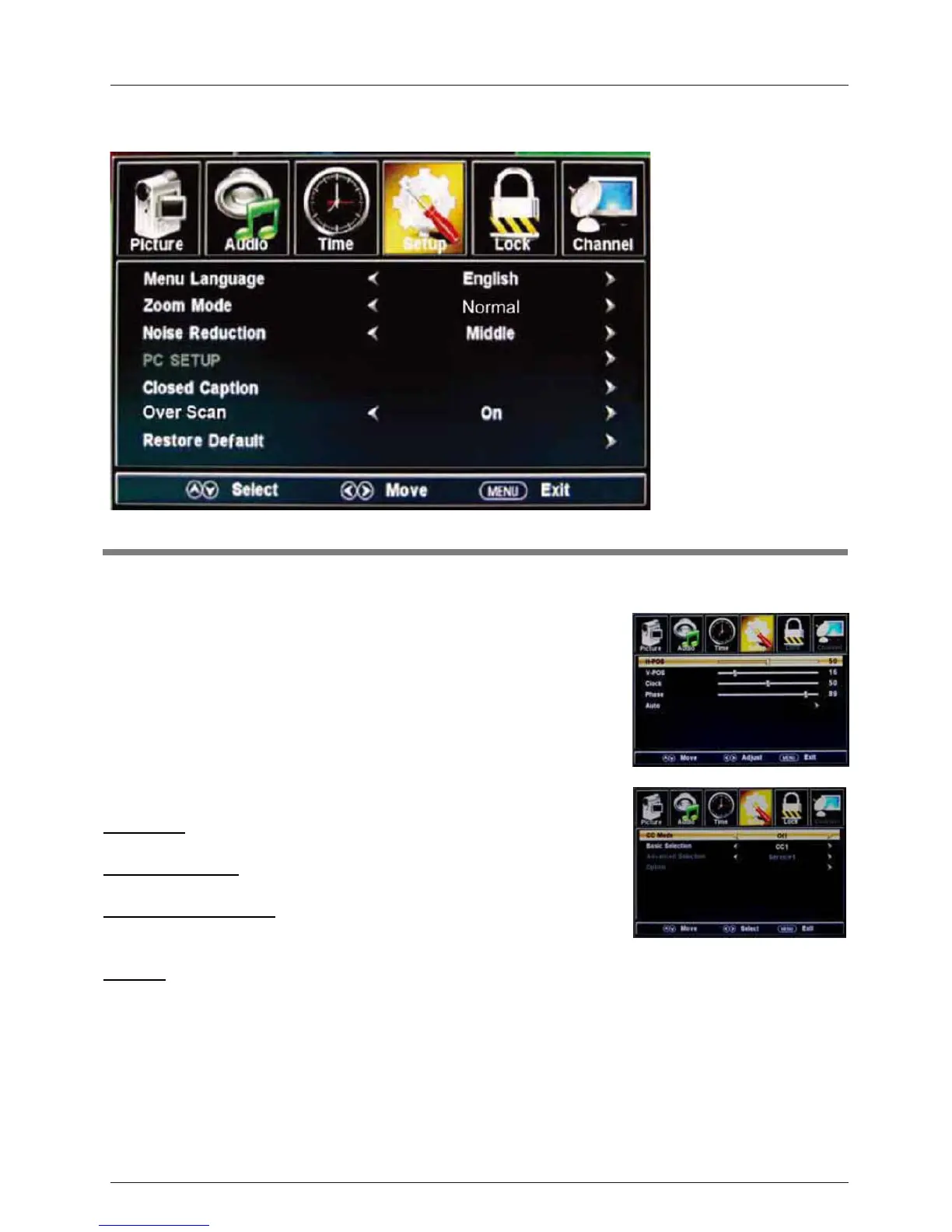
4. Setup menu
Menu Language: Select the OSD menu language.
Zoom Mode: Select the zoom mode: Normal, Zoom, Wide, or
Cinema.
Noise reduction: Select the noise reduction mode: Weak,
Middle, or Strong.
PC SETUP: If the video input signal comes from your PC, you may
adjust the V-Position, H-Position, Clock, Phase or
perform an
Auto adjustment. Menu shown in the image on the right.
Closed Caption:
CC Mode: Select the CC Mode: On, Off and CC on Mute. Menu
shown in the image on the right.
Basic Selection: Select the analog TV captions:
CC1, CC2, CC3,
CC4, Text1, Text2, Text3 or Text4.
Advanced Selection: Select the digital TV captions
: Service1,
Option: Customize the font, style, color, etc. of the captions.
Restore Default: Restore all settings to the factory default settings.
Overs Scan: Turn on/off the over scan function.
Description
OSD Menu
18
Service2, Service3 Service4, Service 5 or Service 6.



 To Next Page