MAIN MENU
HOME
【 】/【 】 HOME menu.
【 】/【 】
【 】/【 】 to select recommend
video to play.
Press ▼ ▲ button to select
Press ▼ ▲ button to select
Press ◄ ► button to
.
In Android mode, to give you a better experience,we recommend
that you use one of the following options.
1) Smart share.Please consult E-Share instructions.
2) IR Remote Controller. Red button to pop up and shut
down a virtual keyboard to help you page up and down in
some APP. Green button to pop up and shut down an
cursor which help you select and confirm.
3)Wired or Wireless mouse(not supply)
Note: We do not supply Wired or Wireless mouse.
TV OPERATION
FTI
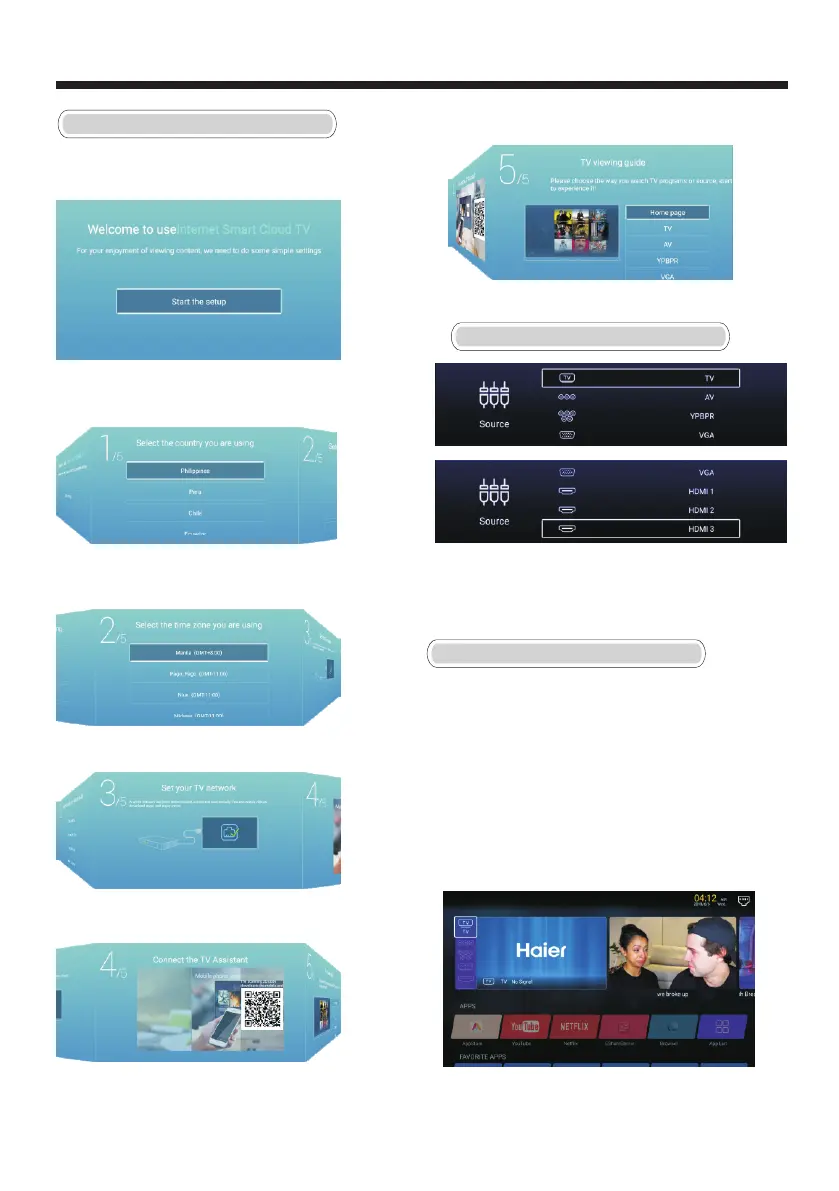
Connect an RF cable from the TV’s input called “RF-In”
and to your TV Aerial socket.
Press OK button to select the Start the setup.
INPUT SOURCE
enter Input Source menu.
【 】/【 】
Press INPUT button to
Press ▼ ▲ button to select
Press OK to select source.
.
Press ▼ ▲ button to select
Press OK button to ►
【 】/【 】 the country.
sure,and press【 】button to select
the time zone.
Press ▼ ▲ button to select
Press OK button to ►
【 】/【 】 the time zone.
sure,and press【 】button to connect
the WIFI.
Press OK button to
P ►
connect the WIFI.
ress【 】button to select the input source.
Scan the QC code to cast the TV screen to your mobile phone
P ►
.
ress【 】button to select the input source.
ress【 】/【 】button to select the input source.P ▼ ▲
-17-



 To Next Page