TV OPERATION
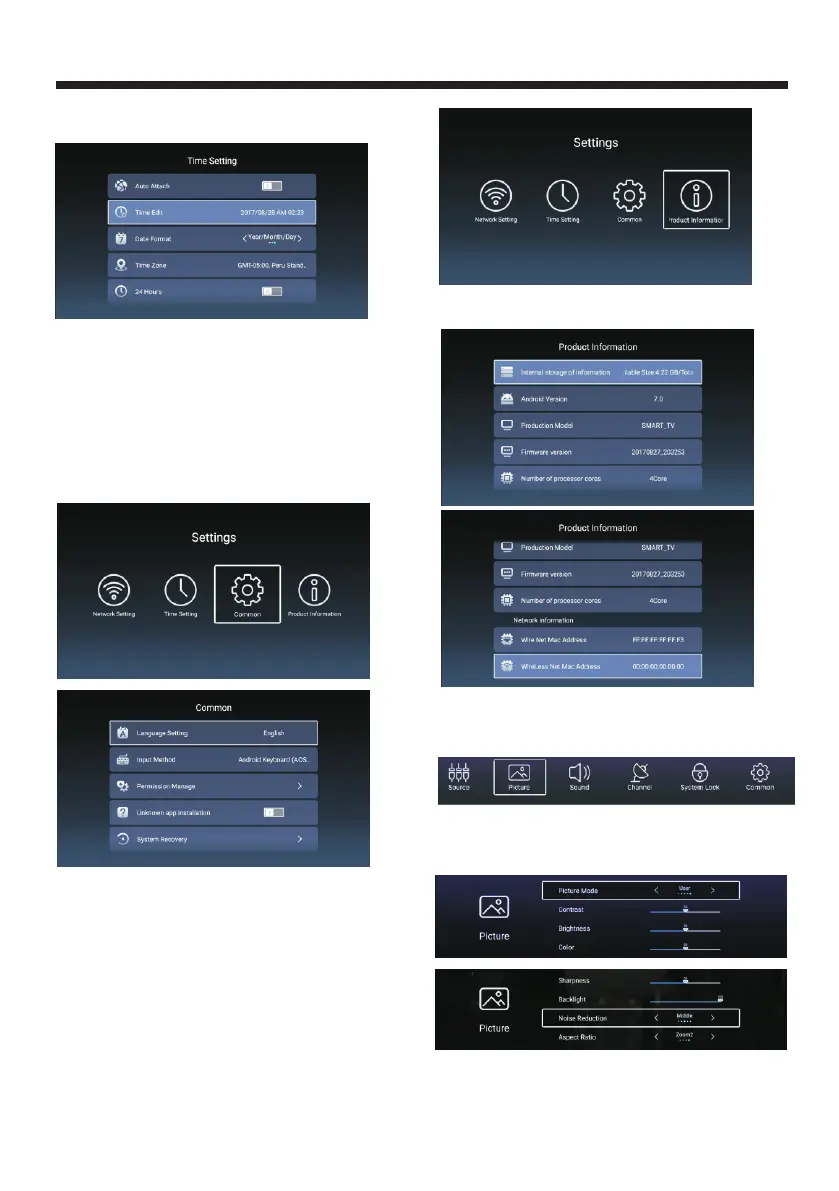
set the time function
Press ▼ ▲ / ◄ ► button to 【 】/【 】 【 】/【 】 to select
.
Auto Attach Set the time automatically/manually.
Time Edit Edit the time maually.
Date Format Select the date format:Day/Month/Year
or
Time Zone Selectt your time zone.
24Hours Select
Year/Month/ Day
ON/OFF.
Common
CommonPress ◄ ► button to 【 】/【 】 to select .
Language Select the language.
Input Method View the information of input method.
Unknown app installation Allow install illegal app.
System Recovery Recover the TV system.
Permission Manage View the permission manage.
Product Information
Product InformationPress ◄ ► button to 【 】/【 】 to select .
Press ▼ ▲ / ◄ ► button to 【 】/【 】 【 】/【 】 to view
the information about TV.
PICTURE
Press ◄ ► button to select picture .
Press OK to enter setting.
【 】/【 】
1. ▼ ▲ :
2. ◄ ►
Press【 】/【 】to select
Press【 】/【 】to adjust or select.
Picture Mode/Contrast/
Brightness/Color/Sharpness/Backlight/Noise Reduction/
Color Temp/More Setting.
-19-



 To Next Page