38
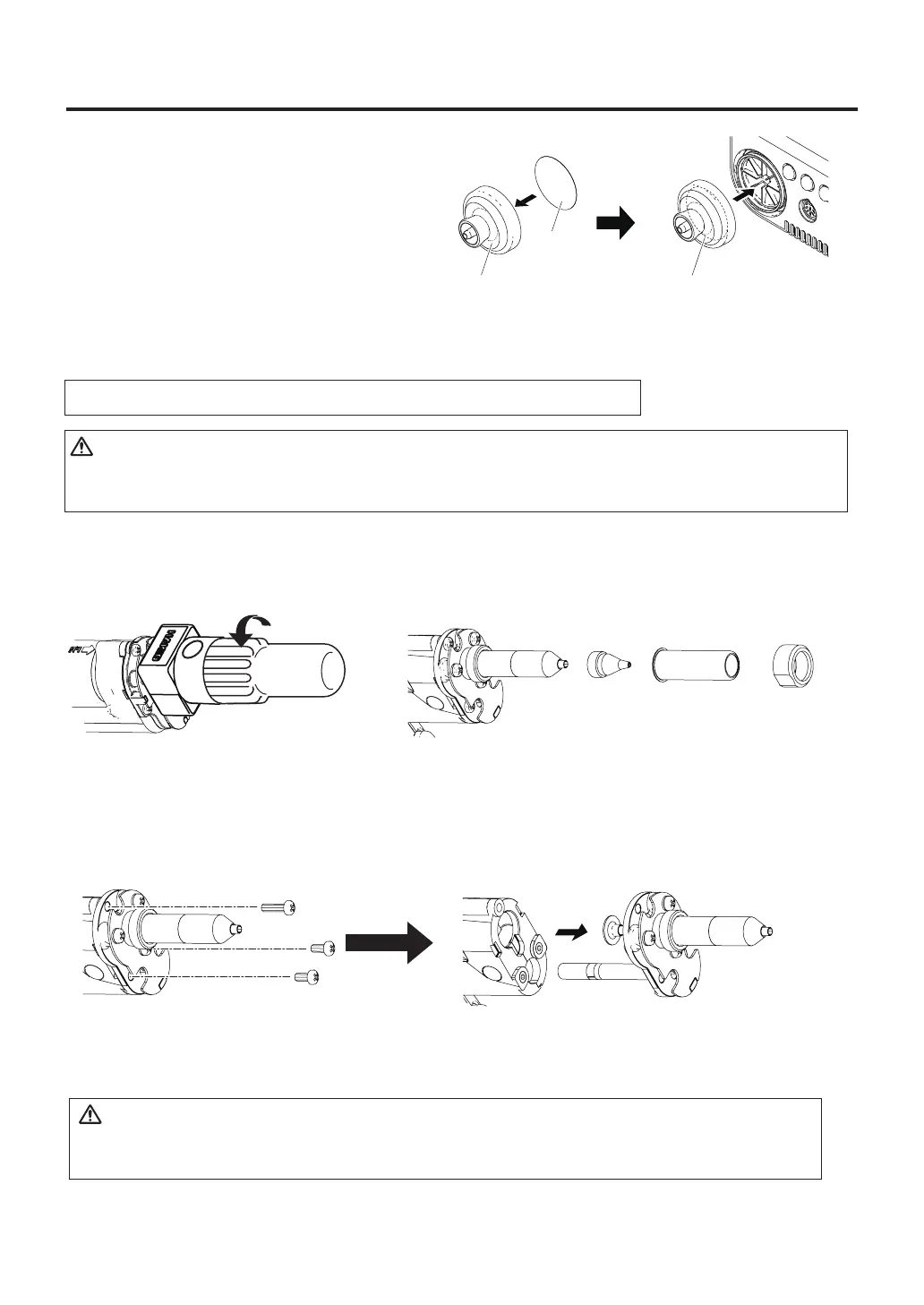
5. Replacement of station filter
If the filer is showing signs of stains
from flux or is stiff, replace it.
Attach the filter as shown in the right
diagram.
Vacuum outlet cap
Filter
Vacuum outlet cap
(with Filter)
① ②
2. Remove the 3 screws from the handpiece and disconnect the heating element.
Remove the tip enclosure and the nozzle with the attached wrench.
Heating
Element
Heating
Element
Element
cover
Nozzle
Nut
Replacing the heating element (heating core)
● Disassembletheheatingelement.
1. Remove the nozzle and tip enclosure.
CAUTION
Except the case especially indicated, always turn the power switch OFF and disconnect the
power plug before performing any maintenance procedure.
3. Replace the heating element. Assemble using the same procedure in reverse.
CAUTION
Be sure to calibrate the nozzle temperature after replacing the heating element. Failure to do
this may result in a heater temperature that is much higher or lower than the previous one.



 To Next Page