7
B. The preset mode
The HAKKO FR-702 (Soldering iron) has a preset mode that will allow the unit to store up to 5 preset
temperatures you can change between instead of using the above normal mode.
Initial preset temperatures
P1: 250℃ (482℉), P2: 300℃ (572℉), P3: 350℃ (662℉), P4: 400℃ (752℉), P5: 450℃ (842℉)
The initial number of active presets is set to 5 at the factory.
The default selected preset is set to P3 at the factory.
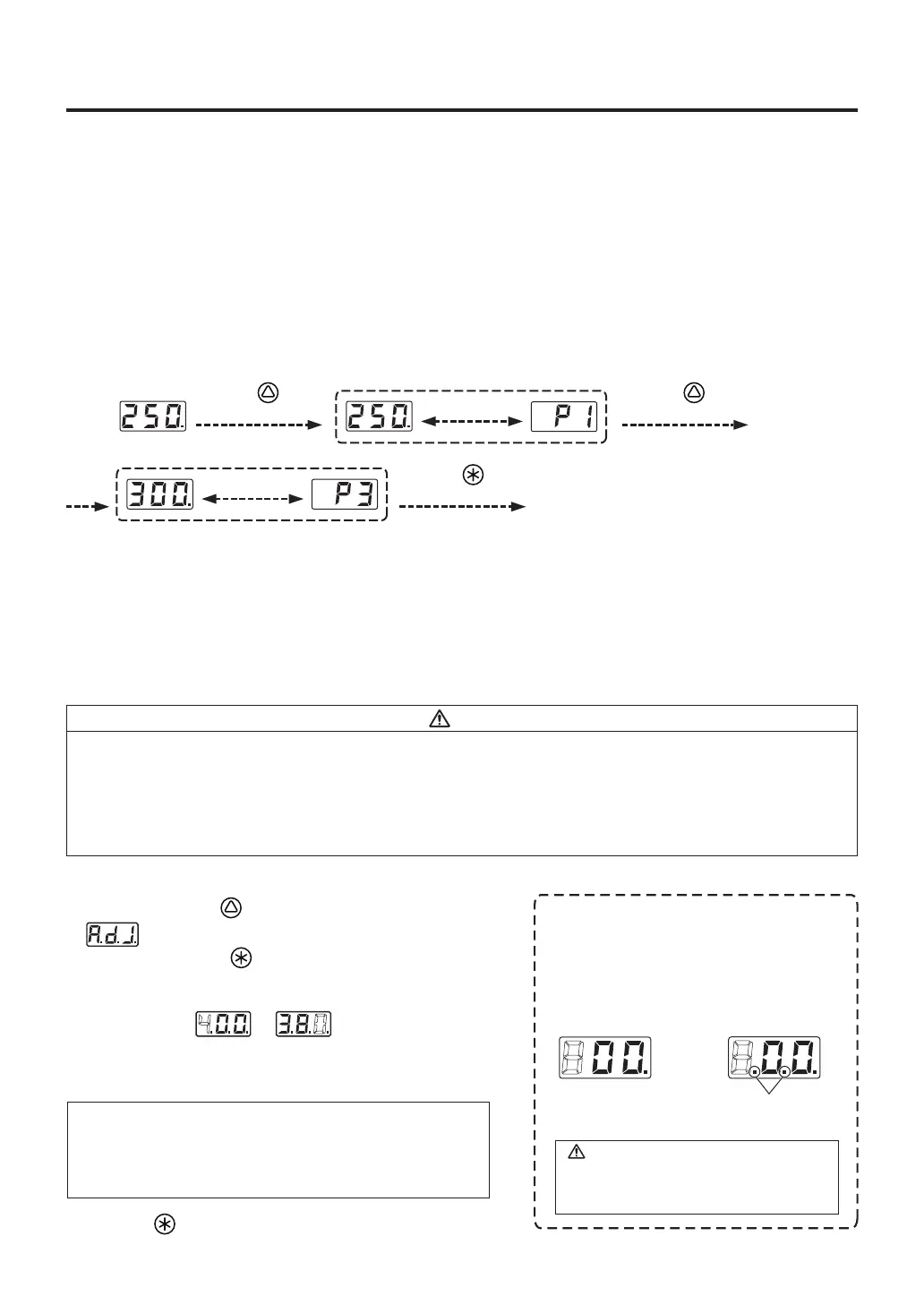
Example : Changing preset temperature from preset No.1(250℃) to No.3(350℃).
Heater control will begin with new preset temperature.
The procedure for making changes to the preset temperatures is the same with “A. Changing the set
temperature” in 5. OPERATION (Soldering iron).
*Preset selection screen
Be displayed
alternately.
Press the button
twice.
Be displayed
alternately.
Press the button
once.
Press the button
once.
CAUTION
C. Performing the temperature adjustment
When replacing the iron, heater or tip, a temperature adjustment may be required.
Use adjustment mode to perform the temperature adjustment.
• Enter the observed value in the adjustment mode after the tip temperature stabilizes.
• The maximum single adjustment that can be made is ±150℃ (270℉) relative to the set temperature.
If a larger adjustment is needed, make the first adjustment at the maximum value of 150℃ (270℉),
then repeat the adjustment process.
• When a new soldering iron is used or insertion position is changed from A.IRON to B.IRON (and vice
versa), temperature adjustment is always required.
NOTE :
During adjustment mode, the hundreds digit will accept
values from 0 through 6 if the temperature is set to display
in ℃, or the values 0 through 9 if the temperature is set to
display in ℉.
CAUTION
* How to distinguish between
Temperature Setting Mode and Adjustment Mode.
The display differs in the temperature setting
and the adjustment mode.
In the Temperature
Setting Mode
In the Adjustment Mode
Identification lamps are on
in the adjustment mode.
Please be sure to confirm the status of the
identification lamps so that you do not enter
a value in the wrong mode.
Example : If the measured temperature is 380℃, and the set temperature is 400℃.
1. Press and hold the button for at least two seconds.
● is displayed.
When you press the button, the display will move to
the adjust mode.
2. Changing from to
● The procedure for changing the value in adjustment mode
is the same as setting the temperature in normal mode.
Please refer to Section 5 - OPERATION (Soldering iron).
3. Press the button to exit the setting after changing the values.
● The tip temperature will be adjusted accordingly.



 To Next Page