43
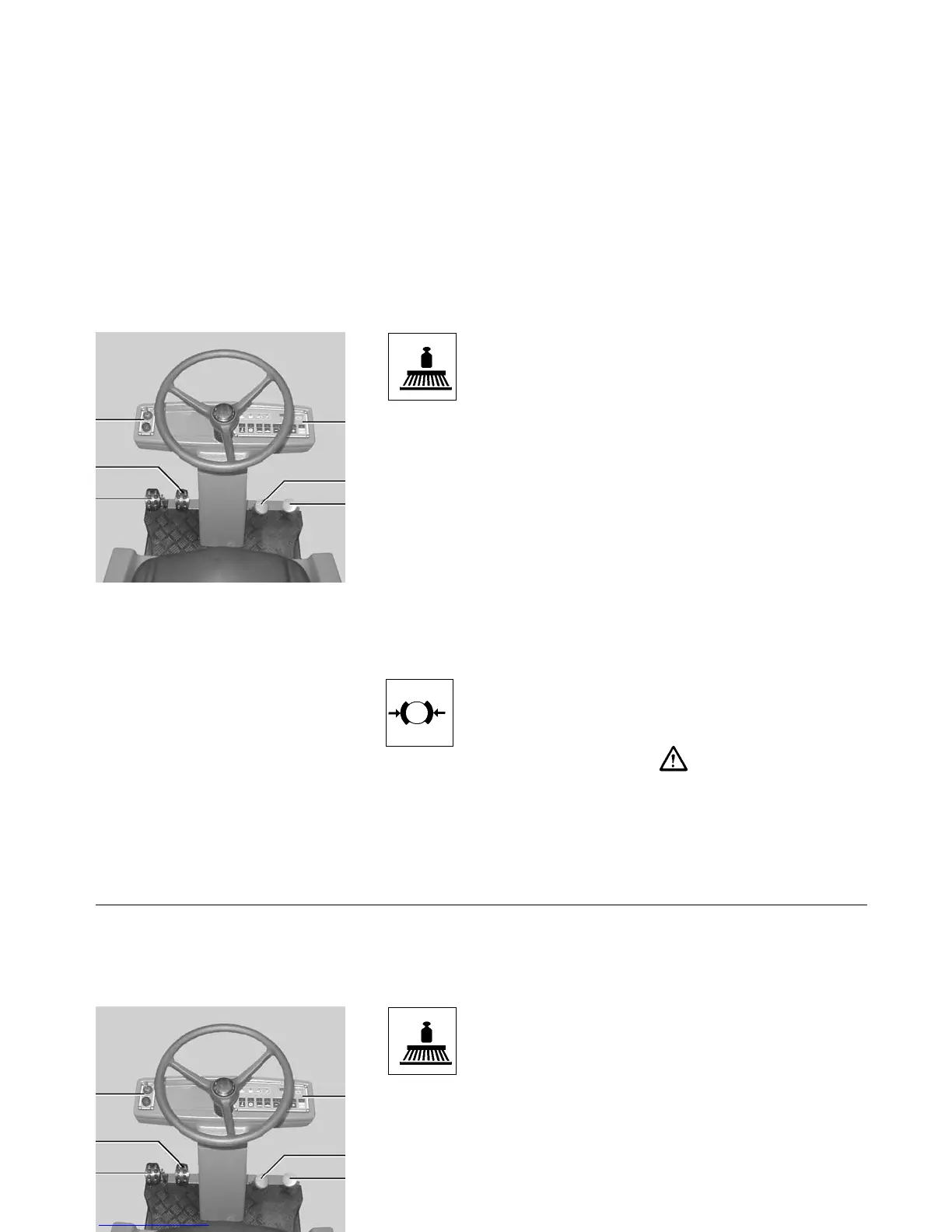
3 Pedal for brush/pad pressure
to adjust brush/pad pressure.
Slowly press pedal down until
the pressure point is attained.
Release pedal and it will lock.
= increased brush/pad pressure
and the yellow pilot lamp (I/C)
alights
Actuate pedal beyond the pres-
sure point and release. It will lift
up to initial position.
= normal brush/pad pressure and
the pilot lamp extinguishes
Note: An increased brush/pad
pressure increases current con-
sumption and brush/pad wear.
4 Parking brake pedal
actuates the parking brake at the
rear wheels. Before leaving the
machine the operator has to protect
it by actuating the parking brake.
The pilot lamp (I/E) alights. When
depressing the drive pedal a buzzer
sounds. Depressing the blocking
device will unlock the brake.
5 Forward drive pedal
allows modification of speed
slowly depress pedal until the
required speed is attained.
release pedal and it will automa-
tically return to the initial position
and the machine slowing down
simultaneously. Speed will be sub-
stantially reduced by actuating
the reverse drive pedal.
6 Reverse drive pedal
allows modification of speed
slowly depress pedal until the
required speed is attained and
the buzzer sounds.
release pedal and it will automa-
tically return to the initial position
and the machine slowing down
simultaneously.
The machine must only be started if
the operator is seated down.
I
1 Left-hand control panel
2 Right-hand control panel
3 Pedal for brush/pad pressure
4 Parking brake pedal
5 Forward drive pedal
6 Reverse drive pedal
Operation
Operation elements
1 Left-hand control panel
(Description see page 44)
2 Right-hand control panel
(Description see page 44)
1
3
4
2
6
5
43
3 Pedal for brush/pad pressure
to adjust brush/pad pressure.
Slowly press pedal down until
the pressure point is attained.
Release pedal and it will lock.
= increased brush/pad pressure
and the yellow pilot lamp (I/C)
alights
Actuate pedal beyond the pres-
sure point and release. It will lift
up to initial position.
= normal brush/pad pressure and
the pilot lamp extinguishes
Note: An increased brush/pad
pressure increases current con-
sumption and brush/pad wear.
4 Parking brake pedal
actuates the parking brake at the
rear wheels. Before leaving the
machine the operator has to protect
it by actuating the parking brake.
The pilot lamp (I/E) alights. When
depressing the drive pedal a buzzer
sounds. Depressing the blocking
device will unlock the brake.
5 Forward drive pedal
allows modification of speed
slowly depress pedal until the
required speed is attained.
release pedal and it will automa-
tically return to the initial position
and the machine slowing down
simultaneously. Speed will be sub-
stantially reduced by actuating
the reverse drive pedal.
6 Reverse drive pedal
allows modification of speed
slowly depress pedal until the
required speed is attained and
the buzzer sounds.
release pedal and it will automa-
tically return to the initial position
and the machine slowing down
simultaneously.
The machine must only be started if
the operator is seated down.
I
1 Left-hand control panel
2 Right-hand control panel
3 Pedal for brush/pad pressure
4 Parking brake pedal
5 Forward drive pedal
6 Reverse drive pedal
Operation
Operation elements
1 Left-hand control panel
(Description see page 44)
2 Right-hand control panel
(Description see page 44)
1
3
4
2
6
5
43
3 Pedal for brush/pad pressure
to adjust brush/pad pressure.
Slowly press pedal down until
the pressure point is attained.
Release pedal and it will lock.
= increased brush/pad pressure
and the yellow pilot lamp (I/C)
alights
Actuate pedal beyond the pres-
sure point and release. It will lift
up to initial position.
= normal brush/pad pressure and
the pilot lamp extinguishes
Note: An increased brush/pad
pressure increases current con-
sumption and brush/pad wear.
4 Parking brake pedal
actuates the parking brake at the
rear wheels. Before leaving the
machine the operator has to protect
it by actuating the parking brake.
The pilot lamp (I/E) alights. When
depressing the drive pedal a buzzer
sounds. Depressing the blocking
device will unlock the brake.
5 Forward drive pedal
allows modification of speed
slowly depress pedal until the
required speed is attained.
release pedal and it will automa-
tically return to the initial position
and the machine slowing down
simultaneously. Speed will be sub-
stantially reduced by actuating
the reverse drive pedal.
6 Reverse drive pedal
allows modification of speed
slowly depress pedal until the
required speed is attained and
the buzzer sounds.
release pedal and it will automa-
tically return to the initial position
and the machine slowing down
simultaneously.
The machine must only be started if
the operator is seated down.
I
1 Left-hand control panel
2 Right-hand control panel
3 Pedal for brush/pad pressure
4 Parking brake pedal
5 Forward drive pedal
6 Reverse drive pedal
Operation
Operation elements
1 Left-hand control panel
(Description see page 44)
2 Right-hand control panel
(Description see page 44)
1
3
4
2
6
5
43
3 Pedal for brush/pad pressure
to adjust brush/pad pressure.
Slowly press pedal down until
the pressure point is attained.
Release pedal and it will lock.
= increased brush/pad pressure
and the yellow pilot lamp (I/C)
alights
Actuate pedal beyond the pres-
sure point and release. It will lift
up to initial position.
= normal brush/pad pressure and
the pilot lamp extinguishes
Note: An increased brush/pad
pressure increases current con-
sumption and brush/pad wear.
4 Parking brake pedal
actuates the parking brake at the
rear wheels. Before leaving the
machine the operator has to protect
it by actuating the parking brake.
The pilot lamp (I/E) alights. When
depressing the drive pedal a buzzer
sounds. Depressing the blocking
device will unlock the brake.
5 Forward drive pedal
allows modification of speed
slowly depress pedal until the
required speed is attained.
release pedal and it will automa-
tically return to the initial position
and the machine slowing down
simultaneously. Speed will be sub-
stantially reduced by actuating
the reverse drive pedal.
6 Reverse drive pedal
allows modification of speed
slowly depress pedal until the
required speed is attained and
the buzzer sounds.
release pedal and it will automa-
tically return to the initial position
and the machine slowing down
simultaneously.
The machine must only be started if
the operator is seated down.
I
1 Left-hand control panel
2 Right-hand control panel
3 Pedal for brush/pad pressure
4 Parking brake pedal
5 Forward drive pedal
6 Reverse drive pedal
Operation
Operation elements
1 Left-hand control panel
(Description see page 44)
2 Right-hand control panel
(Description see page 44)
1
3
4
2
6
5



 To Next Page