ADMINISTRATOR MANUAL
30
PAGE
Heartbeat works with the
connections to 3rd party
products and sends specified
information on a specified
time interval. Individual
product guides are available
on the "Partner Integration
Guides" section of the
website.
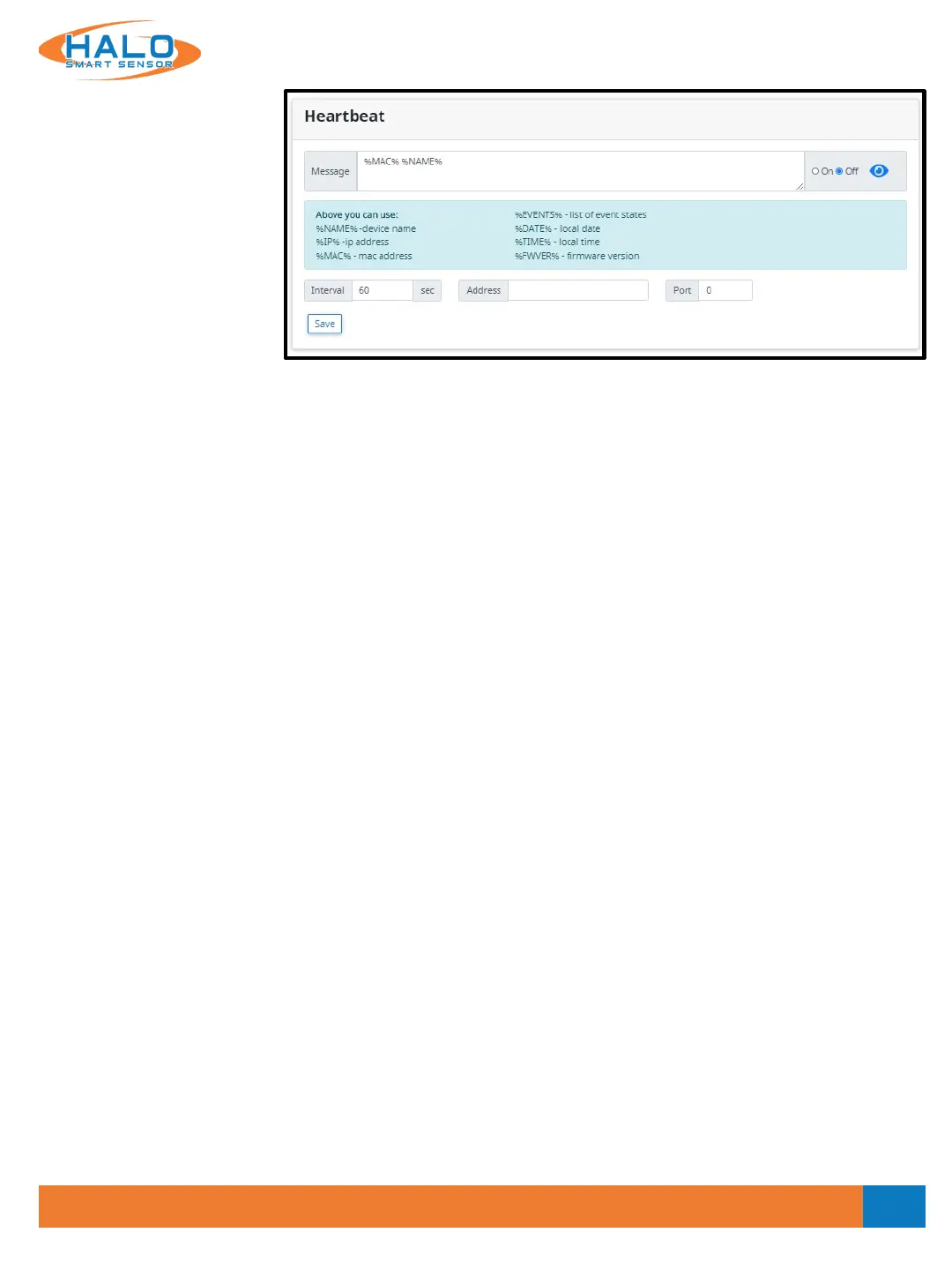
Enter a Message to be sent, using the wildcards as listed below:
%NAME% Device name as specified in Device settings
%IP% IP Address assigned to HALO Smart Sensor unit
%MAC% MAC Address of the HALO Smart Sensor
%EVENTS% List of current event states
%DATE% Date of the Event
%TIME% Local Time of the Event
Enter the Interval Seconds. This setting determines the frequency at which the Heartbeat message is sent,
default value is 60 seconds.
Enter the IP Address of the Destination (listening) Server in the Address field.
Enter the Port that is set to listen to events on the Destination (listening) Server.
V2.2 - 9/09/2020


 To Next Page