ADMINISTRATOR MANUAL
19
PAGE
BACnet
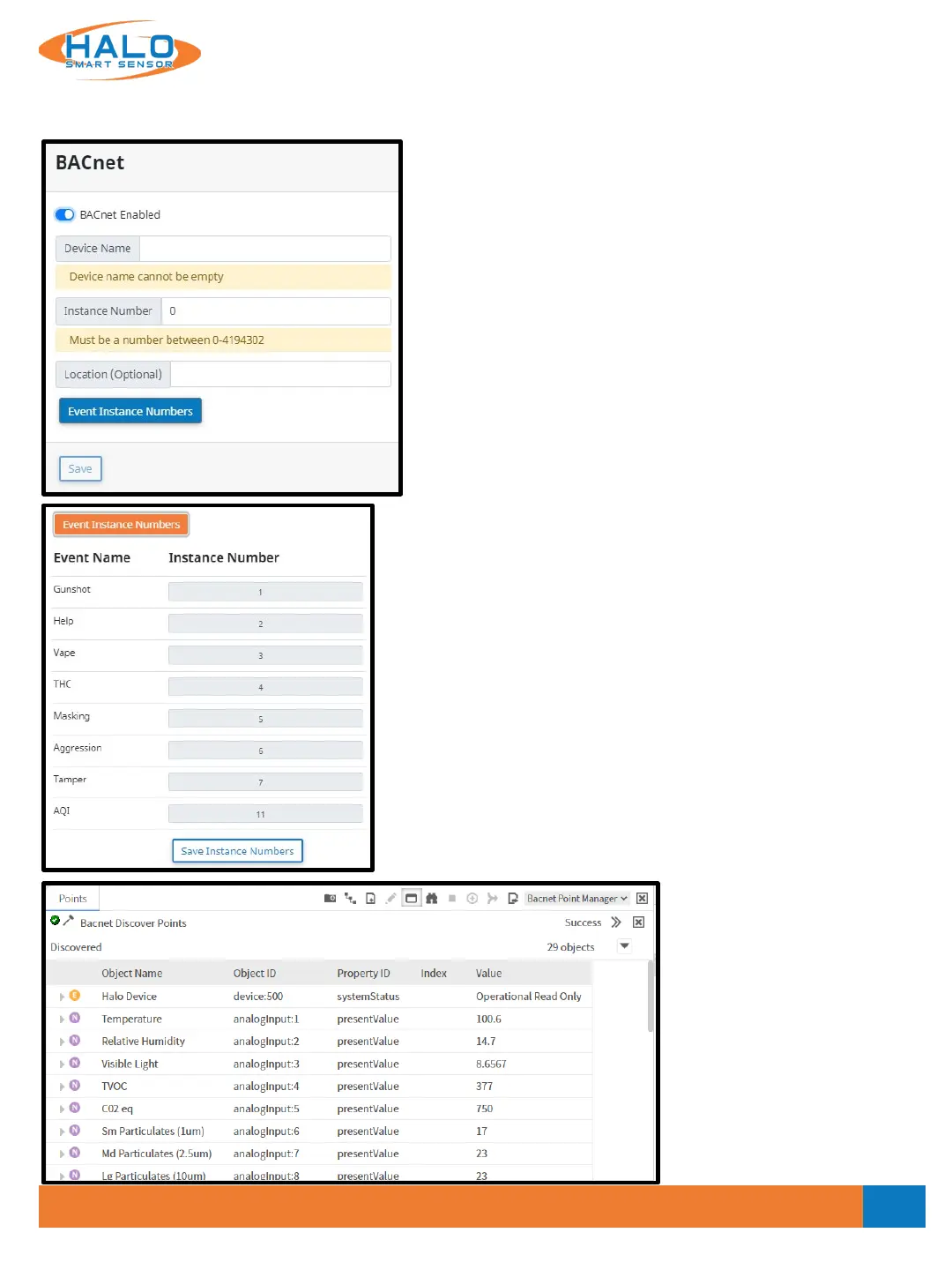
BACnet is a data communication protocol for building
automation and control networks. To enable BACnet, toggle
BACnet Enabled to open the configuration menu. Forms will
appear to allow entry of the Device Name and Instance
number you wish to see on the network. These values must
be unique and cannot be left blank.
To view HALO’s default BACnet “Point Instance Numbers” or
add custom “Points” click “Event Instance Numbers.”
This list shows how HALO’s default events are mapped to
BACnet “Points.”
A dropdown will appear with your default event “Points”
starting at 1 and increasing sequentially. Instance numbers
added after the default instances will begin at 128 and
increase sequentially from there. After making changes,
press the “Save Instance Numbers” button to confirm. Then
the “Save” button to confirm the BACnet configuration.
After clicking “Save” on the BACnet tab, you will be able to
discover the HALO on your existing BACnet network. Custom
events and changes in the BACnet tab will require a
rediscovery of the device in the BACnet network.
V2.2 - 9/09/2020
Shown to the left is an
example of a HALO
Discovery on a JACE BACnet
Controller



 To Next Page