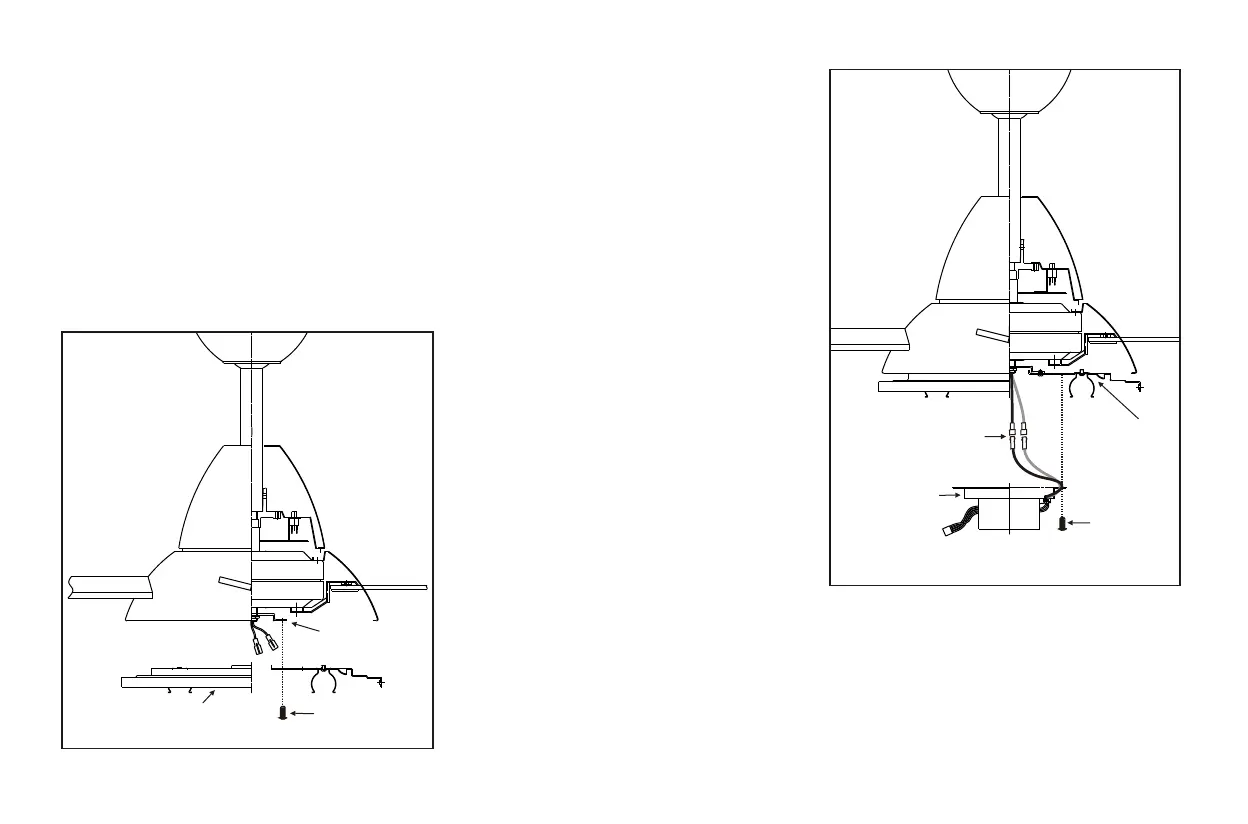
Installing the Light Kit 8.
Light plate
Mounting ring
Screws
Installing the Light Plate
Step 1. Remove the 1 of 3 screws from the
mounting ring and loosen the other 2 screws. (Do
not remove)
Step 2. Place the key holes on the light plate over
the 2 screws previously loosened from the
mounting ring, turn light plate until it locks in
place at the narrow section of the key holes.
Secure by tightening the 2 screws previously
loosened and the one previously removed. (Fig. 14)
Figure 14
Figure 15
Installing the Light
Holder
While holding the light holder under your
fan, m
NOTE: Before starting installation, disconnect
the power by turning off the circuit breaker or
removing the fuse at fuse box.
Turning power off using the fan switch is
not sufficient to prevent electric shock.
1. Remove the 1 of 3 screws from the light
plate and keep it for future use. Loosen
the other 2 screws. (Do not remove)
2.
ake the polarized plug connections:
- White to white
- black to black
3. Place the key holes on the light holder over
the 2 screws previously loosened from the
light plate, turn light holder until it locks
in place at the narrow section of the key
holes. Secure by tightening the 2 screws
previously loosened and the one
previously removed. (Figure 15 )
Light plate
Light holder
Screws
Connection plugs



 To Next Page